Citrix ADC MPX
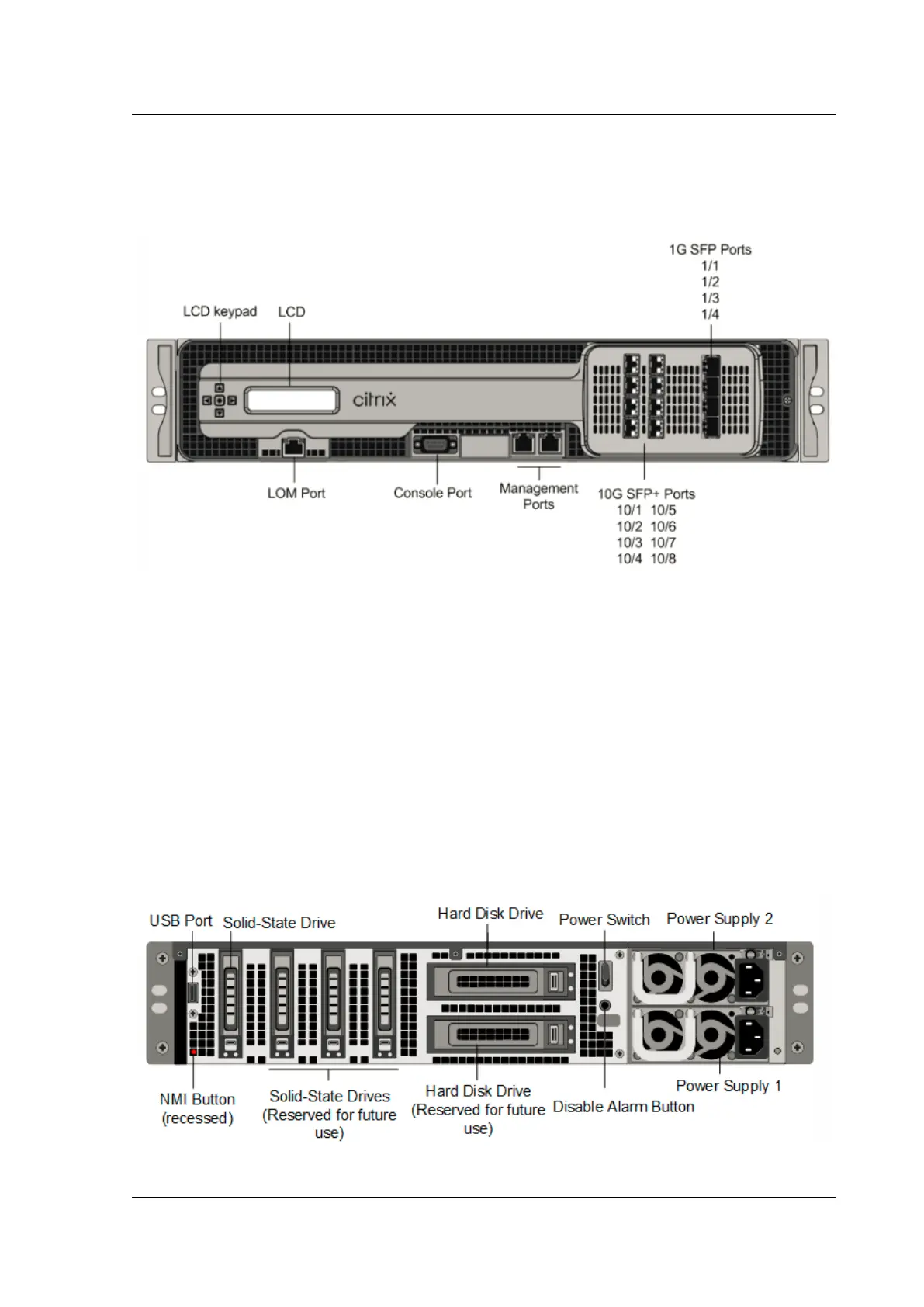
shows the front panel of the
MPX 11515/11520/11530/11540/11542 appliance.
Figure 1. Citrix ADC MPX 11515/11520/11530/11540/11542 appliance, front panel
The MPX 11515/11520/11530/11540/11542 appliances have the following ports:
• RS232 serial console port.
• 10/100Base-T copper Ethernet Port (RJ45), also called LOM port. You can use this port to re-
motely monitor and manage the appliance independently of the Citrix ADC soware.
Note: The LEDs on the LOM port are not operational by design.
• Two 10/100/1000Base-T copper Ethernet management ports (RJ45), numbered 0/1 and 0/2 from
le to right. These ports are used to connect directly to the appliance for system administration
functions.
• Eight 10G SFP+ ports and four copper or fiber 1G SFP ports.
The following figure shows the back panel of the MPX 11515/11520/11530/11540/11542 appliance.
Figure 2. Citrix ADC MPX11515/11520/11530/11540/11542 appliance, back panel
© 1999‒2022 Citrix Systems, Inc. All rights reserved. 49



 To Next Page
 Loading...
