CSD-series Mixers User Manual
Console layout
Each CSD compact mixing console has a bank of mono input channels which can accept a balanced
microphone input or switchable line/instrument input. There is also a stereo input for playback devices or
line level instruments.
All preamps have studio grade, low noise architecture for the cleanest possible path throughout the signal
chain. Console layout is set out in distinct sections to simplify operation.
The following pages of this manual are divided up into these stages to explain the details and function of
each control.
Channel inputs
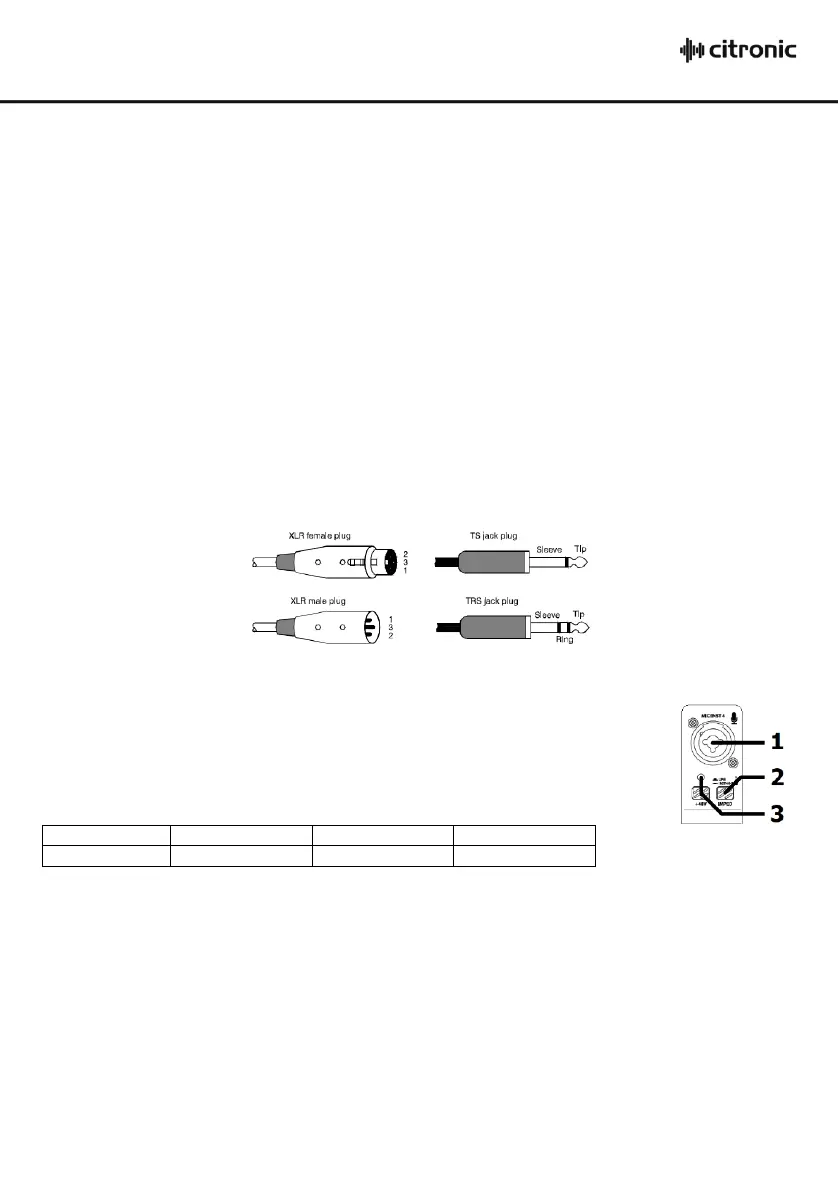
Channel inputs are provided as XLR or 6.3mm jack on combo sockets.
If an XLR is plugged in, this will be connected as low impedance (microphone) level. If a 6.3mm plug is
used, this will be connected as either line or instrument level (switchable)
The connections for these inputs are assigned as follows.
Mic / Line / Instrument input
1. Combo input Connect a balanced microphone via XLR connection or a line level or
instrument input via 6.3mm plug. An unbalanced XLR can be connected provided that
+48V phantom power is not used. Wired as follows.
2. IMPED switch Press this button in to set the input impedance to instrument level or leave the button in
the up position for a line level input. (instrument level is usually for pickups, such
as those on a guitar. Electronic keyboards usually produce a line level output)
3. +48V phantom Press this button in to enable +48V phantom power to the XLR and the LED indicator
will light. This provides power to some condenser microphones and DI boxes.
Do not use with unbalanced XLR connectors. This does not affect any jack inputs.


 To Next Page
 Loading...