CSD-series Mixers User Manual
Channel controls
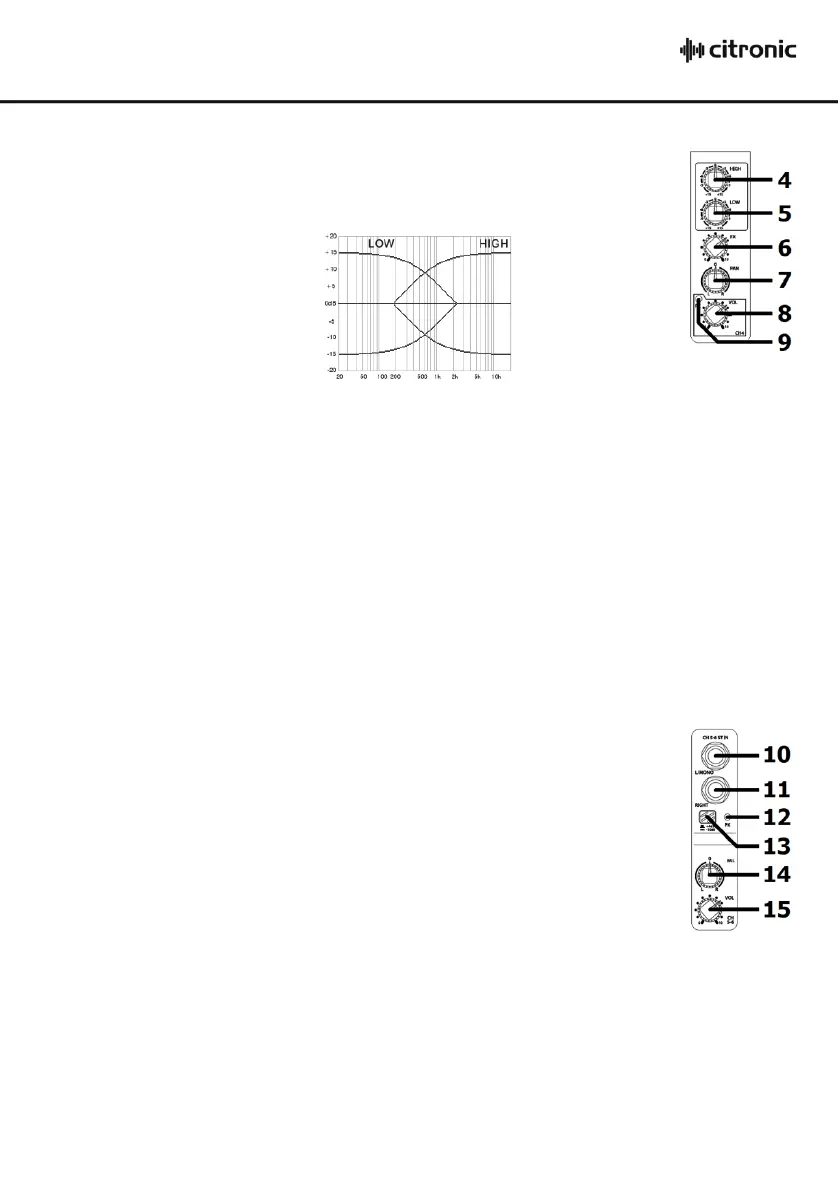
4. HIGH EQ This control can boost or cut the high frequencies by ±15dB
(12 o’clock position is zero)
5. LO EQ This control can boost or cut the low frequencies by ±15dB
(12 o’clock position is zero)
6. FX This control regulates the amount of the channel signal that is fed to the DSP effects
section, varying the amount of effect
7. PAN “PAN” is short for Panoramic, meaning the position that the signal appears in the stereo
field. Moving the control clockwise fades the signal over to the right-hand output and
moving the control anticlockwise fades the signal over to the left-hand output.
8. VOL “VOL” is short for Volume. Moving this control clockwise increases the level of the signal
to the output section.
9. Peak LED The peak LED will light when the channel is overloaded. Take care to only allow this to
happen very briefly on the loudest parts of the audio or not at all. If this LED lights
continually for any length of time, reduce the input level, channel volume or EQ until it
only lights momentarily.
Stereo input
10. L/MONO Line level 6.3mm jack input.
Mono if connected alone or left side if right side input is connected.
11. RIGHT Line level 6.3mm jack input for right side of stereo input.
12. Peak LED The peak LED will light when the channel is overloaded. Take care
to only allow this to happen very briefly on the loudest parts of the
audio or not at all. If this LED lights continually for any length of time,
reduce the input level, channel volume or EQ until it only lights
momentarily.
13. Level Sets the line input level to -10dB if pressed in or +4dB if not pressed in.
14. BAL “BAL” is short for Balance, varying the ratio of left and right sides of the stereo signal.
Moving the control anticlockwise reduces the signal on the right side or moving the control
clockwise reduces the signal on the left side.
15. VOL “VOL” is short for Volume. Moving this control clockwise increases the level of the stereo
signal to the output section.


 To Next Page
 Loading...