42
EN
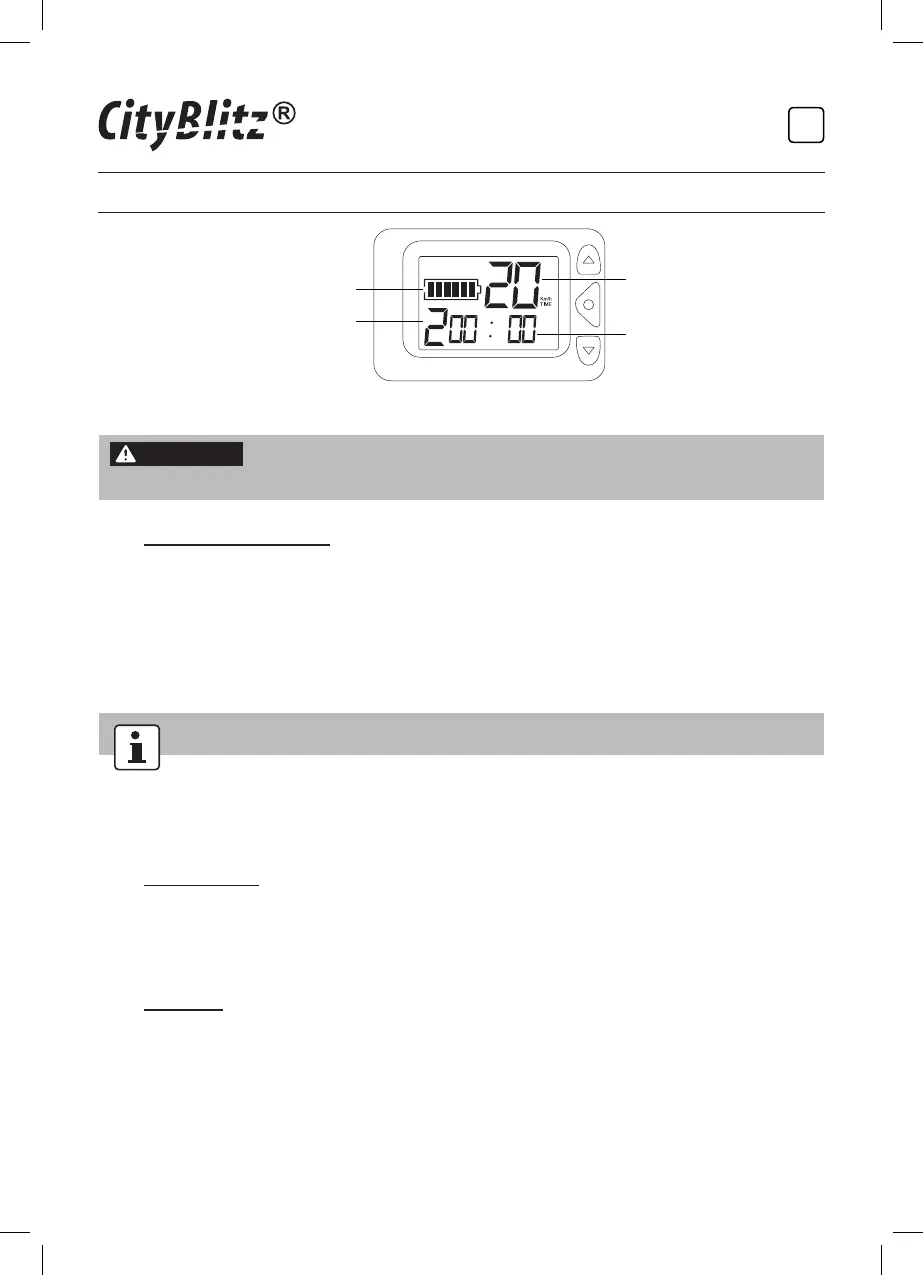
5. TIME (time mode)
Battery capacity
Selected speed gear
Current speed
Using time
WARNING
The use of this product can be dangerous! Get used to the
product step-by-step and take sufcient time to practice.
4.6 Using the Front Light
Press the front light on/off button to turn the light on/off and to choose an
operating mode:
• Press x1: The light ashes in short intervals.
• Press x2: The light ashes in long intervals.
• Press x3: The light is on continuously.
• Press x4: Turn off the light.
The rear light goes on automatically once the product is turned on.
5. Maintenance, Cleaning and Care
5.1 Maintenance
The product and its accessories are maintenance-free and must not be repaired
by the users themselves. For any questions or problems, contact the service
hotline provided on the warranty card.
5.2 Cleaning
• Before cleaning, turn off the product.
• Prior to every cleaning, unplug battery charger from the power supply and
unplug the charging cables from the product.
• Never use solvents or abrasive cleaners, hard brushes, metallic or sharp
objects when cleaning. Solvents are harmful and can damage plastics;
abrasive cleaners and aids can scratch surfaces.
CB0049-BigTrend-IM-INT-V1.2.indb 42 20/12/2018 10:56 AM


 To Next Page