13
English
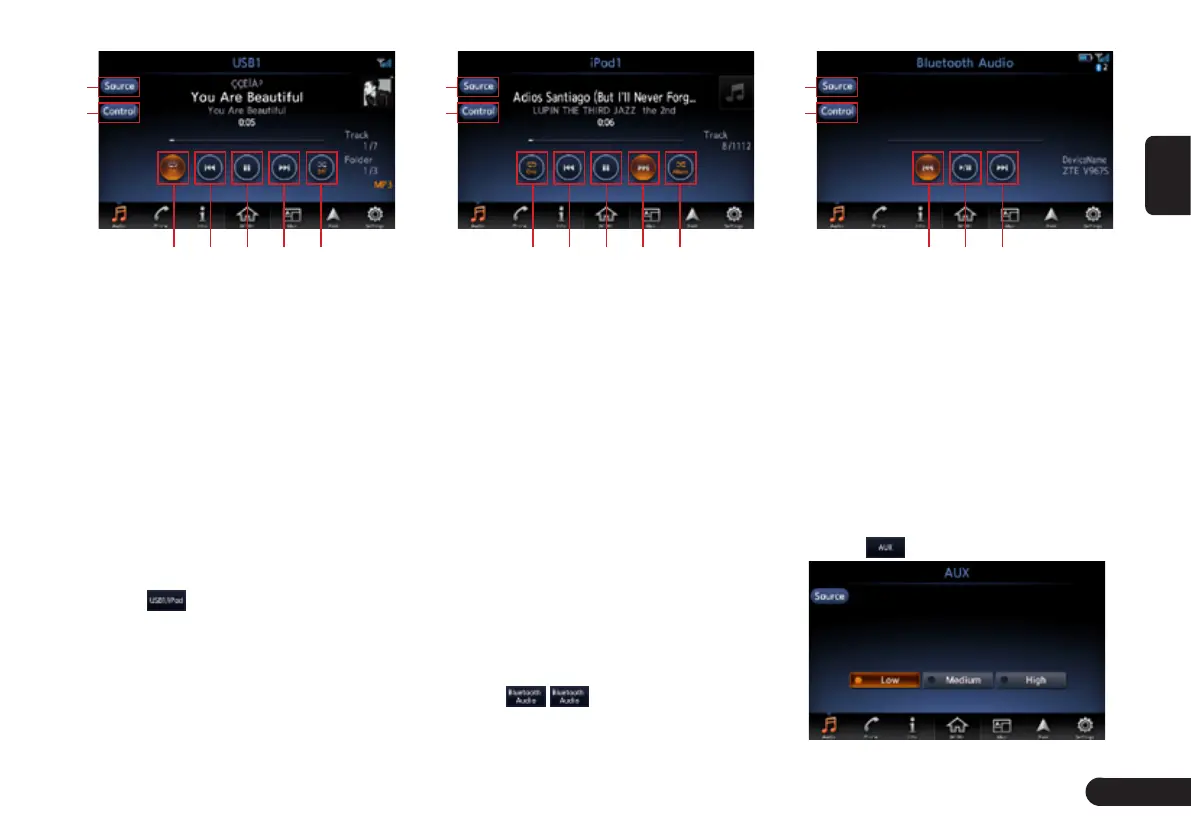
1
2
3 4 5 6 7
1
Back to source screen.
2
Scanning the Tracks, select the
folder and track, turn on or off the
display of album artwork.
3
Turn on or off repeat play.
4
Short touch: switch to Previous
Track; Long touch: Fast Backward.
5
Touch to Play/Pause
6
Short touch: switch to next Track;
Long touch: Fast Forward.
7
Turn on or off shuffle play.
iPod mode
1
Touch to enter USB audio
screen when you connect a iPod.
1
2
3 4 5 6 7
1
Back to source screen.
2
Select the track from playlist, art-
ists, albums, songs, podcasts,
genres, composers and audio-
books; Turn on or off the Display
of Album Artwork.
3
Turn on or off repeat play.
4
Short touch: switch to Previous
Track; Long touch: Fast Backward.
5
Touch to Play/Pause
6
Short touch: switch to next Track;
Long touch: Fast Forward.
7
Turn on or off shuffle play.
Bluetooth Audio mode
Before setting phone you need to
pair the mobile phone with this unit.
1
Touch / to enter Bluetooth
Audio screen.
1
2
3 4 5
1
Back to source screen.
2
View track list and select to play it.
3
Short touch: switch to Previous
Track; Long touch: Fast Backward.
4
Touch to Play/Pause
5
Short touch: switch to next Track;
Long touch: Fast Forward.
AUX mode
Insert the external sound device into
AUX slot via the audio cable.
1
Touch to enter AUX mode.


 To Next Page
 Loading...