24
English
Setting destination by
entering the address
This section explains the basic oper-
ation procedure to set the destination
in detail, using the example to specify
the destination by entering the ad-
dress from the Destination menu.
Read this explanation thoroughly
because this procedure is similar to
other destination entering methods.
For other destination entering meth-
ods, please refer to “Entering the
Destination” on page 秋25秋.
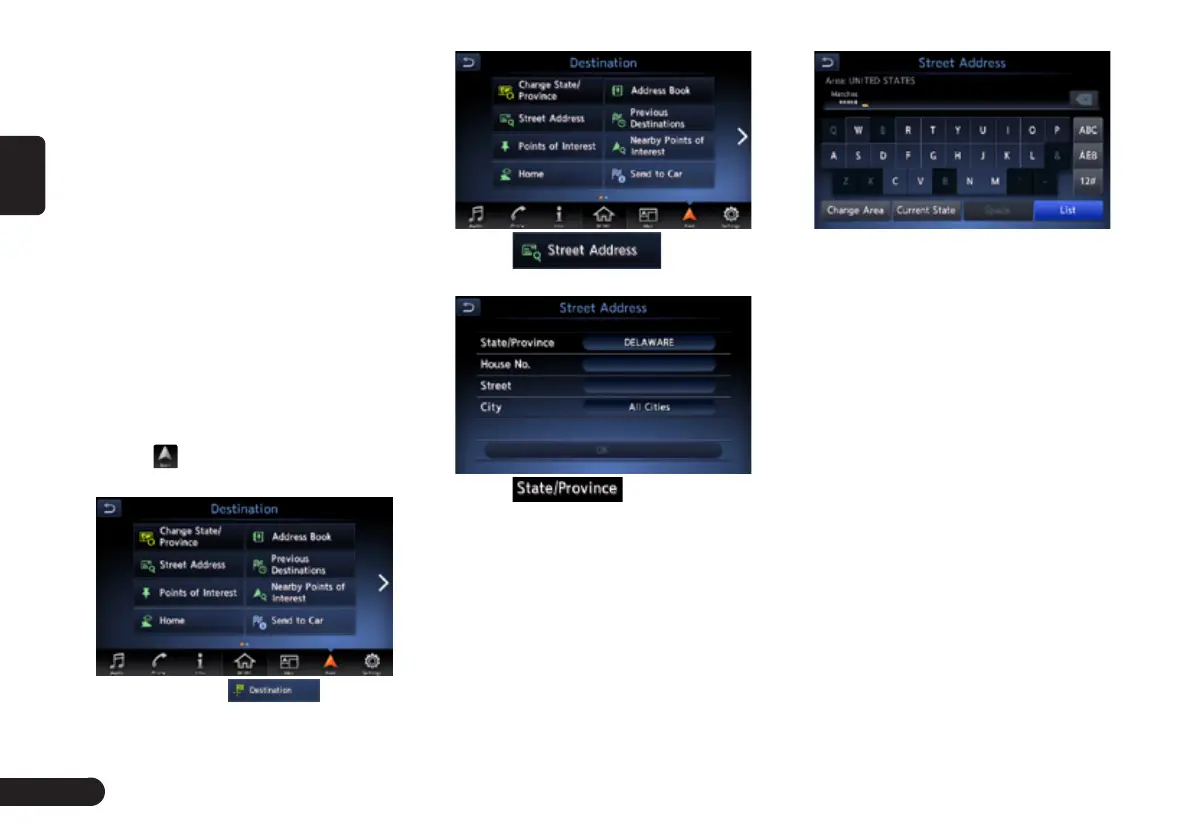
1
Press [MENU]/[MAP]/[AUDIO]
button on the panel to display the
function bar.
2
Touch to enter Destination
screen when no route exist.
z
You need to touch to enter
Destination screen when a route had exist.
3
Touch to enter
Street Address screen.
4
Touch .
Note:
G
You can omit the state/province name
entry and directly enter a road name.
Proceed to step 9.
5
Enter the state/province name
you wish to go to by touching the
characters on the screen.
● [Change Area] key: To change the
country area.
● [Current state] key: Use current
state.
● [Space] key: Input a space.
● [List] key: Displaythe city name
list corresponding to the entered
character(s).
● [ABC] key: Displaythe alphabetic
input keyboard.
● [ÀÈß] key: Displaythe accent char-
acters input keyboard.
● [12#] key: Displaythe number input
keyboard.
Note:
G
During the character entry, the system
shows the city name list automatically
when all the matching cities can be



 To Next Page
 Loading...