5-8
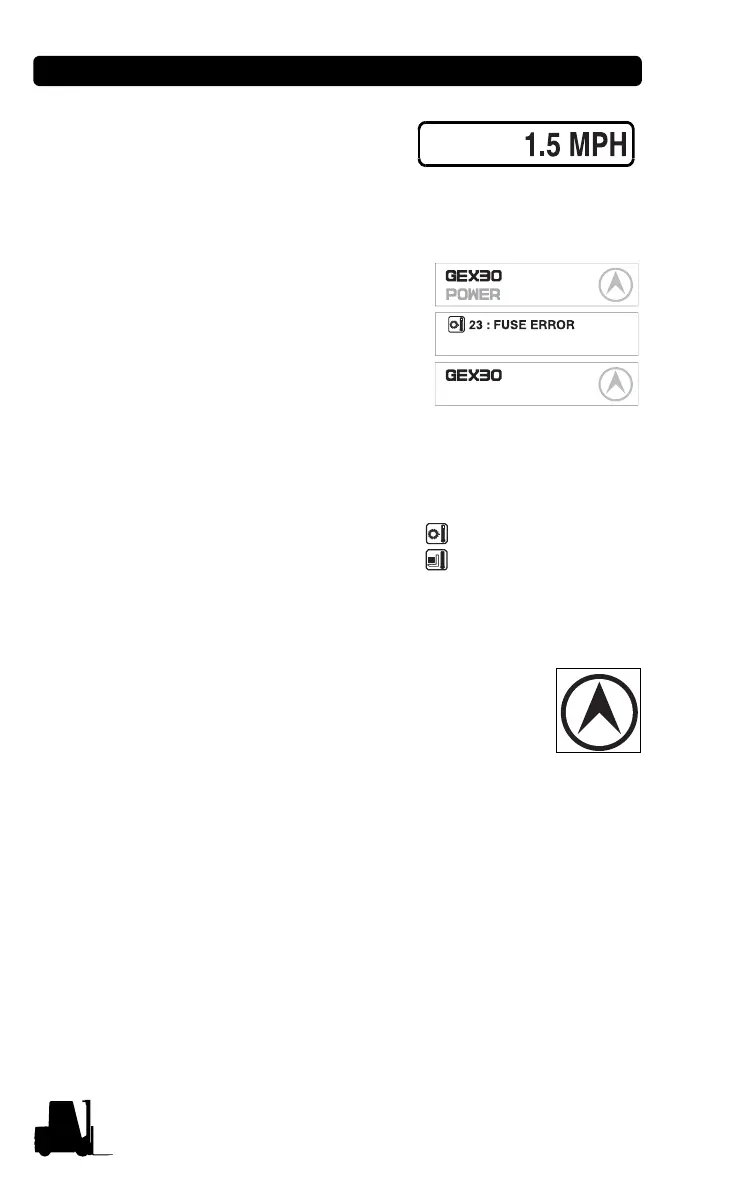
• Speed (MPH) is shown
when the truck is moving.
Message display (GEX,GTX)
The model name, POWER
selection, travel direction,
warning and error message
are displayed.
In normal operating condition:
Model name/POWER/Travel
direction.
When several messages are
simultaneously displayed, it
will be displayed in the order of Error, Warning and Normal condition.
If many error conditions are
simultaneously occurred, the priority
2 Errors will be displayed. (The
priority means Error number)
Travel direction icon (GEX,GTX)
It displays the traveling direction or angle of steering
wheel.
The direction icon rotates in 10 degrees. (Total 36
icon)
Error icon (GEX,GTX) : When error occurs this icon
is displayed to distinguish the condition easily. When the error
message is displayed, this icon is simultaneously displayed.
BATTERY LOW
Normal
Error
Warning
56 : FET SHORT
23 : FUSE ERROR


 To Next Page
 Loading...