3-42 Operator Controls
Seat Adjustment
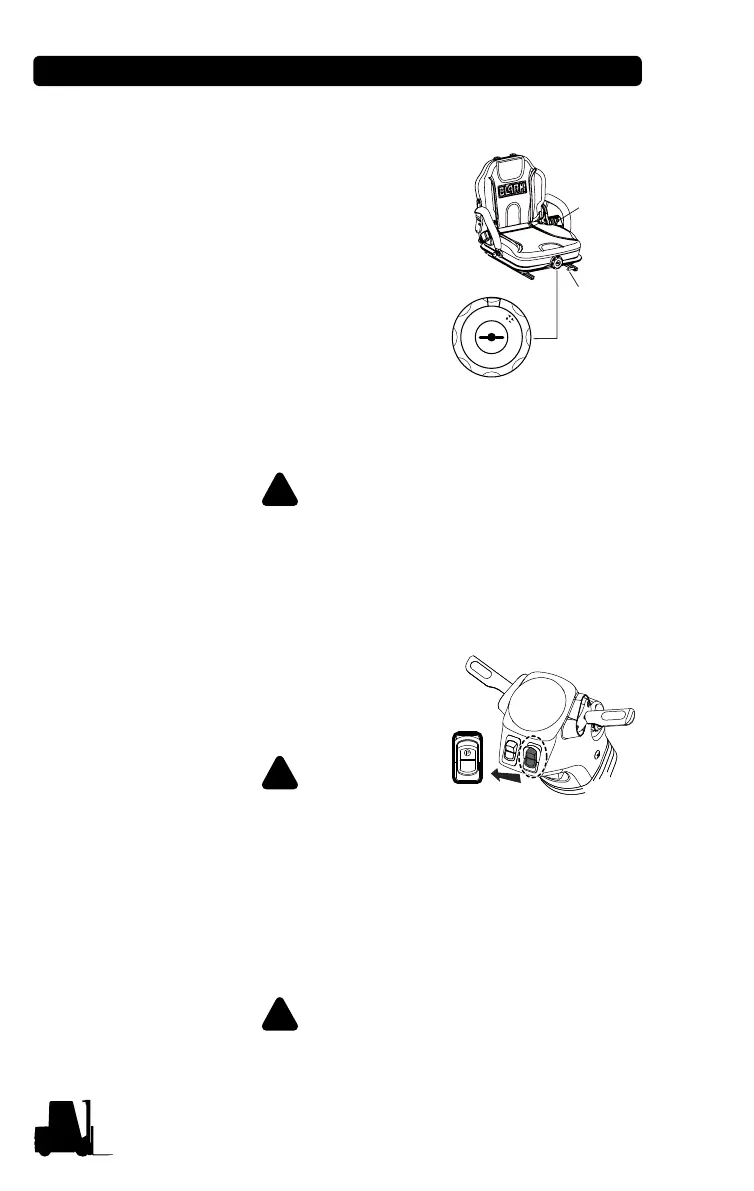
The fore and aft adjustment lever is located
on the front under the seat. To unlock, pull
the lever to the left and adjust the seat,
release the lever. Be sure that the seat
locking mechanism is engaged.
The back declining adjustment lever is
located on the left side of seat cushion. Pull
the lever up and adjust the back, release
the lever. Be sure that the back locking
mechanism is engaged.
The driver's weight adjustment knob is
located on the front under the seat. To adjust, turn the knob to the left
or right. The weight range is 50 kg~170 kg (110 lb~374 lb).
Never adjust driver's seat while truck is moving, to avoid
the possibility of loss of control and of personal injury.
Parking Brake
The parking brake automatically applies
when the truck is turned OFF or when the
operator leaves the seat. The parking
brake will also automatically apply during
certain functions, ex. Anti Roll Back.
Never exit a moving truck. Remain
seated until the parking brake
symbol shows on the dash.
If an emergency situation occurs or the service brake fails, the driver
can activate the parking brake by pressing the Parking Brake Switch.
Frequent use of the parking brake during operation can damage the
brake. Each use of the parking brake in this manner is recorded in
the error log.
To manually release the parking brake when lift truck is
disabled, refer to "How to Tow a Disabled Truck" on page 6-2.
Fore and
Aft Adjust
Ba c k
declining
adjustment
Driver’s weight
adjustment
k
g
1
7
0
1
6
0
1
5
0
1
4
0
1
3
0
1
2
0
1
1
0
1
0
0
9
0
8
0
7
0
6
0
5
0
l
b
3
7
0
3
5
0
3
3
0
3
1
0
2
9
0
2
7
0
2
5
0
2
3
0
2
1
0
1
9
0
1
7
0
1
5
0
1
3
0
1
1
0


 To Next Page