7
English
6
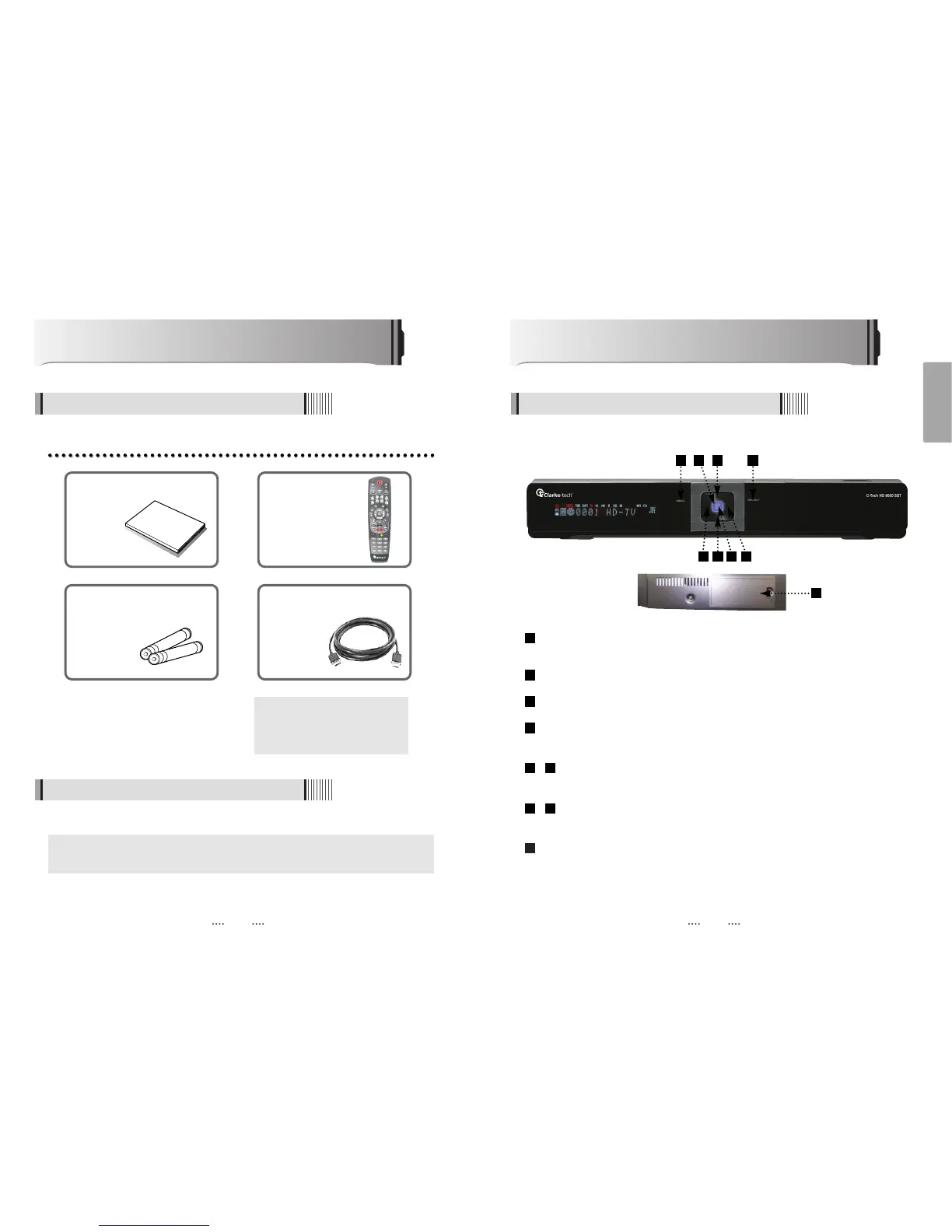
Controls/Functions
4.1 Front Panel
Standby/Power on Indications Lamp : Flashes red light in “Standby” mode and shows no
light in “Power ON” mode.
Power : Switches the receiver between “Standby” and “Power ON” modes.
Menu : To enter or exit the main menu.
Select : To show the Channel List in non-menu mode and select on item or confirm in
menu mode.
- VOL
ȜȞ : To change the volume level in non-menu mode and modify a setting in
menu mode.
- CH ƌƊ : To switch channels or change the cursor position on the application
screen.
2.5” & 3.5” S-ATA HDD(Max. 1TB)
9
87
65
4
3
2
1
8
7 43
User's manual : 1
User's manual
Remote control : 1
Batteries (AAA type) : 2 HDMI cable : 1
ᶀ If any of the above-listed
accessories is missing, contact
your sales representative.
The accessories below are included with this receiver:
Points to Check before Use
3.1 Accessories
Your dish should be properly installed and azimuth and elevation must be precisely set up.
ᶀ
This unit supports DiSEqC 1.2 and can work with a compatible antenna positioner.
Ask your dealer for information.
3.2 The Satellite dish
2 65
1
9



 To Next Page