8
Parts & Service: 020 8988 7400 / E-mail: Parts@clarkeinternational.com or Service@clarkeinternational.com
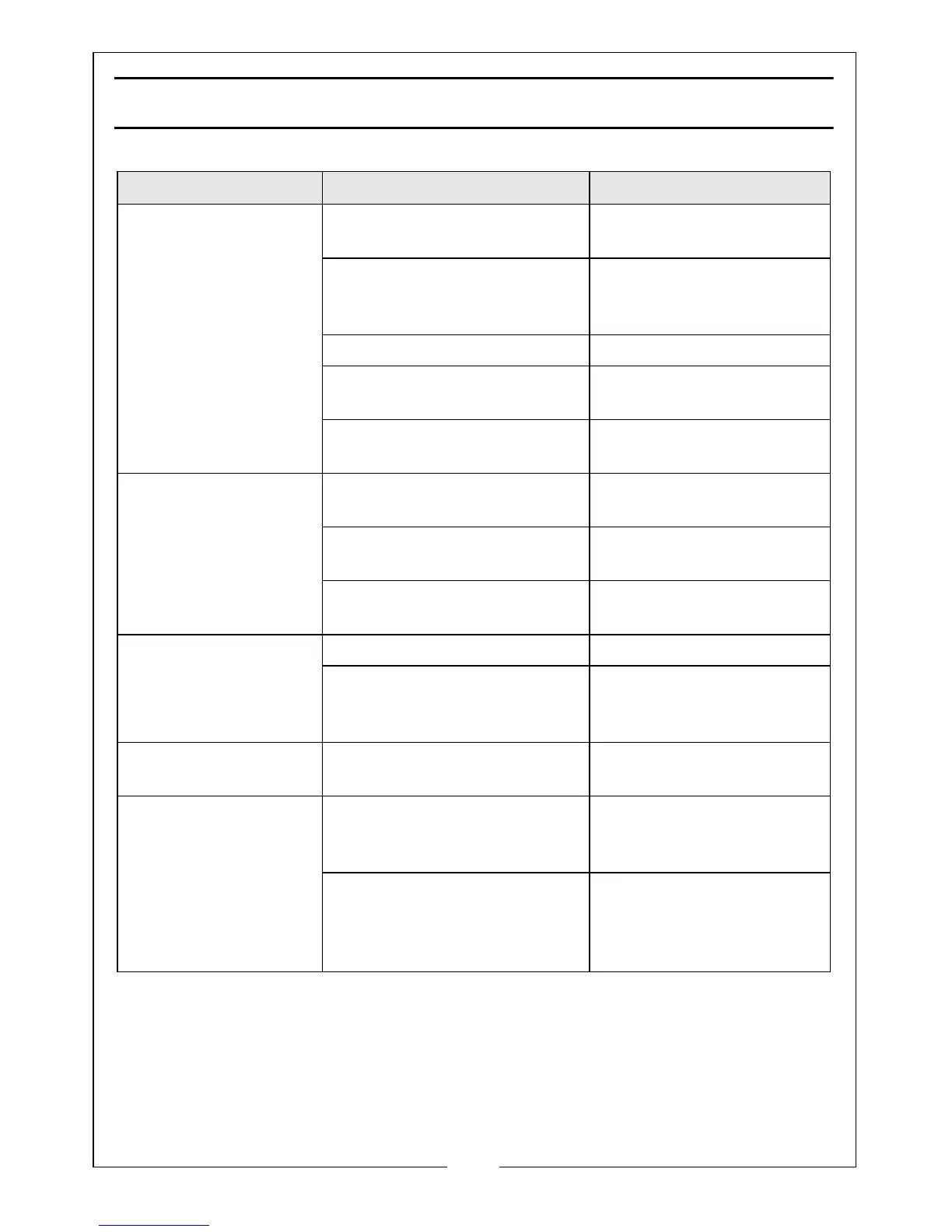
TROUBLESHOOTING
Problem Check Solution
Excessive dust in the
cabinet.
No dust extract device
used.
Install dust extract
device.
Air vent or overflow
blocked.
Clean rear vent and
keep vent away from
any wall.
Abrasive media worn. Replace abrasive media
Too much abrasive media in
the cabinet.
Remove excessive
media.
Loose airline or loose
connections.
Tighten fittings and
ensure airline is secure.
Uneven blasting
action
Too much abrasive media in
the cabinet.
Remove excessive
media.
Abrasive is damp. Renew abrasive or dry
thoroughly before use.
Moisture present inside
cabinet.
Check airline to ensure it
is free from moisture.
Inadequate speed or
inefficient blast.
Abrasive media worn. Replace abrasive media
Pressure too low. Increase inlet pressure
and ensure control valve
is fully open.
Static electricity
present
Dry weather conditions. Leave the item to be
cleaned on the grid.
Excessive media
blown into the
surrounding
atmosphere when no
vacuum extract is
being used.
Lid not secure. Secure the lid with the
swivel clips and adjust
them if necessary.
Air vent filter missing. Replace filter or blank off
hole in rear panel
temporarily with masking
tape.


 To Next Page