7
English
15. [ MODE ] Mode selection: Normal, Nature orSleep.
- Normal: constant fanspeed.
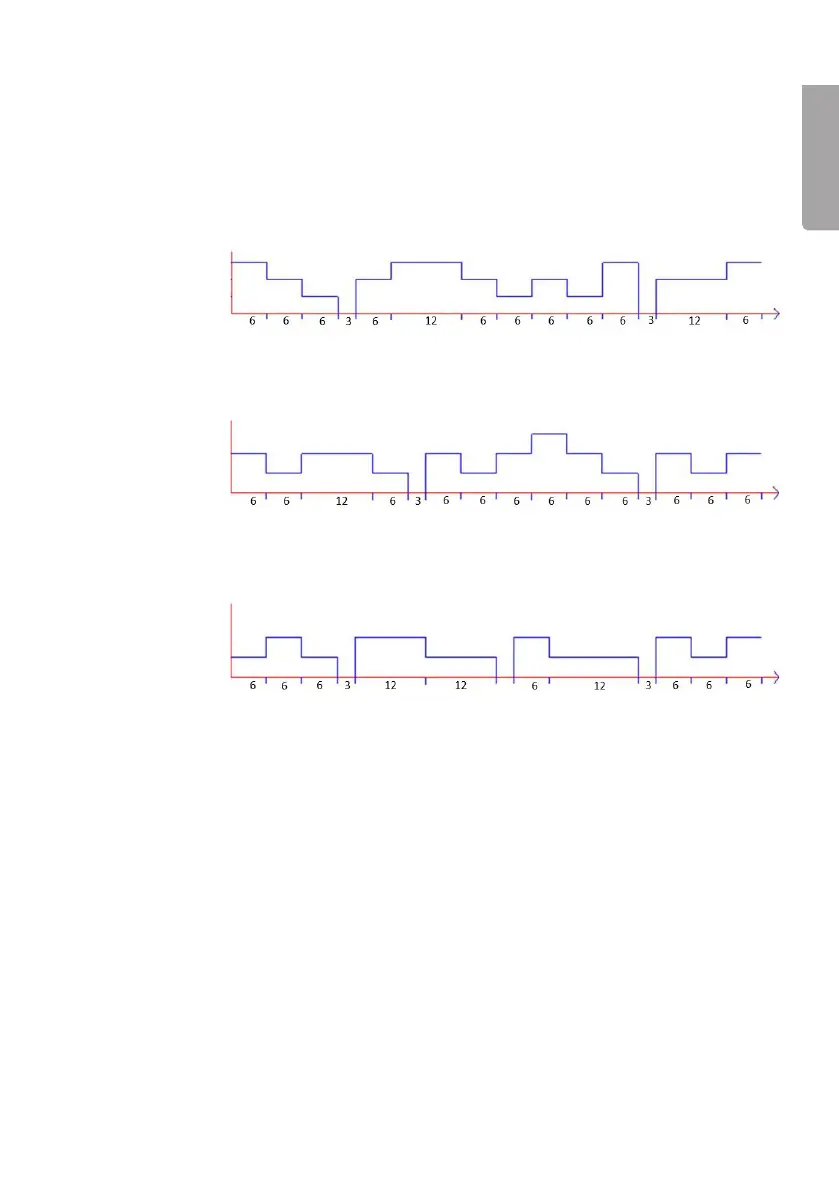
- Nature: in nature mode thefan speed will vary according to afixed pattern
and depending on thefan speed selected. The fan alternates between: low,
medium and high.
- If thehigh fan speed has been selected, thefan speed will follow thepattern
shown in thediagram below:
Medium
Medium
Medium
High
High
High
Low
Low
Low
Time (seconds)
Time (seconds)
Time (seconds)
- If themedium fan speed setting has been selected,thefan speed will follow
thepattern shown in thediagram below:
- If thelow fan speed setting has been selected, thefan speed will follow
thepattern shown in thediagram below:
- Sleep: thefan will follow thesame pattern as in thenature mode but with
thedifference that it will reduce speed successively at 30-minute intervals.
• If you select the sleep mode and the high fan speed, the fan will follow the pattern
for high fan speed as shown above for 30 minutes, then change to the medium
speed pattern for 30 minutes, then the low speed pattern for 30 minutes until it
turns off.
• If you select the sleep mode and the medium fan speed, the fan will follow the
pattern for the medium fan speed as shown above for 30 minutes, then change to
the low speed pattern for 30 minutes and then turn off.
16. [ SPEED ] Speed setting: High, Medium, Low or Silent
17. Indicators for the “Nature” and “Sleep” modes


 To Next Page