Weighing
1. Press [ ] to switch the scale
on, and then wait unl 0.00 kg
appears on the display.
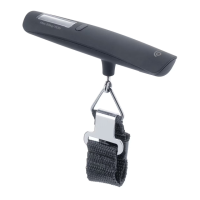
2. Thread the end of the
luggage suspension strap
through the handle of the
luggage and carefully li the
luggage up.
3. Wait unl the load has
stabilised. The display will
ash three mes and then
display the weight.
4. Pressing the buon once
again will reset
the scale to zero.
5. Holding in the buon unl the
display goes blank will switch
the scale o
(the scale automacally shuts
o aer about two minutes if
it is not used).
Changing the unit of
measurement
1. Make sure that the scale is
switched o.
2. Hold in [ ] unl the display
shows 0.00 kg.
3. Release the buon, kg will
ash on the display.
4. Press [ ] again to switch
from kg to lb.
5. Wait unl the chosen unit has
stopped ashing
to conrm your selecon.
Care and maintenance
• Clean the scale by wiping
it with a damp cloth. Use
only mild cleaning agents,
never solvents or corrosive
chemicals.
• Store the scale in a dry,
dust-free environment out of
children's reach whenever it is
not to be used for a long me.
Changing the baery
1. Remove the baery cover and
carefully remove the baery.
2. Insert a new baery, making
sure that the posive terminal
of the baery (+)
faces outwards.
3. Ret the baery cover.
English


 To Next Page