5
English
Operating instructions
1. Insert thefilter (4) into thewater separator (3) and twist it clockwise until it locks in place.
2. Insert thewater separator into thedust collector.
3. Attach thedust collector (2) to themotor unit (5). Fit thecrevice nozzle (1) onto
thedust collector (2) for vacuuming in confined spaces such as corners, cracks
and between cushions.
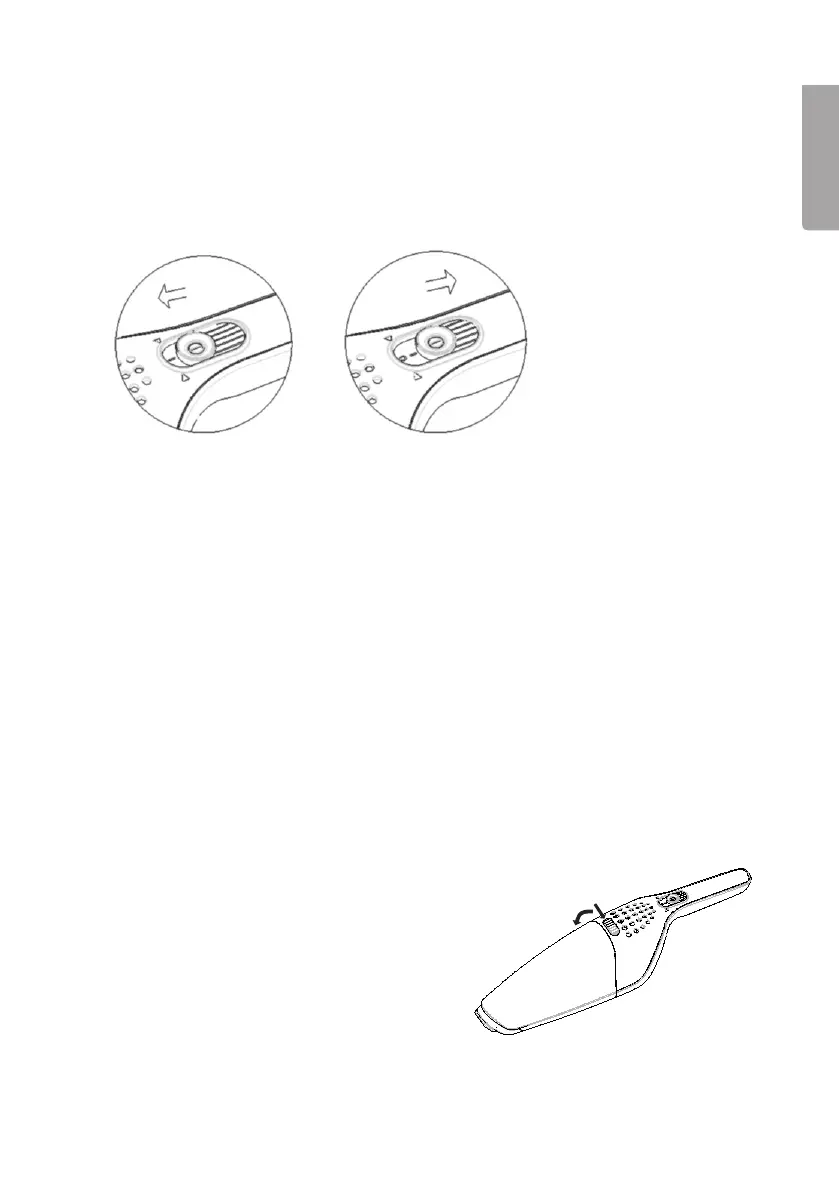
4. Slide thepower switch forwards to switch thevacuum cleaner on. Do not vacuum
up more than 100 ml water. Note: If water is vacuumed, it must be emptied
out straight away.
5. Slide thepower switch backwards to switch thevacuum cleaner off.
If thesuction power is poor or thevacuum cleaner switches itself off automatically,
either thevacuum cleaner needs to be charged or thedust collector needs to be
emptied and thefilter cleaned.
Service and maintenance
• Unplug thecharger before cleaning theproduct.
• Clean theproduct using asoft, moist cloth. Use amild detergent.
Never use solvents or strong, abrasive cleaning agents.
Start Stop
Emptying thedust collector
1. Switch off thevacuum cleaner using its
power switch and disconnect thecharger
before emptying thevacuum cleaner.
2. Press therelease catch (6) to release
thecollector (2).


 To Next Page