EasyManua.ls Logo

Classeq C500WS - Know Your Warewasher; Warewasher Layout

Classeq C500WS
37 pages
Print Icon
To Next Page IconTo Next Page
To Previous Page IconTo Previous Page
Loading...
90001697 Classeq Under Counter Range - User Manual
7
EN
2. Know Your
Warewasher
Before installing your warewasher you should familiarise yourself
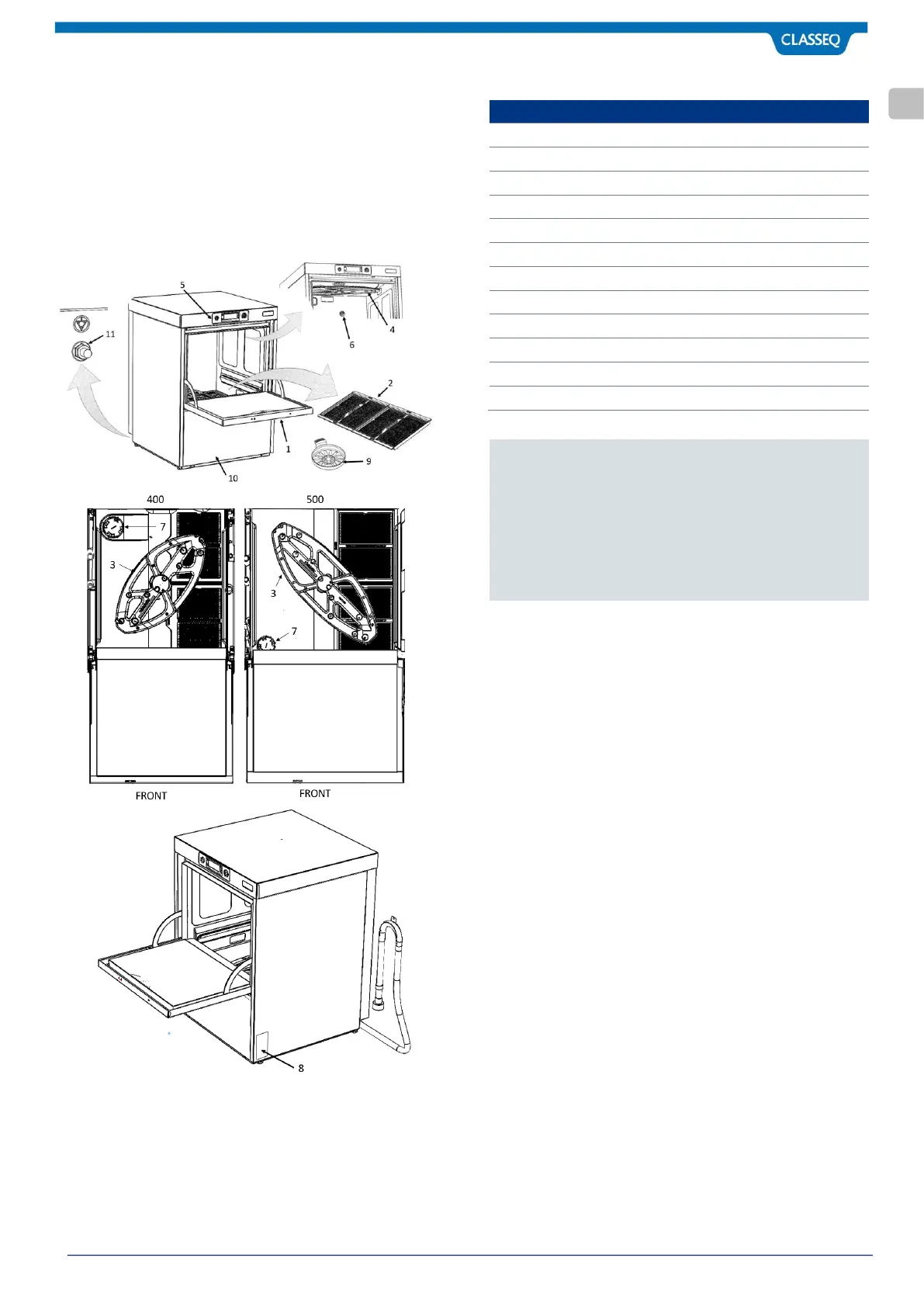
with the various components shown below.
2.1 Warewasher Layout
Item
Description
1
Door (Note 1)
2
Primary Filters
3
Bottom Wash and Rinse Arms
4
Top Wash and Rinse Arms
5
Control Panel
6
Anti-syphon device
7
Salt Reservoir Cap (Note 2)
8
Rating Plate
9
Secondary Filters
10
Removable Lower Front Panel
11
Earth bonding stud
Notes:
1. The Door of the warewasher should never be used
as a step or seat.
2. Fitted to warewashers with a Water Softener only.
3. Water softener is located at the rear on C400 unit.
4. Water softener is located at the front on C500 unit.

Related product manuals