20/EN
Using the oven clock
Starting the cooking
In order to operate the oven, you must
select cooking mode and the desired
temperature and set the time. Otherwise,
the oven will not operate.
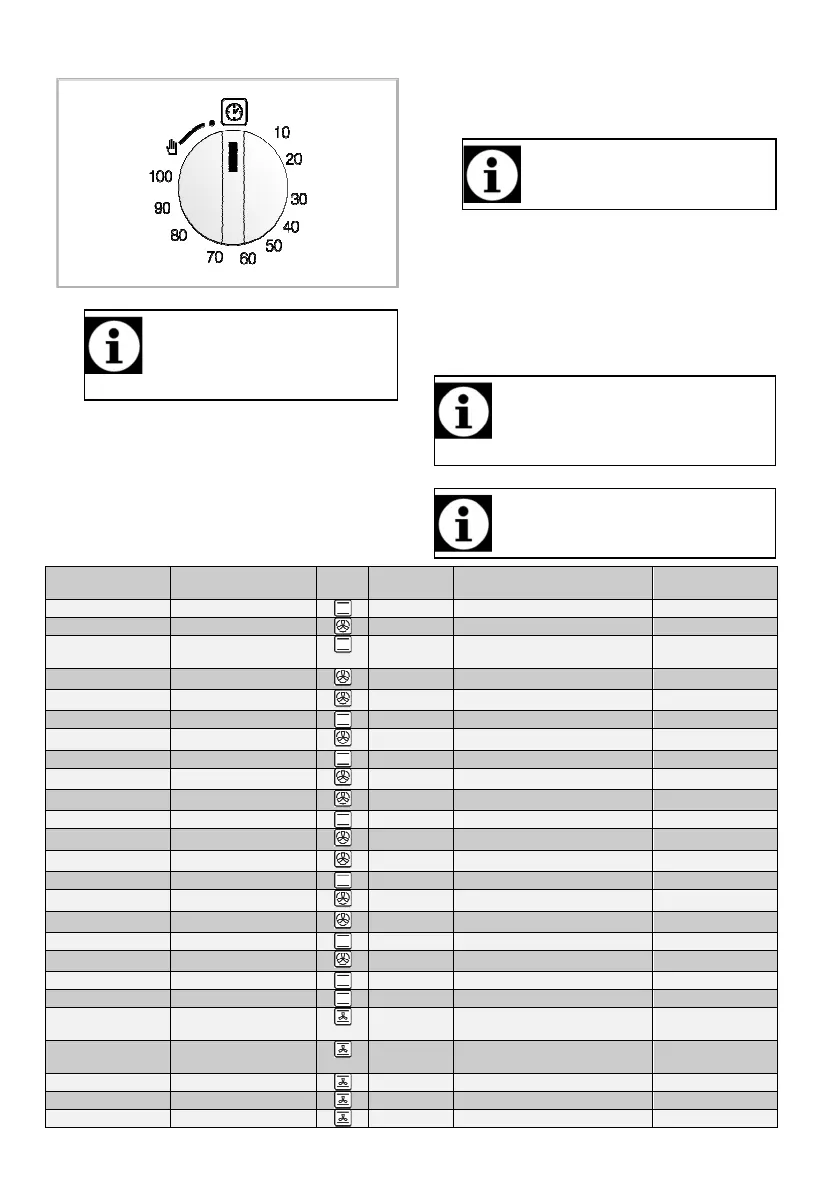
1. Turn the Time Adjustment knob clockwise to set
the cooking time.
2. Put your dish into the oven.
3. Select operation mode and temperature; see. How
to operate the electric oven, page 18.
» The oven will be heated up to the preset
temperature and will maintain this temperature until
the end of the cooking time you selected.
4. Once the cooking time is over, Time Setting knob
will automatically rotate counterclockwise. A
warning sound indicating that the set time is over
is heard and the power is cut.
If you do not want to use the timer
function, turn the knob counterclockwise
towards the hand symbol.
5. Turn off the oven with the Time Setting knob,
function knob and temperature knob.
Turning off the oven before the set time
1. Turn the Time Adjustment knob counterclockwise
until it stops.
2. Turn off the oven with the Function knob and
Temperature knob.
Cooking times table
The timings in this chart are meant as a guide.
Timings may vary due to temperature of food,
thickness, type and your own preference of
cooking.
Baking and roasting
1st rack of the oven is the bottom
bottombottom
bottom rack.
Cooking level number
Cooking level numberCooking level number
Cooking level number
position
positionposition
position
Temperature (°C)
Temperature (°C)Temperature (°C)
Temperature (°C)
Cooking time
Cooking time Cooking time
Cooking time
(approx. in min.)
(approx. in min.)(approx. in min.)
(approx. in min.)
paper*
Roast
25 min. 250/max, then 180 ..
(casserole)
25 min. 250/max, then 190
15 min. 250/max, then 180 ... 190
25 min. 250/max, then 180 ... 190



 To Next Page