EasyManua.ls Logo

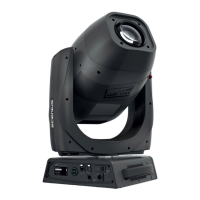
Clay Paky scenius spot - User Manual

Clay Paky scenius spot
32 pages
Print Icon
To Next Page IconTo Next Page
Loading...
1
SCENIUS SPOT
C61500
INSTRUCTION MANUAL
ENGLISH
Congratulations on choosing a Clay Paky product!
We thank you for your custom.
Please note that this product, as all the others in the rich Clay
Paky range, has been designed and made with total quality to
ensure excellent performance and best meet your expectations
and requirements.
INDEX
Page Contents
2 Safety Information
5 Unpacking and preparation
6 Installation and start-up
7 Control panel
9 Menu setting
18 Maintenance
24 Technical information
25 Cause and solution of problems
26 Channel functions

Other manuals for Clay Paky scenius spot

Question and Answer IconNeed help?

Do you have a question about the Clay Paky scenius spot and is the answer not in the manual?

Summary

Control Panel Operations

Setting Projector Starting Address

Configure the DMX starting address for control signal (1-512).

Setting Projector Fixture ID

Assign a unique ID (0-255) for easy projector identification in installations.

Control Panel Button Functions

Explains the functions of the control panel buttons and navigating the menu system.

Menu System Configuration

Setup Menu Options

Configure DMX, network, and other projector settings via the setup menu.

Option Menu Settings

Adjust operating parameters like Pan/Tilt, Color mixing, Shutter, and Lamp dimming.

Information Menu Monitoring

View system status, hours, versions, board diagnostics, fan speeds, and sensor data.

Test Menu Functions

Access tests for various effects like Lamp, Reset, Channel, Pan/Tilt, Colour, and Gobo.

Advanced Menu Operations

Perform advanced operations such as firmware upload, calibration, and menu locking.

Clay Paky scenius spot Specifications

General IconGeneral
BrandClay Paky
Modelscenius spot
CategoryLight Fixture
LanguageEnglish

Related product manuals