5
ASSEMBLING THE VACUUM
Attaching the Handle to the Vacuum
NOTE: Do not turn on the vacuum until it is
completely assembled.
The vacuum cleaner and the handle are
packed separately and require assembly.
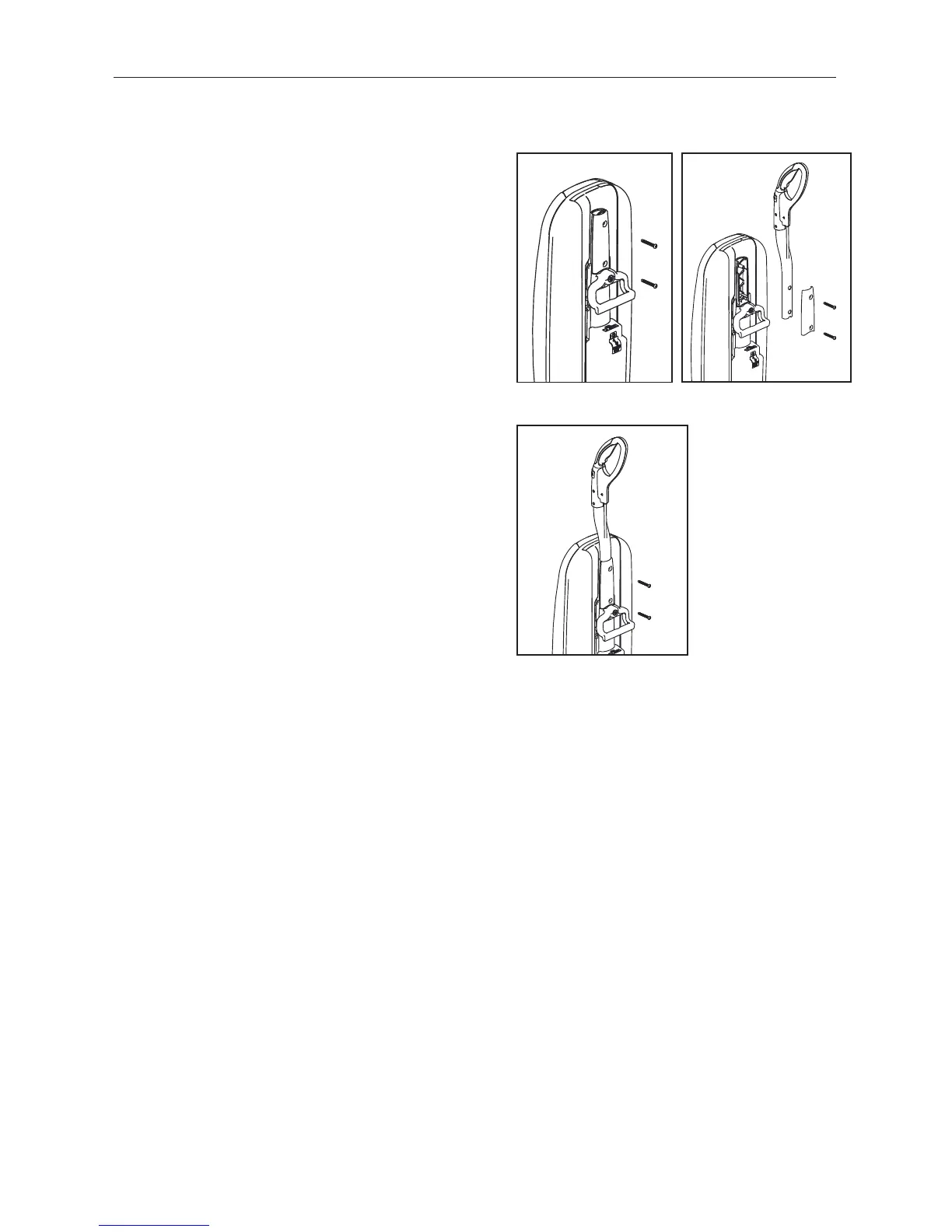
• Remove the handle bracket by removing the
two screws (Fig. 1).
• Place handle onto the back of the vacuum,
aligning holes with pegs (Fig. 2).
• Place the handle bracket back into position
(Fig. 3).
• Secure with two screws removed in Fig. 1.
Tuck the cord into the space to the left of
the handle.
• Open the bag compartment to ensure a
vacuum bag is in place.
• Your vacuum is now ready for use.
Pre-Charged Battery
The battery is partially charged and will run for
a short time. To fully charge the battery see
Battery Charging (page 6).
Fig. 1
Fig. 2
Fig. 3


 To Next Page