Chapter 2: Getting Started 7
CONNECTING THE CHAT 170 TO EXTERNAL DEVICES
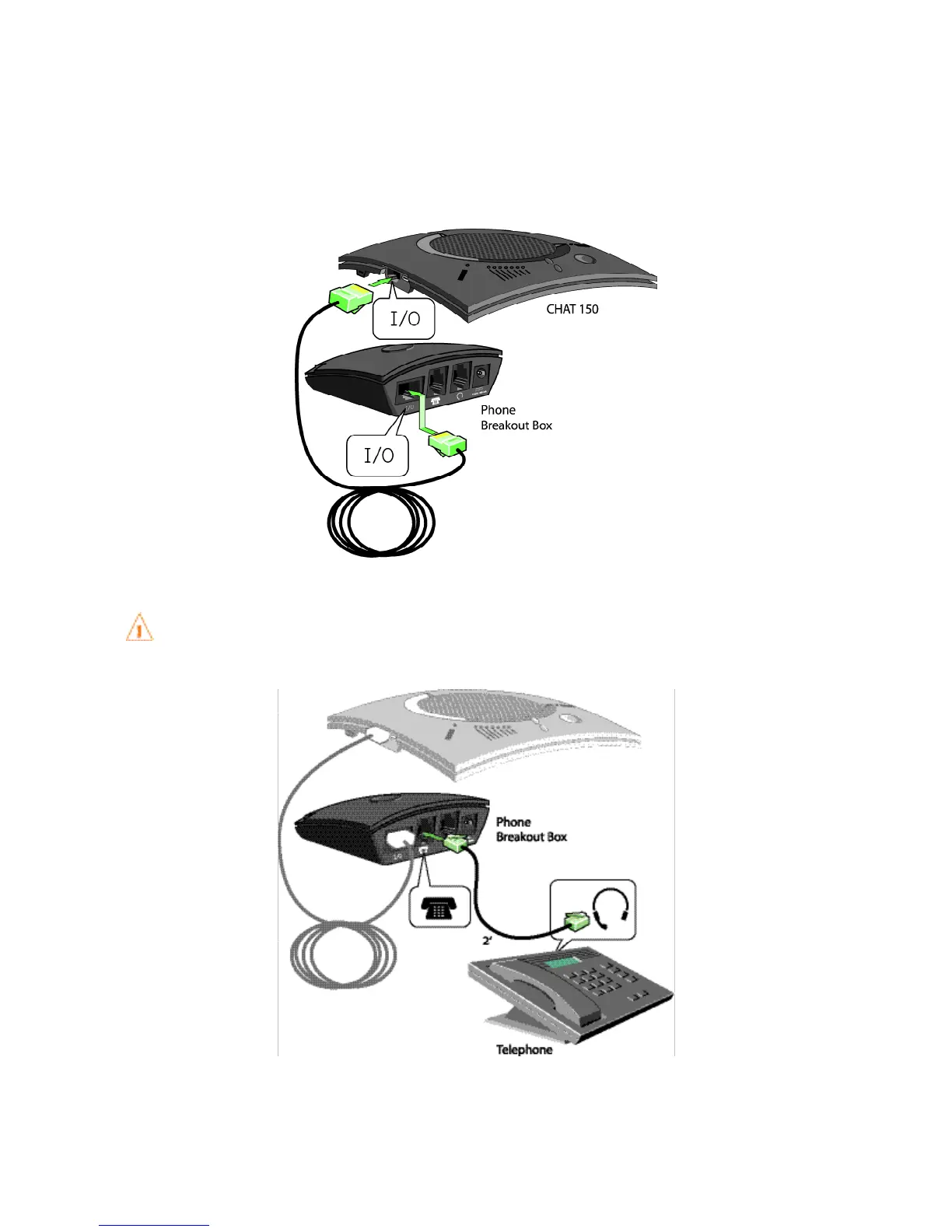
Connecting to a Telephone
ClearOne provides configurations of the CHAT 170 that make it possible to connect the CHAT 170 to enterprise tele-
phone handsets from Cisco and Avaya (see CHAT 170 Configurations in the Introduction to this manual). The CHAT
170 phone Breakout Box is the interface between the CHAT 170 and the particular telephone.
Using the included 25’ RJ-45 cable, connect the Phone Breakout Box to your CHAT 170.1.
Using the included 2’ RJ-9 telephone cable, connect the Phone Breakout Box’s 2. phone jack to your telephone’s
headset jack.
DO NOT plug the cable into the telephone’s line jack, handset jack, or a telephone different from that
listed on the bottom of the Phone Breakout Box as damage to the telephone and/or CHAT 170 might
occur.



 To Next Page