USING THE PHONE
To Make a Call
1. Press the ON/OFF key to activate the
phone. You will hear a dial tone.
2. Dial the number as you would on a
standard phone. The number appears on
the LCD screen.
You can also pre-dial the number while
in Standby mode and press the ON/OFF
key to connect the call.
To add a pause to the number you are
pre-dialing, press and hold the pound
(#) key.
To Answer a Call
• Pressanykey(exceptthe“*”,MUTE,
VOLUMEUPorVOLUMEDOWNkeys).
Whenthereisanincomingcall,thephone
rings (unless the ringer is turned off) and
thephoneLEDsandphoneicononthe
LCD screen flash.
To End a Call
• PresstheON/OFF key.
To Turn the Ringer On/Off
(In Standby)
• Pressandholdthe"*"keyuntiltheringer
off icon appears on the LCD display.
To Adjust Ringer Volume
• Whilethephoneisringing,press
VOLUME UP or VOLUME DOWN.
• Whilethephoneisinactive,press
VOLUME UP or
VOLUME DOWN. The
ringer melody will play once at the new
level.
To Access a Speed Dial Number
• PresstheSPEED DIAL key. This
feature must be programmed before use.
To Access Your Service Center
• WhileinStandbymode,pressandhold
the 0 key for 2 seconds. This feature must
be programmed before use.
To Store a Number in the Phonebook
1. Enterthenumberwhilephoneisin
standby (inactive) mode.
2. Press and hold the PHONEBOOK key
until the Phonebook and Program icons
appear.
3. Assign a Phonebook location (0–9)
by pressing the corresponding number
key.
4. Press PHONEBOOK again to save the
entry. You will hear a confirmation tone.
5.ToexitPhonebookEditmodebefore
saving the entry, press CLEAR.
To Make a Call Using the Phonebook
1. Press the PHONEBOOK key.
2. Press the number (0-9) key that
corresponds with the stored phone
number you want to dial. The number will
be displayed on the LCD screen.
3. Press the ON/OFF key to dial the number.
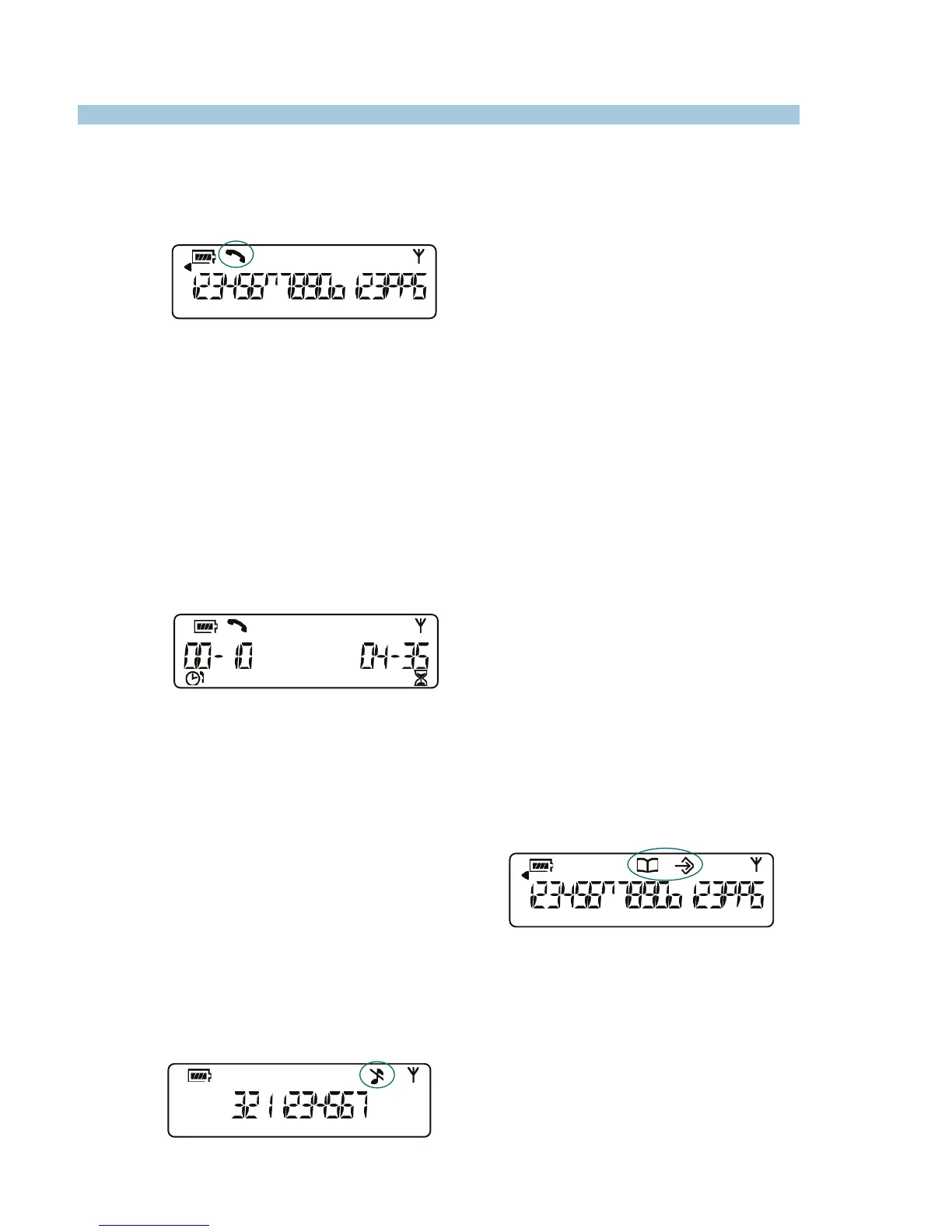
The Phonebook and Program icons
Phone active icon
Elapsed call time (left) and remaining talk
time (right) are shown during a call
Ringer off icon


 To Next Page