CONNECTING MAX WIRELESS TO A DIGITAL (PBX) PHONE LINE
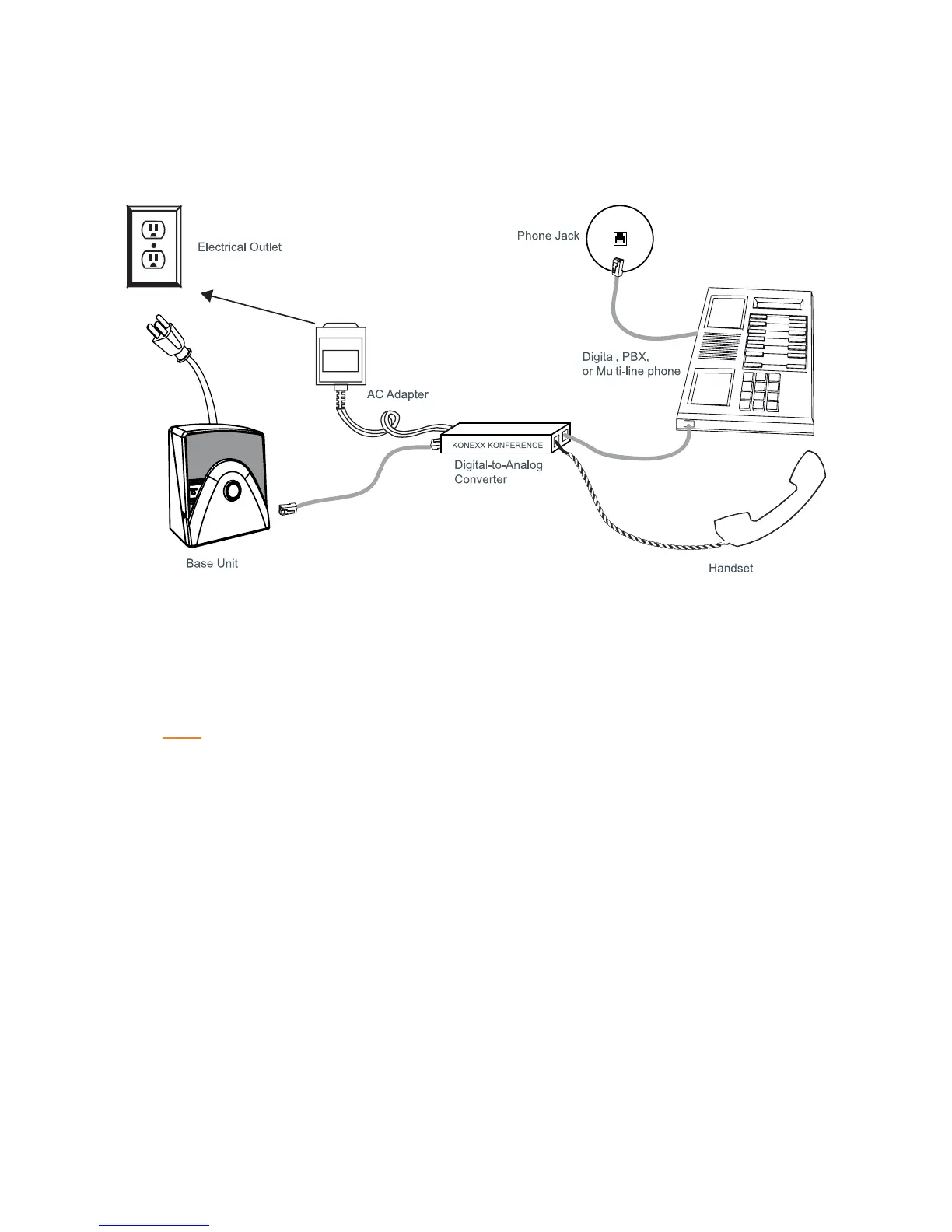
MAX Wireless phones can be connected to a PBX by using a digital-to-analog converter. To connect a MAX Wireless
phone to a digital (PBX) line, use the following diagram and procedure:
1. Connect the telephone cable to the phone jack on the back of the base unit, and the other end into the
digital-to-analog converter.
2. Connect the converter's AC power adapter to an electrical outlet.
3. Connect a second telephone cable from the converter to a digital or PBX phone. Consult the converter’s user
manual for more information.
4. Connect the power cable to the base unit and plug it into an AC outlet.
NOTE:
Do not connect the MAX Wireless phone directly to a digital (PBX) line with out using a
digital-to-analog telephone line converter. Permanent damage may result. For assistance,
contact ClearOne technical support.
Chapter 2: Getting Started 7


 To Next Page