Apex Tool Group P2402KA | 2019-05 9
Setting up the mPro200GC-AP
3
EN
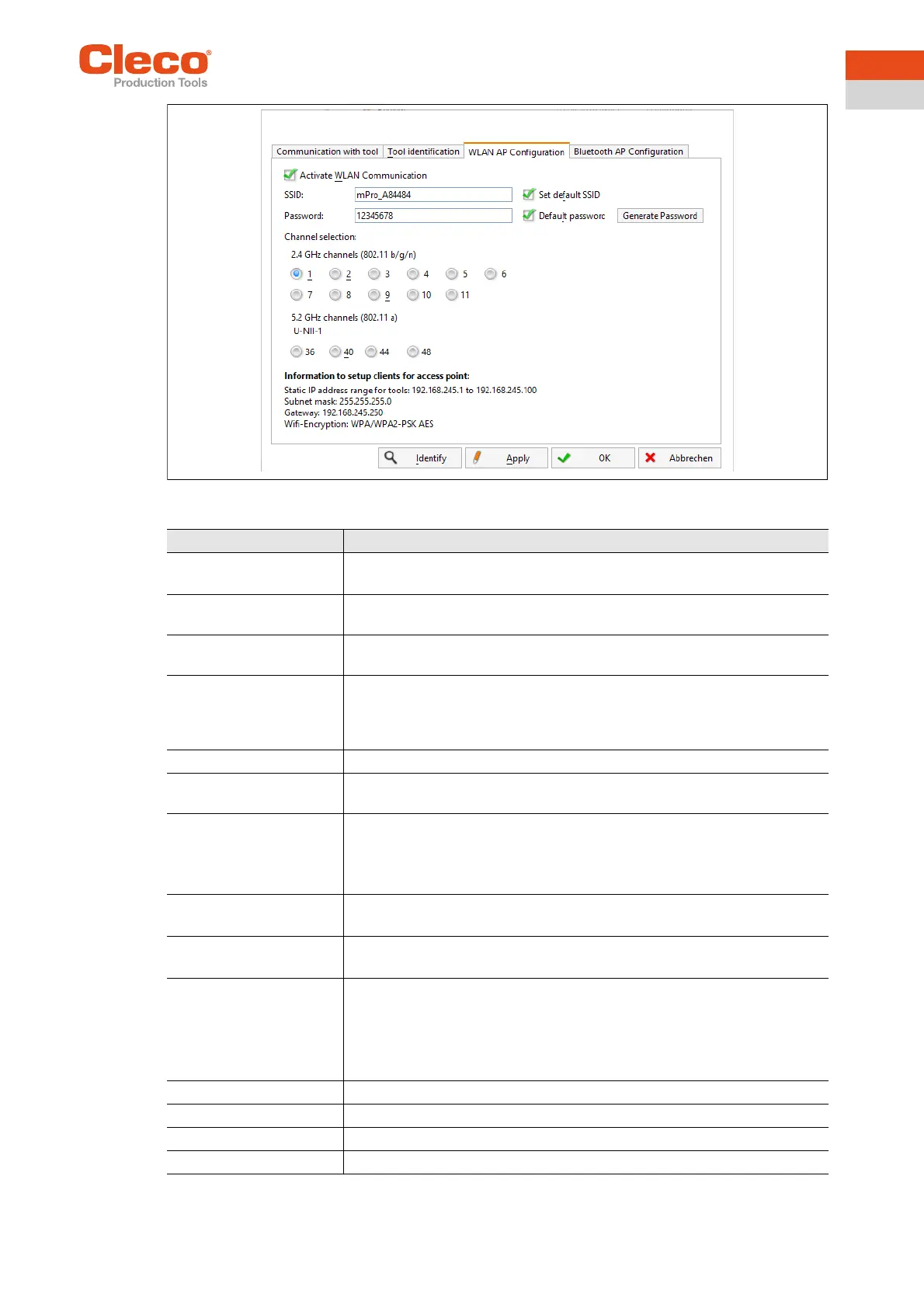
Abb. 3-1: WLAN AP Configuration
Parameter Description
Activate WLAN Commu-
nication
If the checkbox is activated, WLAN is active on the controller.
→ The Bluetooth function is deactivated.
SSID Enter the SSID for the WLAN name (access point) to which a connection is
to be established.
Set default SSID If the Set default SSID checkbox is activated, then a default value for the
SSID is assigned.
Password Enter the password for the access point.
The default password is visible. As soon as a new password is assigned,
asterisks * are displayed instead of numbers.
<Generate Password> Press <Generate Password> to generate any eight-digit password.
Default Password If the Default Password checkbox is activated, then the default password is
displayed.
Channel bands Select the frequency band. Only one channel can be selected.
The following may be selected:
• 2.4 GHz
• 5.2 GHz
2.4 GHz channels
(802.11 b/g/n)
Select channel. Only one channel can be selected.
Only active if the 2.4 GHz frequency band has been selected.
5.2 GHz channels
(802.11 a)
Select channel. Only one channel can be selected.
Only active if the 5.2 GHz frequency band has been selected.
Information to setup cli-
ents for access point
Information to setup clients for access point:
• IP address range for tools
• Subnet mask
• Gateway
• WLAN-Encryption
<Identify> Update the view of the WLAN settings.
<Apply> Save the settings.
<OK> Exit software, the settings are saved.
<Cancel> Exit software, the settings are not saved.



 To Next Page