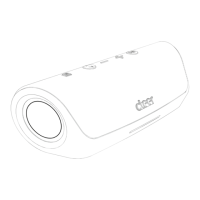
The Cleer Scene is a portable speaker designed for a variety of audio experiences, from music playback to hands-free phone calls. This quick start guide outlines its features, usage, and maintenance to ensure an optimal user experience.
Function Description
The Cleer Scene is a versatile audio device that primarily functions as a portable Bluetooth speaker. It allows users to stream audio wirelessly from compatible devices, providing a rich sound experience. Beyond music playback, the Scene also supports hands-free phone calls, making it a convenient accessory for communication on the go. Its design incorporates intuitive controls for easy operation, and it features a durable build suitable for various environments. The speaker is equipped with a rechargeable battery, offering portability and extended listening times.
Usage Features
The Cleer Scene offers a straightforward user interface with clearly labeled controls for various functions.
Top Panel Controls:
- Mic Off Button: A short press of this button mutes the microphone, useful for privacy during calls or when you don't want your voice picked up.
- Volume Down Button: A short press decreases the volume. A long press of this button skips to the previous track, providing quick navigation through your music library.
- Volume Up Button: A short press increases the volume. A long press of this button advances to the next track, allowing for easy song selection.
- Playback/Call Button: This multi-function button handles both audio playback and phone calls. A short press will play or pause the current audio track. During an incoming call, a short press will pick up the call, and another short press will hang up the call.
Front Panel Indicator:
- Front Light Indicator: This indicator provides visual feedback on the device's status, such as charging or Bluetooth pairing.
Rear Panel Controls and Connections:
- Power Button: To turn the device ON, press and hold the power button for 1 second. To turn the device OFF, press and hold the power button for more than 2 seconds.
- Bluetooth Pairing Button: A short press of this button initiates Bluetooth pairing mode, allowing you to connect the Cleer Scene to new devices.
- Connections Port: Located under a protective cover, this port allows for both wired audio input and charging.
- 3.5mm Audio Jack (Line In): This allows you to connect audio sources directly to the speaker using a 3.5mm audio cable, useful for devices without Bluetooth capabilities.
- TYPE-C Charging Cable Port: This port is used to charge the speaker's internal battery.
Bluetooth Pairing:
- Initiate pairing by pressing the Bluetooth pairing button on the rear of the speaker for 1 second.
- On your source device (e.g., smartphone, tablet), navigate to the Bluetooth settings and select "Cleer SCENE" from the list of available devices. Once selected, tap "PAIR" to complete the connection.
Phone Call Management:
- When an incoming call is received, the speaker will indicate it.
- Press the Play/Pause/Call button on the top panel to pick up or hang up the phone call.
- Once the call is connected, you can talk through the speaker's built-in microphone.
LED Behavior (Status Indicators):
The Cleer Scene uses LED indicators to communicate its current status, with distinct patterns for blinking and steady lights.
- Power Status:
- When the power button is pressed for 1 second (ON), the LED will show a specific pattern.
- When the power button is pressed for more than 2 seconds (OFF), the LED will show a specific pattern.
- A steady green light indicates "Power On."
- Bluetooth Status:
- A blinking blue light indicates "Bluetooth pairing" mode, meaning the speaker is discoverable and ready to connect.
- A steady blue light indicates "Speaker connected" via Bluetooth.
- Other Statuses:
- "NA" (Not Applicable) is used for other states where a specific LED behavior is not defined or relevant.
Front Light Indicator (Charging Mode):
The front light indicator provides clear information about the charging status of the Cleer Scene.
- Charging 0-99%: When the speaker is charging and the battery level is between 0% and 99%, the indicator will show a specific visual cue, likely a blinking or pulsing light, along with a battery icon that gradually fills up.
- Charging Complete: Once the battery is fully charged, the indicator will display a steady light and a full battery icon, signaling that charging is complete.
Maintenance Features
Proper maintenance ensures the longevity and optimal performance of your Cleer Scene speaker.
Warnings:
- Passive Radiator Care: Do not push the speaker's passive radiator during audio playback. The passive radiator is a crucial component for bass response, and applying pressure to it can cause damage, affecting sound quality and potentially leading to malfunction.
- Hearing Protection: To prevent possible hearing damage, avoid listening at high volume levels for extended periods.
- Small Parts: The product contains small parts that could be a choking hazard. Keep it out of reach of children under 3 years old.
- Magnetic Material: The speaker contains magnetic material. If you have an implantable medical device, consult your physician regarding potential interference.
- Battery Safety:
- Risk of explosion if the battery is replaced by an incorrect type. Always dispose of used batteries according to local instructions and regulations.
- Avoid exposing the product to extreme temperatures (hot or cold), as this can reduce battery capacity and lifetime. The recommended operating temperature range is between -20°C and 40°C. A hot or cold battery may temporarily prevent the product from working, even if fully charged.
- Water Exposure: Do not submerge the speaker or expose it to water for extended periods. Avoid wearing it during water sports such as swimming or surfing.
- Unusual Noise: If the speaker emits any loud or unusual noise, discontinue use immediately. Place it back in its charging case (if applicable) and contact Cleer customer service for assistance.
Recycling:
- Product Recycling: The Cleer Scene is designed with high-quality, recyclable materials and components. When you see the crossed-out wheelie bin symbol on the product, it indicates compliance with European Directive 2002/96/EC. Do not dispose of the product with general household waste. Instead, follow local regulations for the separate collection of electrical and electronic products. Proper disposal helps prevent negative environmental and health impacts.
- Battery Recycling: The product contains batteries covered by European Directive 2006/66/EC. These batteries should not be disposed of with normal household waste. Follow local guidelines for battery recycling.
FCC Compliance:
- The device complies with Part 15 of the FCC Rules, ensuring it does not cause harmful interference and accepts any interference received.
- Any unauthorized changes or modifications to the equipment could void the user's authority to operate it.
- The equipment has been tested and found to comply with Class B digital device limits, providing reasonable protection against harmful interference in residential installations.
- If the equipment causes harmful interference to radio or television reception, try reorienting the receiving antenna, increasing the separation between equipment and receiver, connecting the equipment to a different circuit, or consulting a dealer/technician for help.
- The device complies with FCC radiation exposure requirements for an uncontrolled environment and can be used in portable exposure conditions without RF restriction, maintaining a minimum distance of 20cm between the radiator and your body.
Cleer Limited provides a (1) year warranty against defects in material or workmanship when purchased directly from Cleer Limited or an authorized retailer. This warranty covers repair or replacement with new or refurbished parts. For warranty service, you must deliver the product, freight prepaid, in its original packaging or equivalent, to Cleer Limited or a Cleer Limited Customer Service point. It is your responsibility to back up any data, software, or other materials on your unit, as Cleer Limited is not responsible for any data loss during service. The warranty does not cover consumable parts (like batteries, unless defective), cosmetic damage, normal wear and tear, damage from accidents, misuse, unauthorized service, tampered seals, removed serial numbers, or non-compliance with environmental requirements.

 Need help?
 General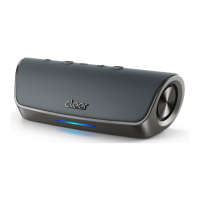

 To Next Page