CMS-2 CARBON MONOXIDE MONITOR Page 10
© 2018 CLEMCO INDUSTRIES CORP. www.clemcoindustries.com Manual No. 22925, Rev. I, 04/18
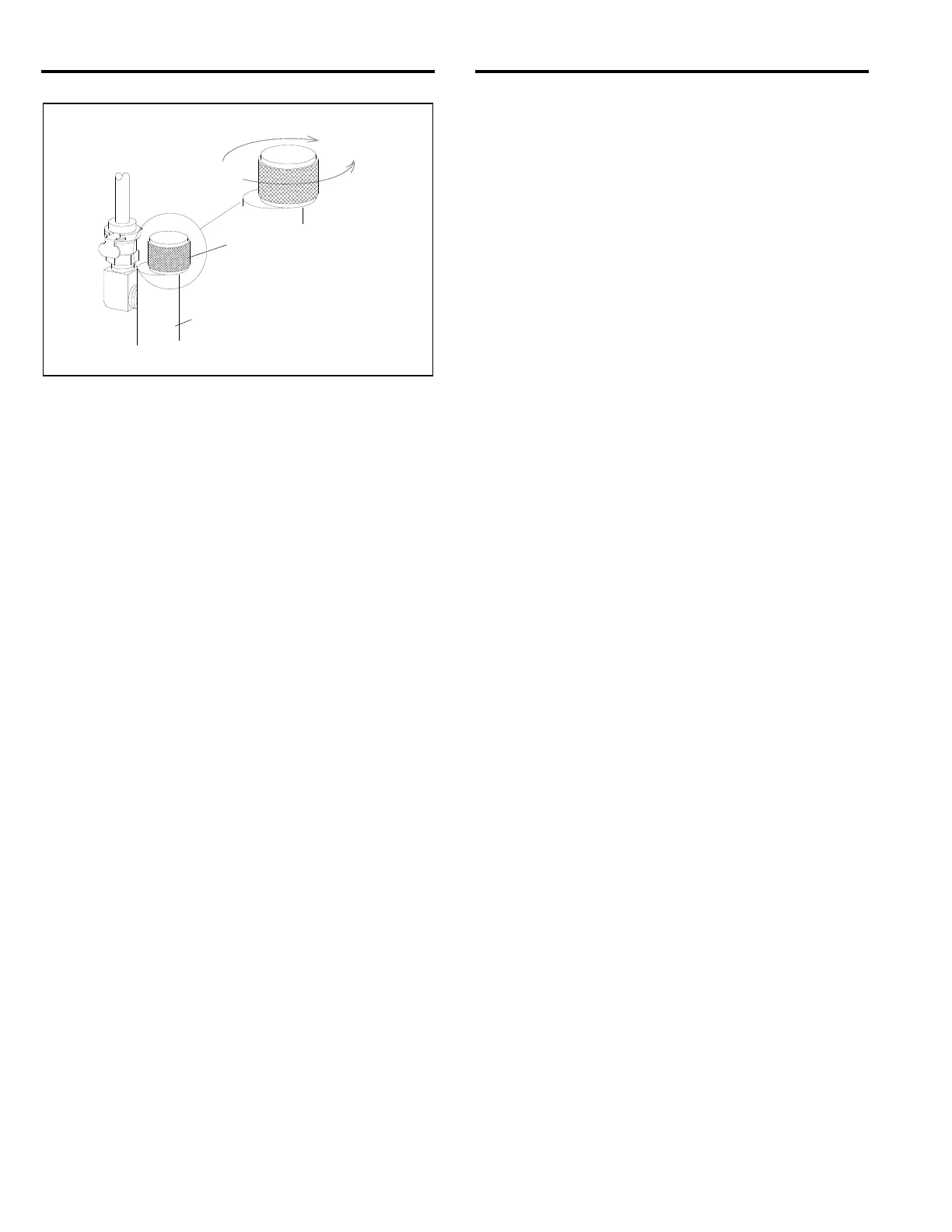
Figure 10
4.6.5 Allow test gas to flow through the instrument for
about one minute, or until the interior calibration
indicator light turns red.
4.6.6 After the calibration light turns red, the initial
phase of the calibration test is complete. Return the
instrument to operating mode per Section 4.8. If the
indicator light does not turn red, proceed with Paragraph
4.6.7.
4.6.7 If after one minute of operation with test gas the
calibration indicator light has not turned red and the
instrument has been in operation for 30 minutes,
calibrate the instrument per Section 4.7. If the instrument
has not been in operation for 30 minutes, return it to
operating mode per Section 4.8 and operate with
sample air flowing through for at least 30 additional
minutes. Re-test the calibration, and if the calibration
light does not turn red, calibrate the instrument per
section 4.7.
4.7 Calibration
4.7.1 Do not calibrate the instrument unless it has
gone through two stabilizing periods and calibration
tests, per Sections 4.3 and 4.6, and only if the calibration
indicator light has not turned red.
4.7.2 Connect the calibration connector and 10 ppm
test gas per Sections 4.4 and 4.5.
4.7.3 Place the Run/Calibration toggle toward
CALIBRATION. Slowly open the flow-control knob and
adjust the flow so the flow ball remains between 0.5 and
0.8 SCFH (normally a little nearer to 0.8).
4.7.4 Allow test gas to flow through the instrument for
about one minute. Insert a small screwdriver into the
calibration adjustment port and turn the potentiometer as
follows:
If the potentiometer is blue, turn clockwise until the
calibration indicator light turns red.
If the potentiometer is white, turn counterclockwise
until the calibration indicator light turns red.
4.7.5 Once the indicator is red, turn the potentiometer
in the opposite direction until the light turns green. Then,
slowly turn the potentiometer from green to red several
times to find the trip point. The monitor is calibrated at
the spot where the light turns red. Return the instrument
to operating mode per Section 4.8.
4.8 Return Monitor to Operating Mode
4.8.1 Turn the flow-control knob counterclockwise to
close the calibration-connector valve.
4.8.2 Remove the calibration tubing from the monitor
by gripping the tube-end connector, push in lightly, turn it
counterclockwise to unlock, and pull straight out.
4.8.3 Place the calibration toggle toward the RUN
position. The flow meter ball should rise to 0.5 to 0.8
SCFH. After several seconds the external alarm light
should change from yellow to green, and the interior light
should change to green. If the lights respond as
described, proceed with Section 4.8.4 to return the
instrument to operation. If after about one minute of
operation the lights do not change to green, do both of
the following:
Calibrate the instrument, per Section 4.7.
Test instrument function by applying impurity-free
air, per Section 4.9.
4.8.4 Close and latch the instrument case cover.
4.8.5 Remove the calibration connector from the test
gas. The test gas cylinder has a positive seal, whereas
the calibration connector valve does not. NOTE: If the
connector is not removed from the test gas cylinder,
over time the cylinder will empty.
4.8.6 If the tubing needs to be removed from the
calibration connector, press and hold the slide-release
fitting and gently pull the tubing connector from the
fitting.
4.8.7 Store all material in a clean, dry area.
4.9 Impurity-Free Air (zero contamination) Test
4.9.1 This test should be done whenever the
instrument stays in an alarm condition after it is returned
to the operating mode. This test shows whether the
alarm condition is due to contaminated air or monitor
malfunction.
CLOSE
OPEN
Calibration Connector
Flow-Control Knob
Turn fully clockwise to close.


 To Next Page