1. Empty Calibration
Advance the front wheels only of the Empty truck (with full
fuel) onto the weighbridge.
Record steering tare (Empty) weight: exp. 9000 lbs.
Next move entire truck onto the weighbridge.
Record total Empty weight: exp. 25000 lbs
Subtract steering (A) empty weight from total Empty weight
to obtain drive axle Empty weight :
exp. 25000 – 9000 = 16000
Drive axle Empty weight = 16000 lbs.
Now it‟s time to enter the Empty weights
To enter the Empty weights:
A = Steering
B = Drivers
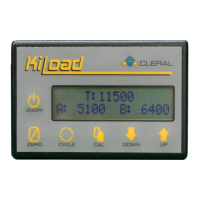
1. Press CAL key and a
flashing “Empty” will
appear.
2. Press CAL key again; a
flashing “A” will appear.
3. Press & hold Up or Down
arrow to reach the desired
“Empty” weight of “A” axle
group (steering axle).
4. Press CAL key to move to
the “B” axle group (rear
drivers) “B” will begin
flashing.
5. Press & hold Up or Down
arrow to reach the desired
“Empty” weight of “B” axle
group (rear drivers).
6. Press CAL key. You are
done entering your
“Empty” weights.
EMPTY T: 9000
A: 9000 B: 16000


 To Next Page