2. Full Calibration
Advance front wheels only of the Full truck onto
the weighbridge.
Record steering Full weight: exp. 10000 lbs.
Next move entire truck onto the weighbridge
Record total Full weight: exp. 40000 lbs.
Subtract steering axle (A) Full weight from total Full weight to
obtain drive axle weight:
exp. 40000 – 10000 = 30000
Drive axle Full weight = 30000 lbs
Now it‟s time to enter the Full weights
To enter the Full weights:
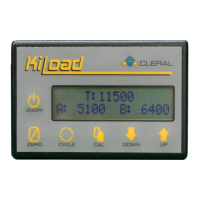
A = Steering
B = Drivers
FULL T: 40000
A: 10000 B: 30000
1. Press CAL key and a
flashing “Empty” will
appear.
2. Press Up or Down arrow
key; “Full” will begin
flashing.
3. Press CAL key “A” will
begin flashing.
4. Press & hold Up or Down
arrow to reach to desired
“Full” weight of “A” axle
group (steering axle).
5. Press CAL key “B” will
begin flashing.
6. Press & hold Up or Down
arrow to reach the desired
“Full” weight of “B” axle
group (rear drivers).
7. Press CAL key & you are
done.


 To Next Page