English - 49 -
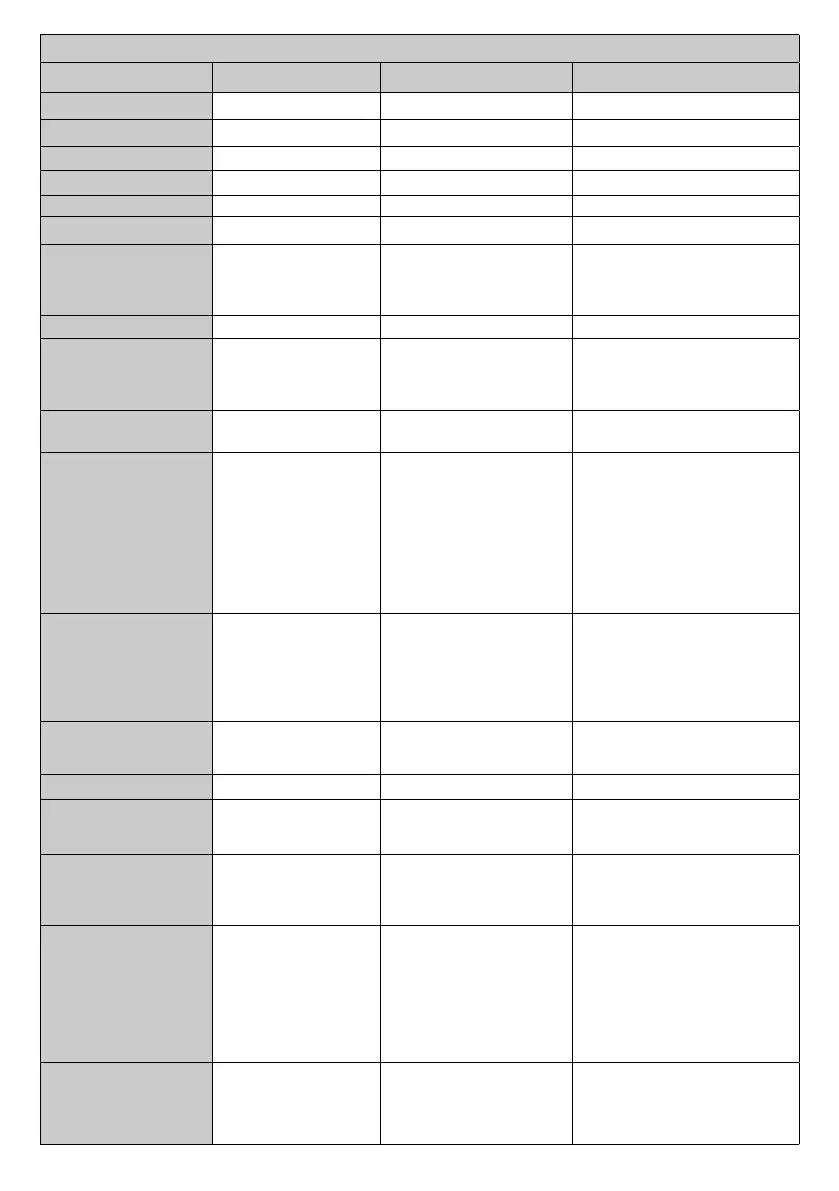
VIDEO WALL COMMANDS
Command Description Parameter Return
SETROWCOUNT Set row count. #*set row count to n
GETROWCOUNT Get row count. no parameter #*row count is ...
SETCOLUMNCOUNT Set column count. #*set column count to n
GETCOLUMNCOUNT Get column count. no parameter #*column count is ...
SETCELL Set cell. #*set cell to n
GETCELL Get cell. no parameter #*cell is ...
SETOFFSET
the number of pixels which
will be cropped from all four
sides.
GETOFFSET no parameter
SETVIDEOWALL Set videowall parameters
parameters for items in
following format:
RowCount-ColumnCount-
to ...
GETVIDEOWALL Get videowall parameters no parameter
SETALLVIDEOWALL
Set all videowall
parameters
parameters for items in
following format:
picture_mode-contrast-
brightness-sharpness-
color-powesave_mode-
backlight_mode-colortemp-
zoom_mode-hdmi_trueblack-
picture_hue-volume-
headphone_volume
in order)
GETALLVIDEOWALL
Get all videowall
parameters
no parameter
#*picture_mode-contrast-
brightness-sharpness-color-
powesave_mode-backlight_mode-
colortemp-zoom_mode-hdmi_
trueblack-picture_hue-volume-
headphone_volume
SETPIXELSHIFT
Set pixel shift is enabled
or not
#*ACK
or
#*NACK
GETPIXELSHIFT Get pixel shift no parameter #*Pixel Shift is ...
SETSIGNAGEID Set Signage ID
the Signage ID
#*ACK
or
#*NACK
GETSIGNAGEID Get Signage ID no parameter
#*The signage ID is ...
no signage id is assigned. 0 is the
default value.)
SETVIDEOWALL-
ENABLED
Set video wall is enabled
or not
#*Video wall is set to ON
or
#*Video wall is set to OFF
or
or
#*Video wall is not set (invalid
input)
GETVIDEOWALL-
ENABLED
Get video wall enable
value
no parameter
#*Video Wall is ON or OFF
or
#*Video wall is disabled in



 To Next Page