Need help?
Do you have a question about the Cleyver HW10 and is the answer not in the manual?
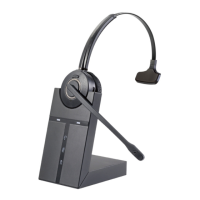
Identifies key components of the wireless headset including headband, mute button, volume controls, and LED indicator.
Details the components of the headset base station, such as charging contacts and power adapter jack.
Instructions for pairing the headset to a DECT telephone base station, including mode activation and success indicators.
Explains how to answer incoming calls and end active calls using the multifunction button on the headset.
Guides users on setting the received audio volume by pressing the '+' or '-' buttons on the headset.
Details how to activate and deactivate the microphone mute function, including auditory feedback.
 General
| Connectivity technology | Wired |
|---|---|
| Microphone | Yes |
| Driver Size | 40 mm |
| Frequency Response | 20 Hz - 20 kHz |
| Connection | 3.5 mm jack |
| Impedance | 32 Ohm |

 To Next Page