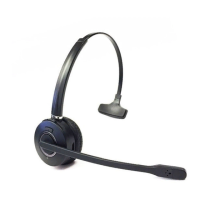
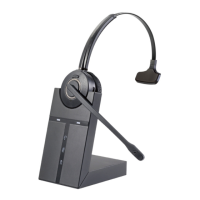
The CLEYVER ODHW30 / ODHW35 DECT headset is a wireless communication device designed for use with PC softphones, including Microsoft Teams and Skype for Business. It offers a range of features aimed at providing high-quality audio and convenient call management.
Function Description:
The ODHW30 / ODHW35 DECT system consists of a wireless headset and a base unit. The headset provides hands-free communication, while the base unit serves as a charging dock, a connection point to a PC, and a visual indicator for call and connection status. The system is designed for professional use, offering wideband audio for clear sound, noise-cancelling microphone for improved speech clarity, and advanced hearing protection.
Important Technical Specifications:
ODHW30 / ODHW35 DECT Headset:
- Operating Environment: 0°C to +40°C; Up to 95% Rh non-condensing.
- Call Control: Multi-function button for answer, end, reject calls, and docking operations.
- Volume Control & Microphone Mute: Button controls on the headset.
- Visual Indicator: LED indicates call status, pairing status, and other events.
- Audio Indicators: Tones for incoming calls, low battery, volume level, microphone muting, and other events.
- Sound Quality: DSP noise reduction, echo cancellation, tone control, wideband and narrowband audio.
- Recharge: While docked in the ODHW30 / ODHW35 DECT Headset base.
- Wireless Standard: (CAT - IQ) European DECT and U.S. DECT.
- DECT Range:
- European DECT: Up to 120 meters from base to headset.
- U.S. DECT: Up to 350 feet from base to headset.
- DECT Frequencies:
- US DECT: 1.92 - 1.93 GHz.
- EU DECT: 1.88 - 1.90 GHz.
- Wearing-styles: Headband.
- Microphone Boom Arm Style: Long boom arm.
- Speaker(s): Wideband speaker.
- Microphone: Noise-cancelling microphone.
Headset Battery:
- Battery Type: Lithium Ion-polymer.
- Battery Capacity: 300 mAh, typical.
- Battery Talk Time: Up to 8 hours.
- Battery Lifetime: Minimum 1000 charge cycles.
- Battery Standby Time: At least 36 hours.
- Operating Temperature Range: -20°C to +60°C.
- Battery Charge Time:
- 20% charge in less than 20 minutes.
- 50% charge in less than 45 minutes.
- Full charge in less than 3 hours.
- Battery Shelf Life: Headset battery holds charge for 6 months in the off state before recharge is required.
ODHW30 / ODHW35 DECT Base:
- Dimensions: 97mm x 75mm x 120mm.
- Wireless Standard: (CAT - IQ) European DECT and U.S.DECT.
- Operating Environment: -0°C to +40°C; Up to 95% Rh non-condensing.
- Recharge Cradle: Fits supplied ODHW30 / ODHW35 DECT series headset.
- PC Connections: Mini USB port for connecting to PC, DC port for Power Adapter.
- Clear Dial Tone Switch and Microphone Volume Switch: Electromechanical switches for manual adjustment.
Usage Features:
Headset Controls:
- Multi-Function Button:
- Tap: Answer incoming call, end current call, power on.
- Press hold: Power off.
- Speaker Volume Buttons (+/-): Adjusts headset speaker volume.
- Mute Button:
- Tap: MIC muting, mute canceling.
- Press hold: In the paired status.
- Headset Status LED Indicator:
- Light hold for 2S: Power on.
- ON 100ms OFF 100ms FLSSH 3S: Power off.
- ON 250ms OFF 250ms FLASH: Pairing.
- ON 250ms OFF 8s FLASH: Standby.
- Light on hold: Connected.
- Light on hlod: Online.
- ON 300ms OFF 700ms Flash: Incoming call.
- ON 3S OFF 5S FLASH: Headset docked in base.
- ON 300ms OFF 100ms+ON 300ms OFF500 FLASH: Low battery alarming.
Base Controls and Indicators:
- Headset Seat: Docking cradle for headset recharge.
- Charger Contacts: For charging the headset.
- Headset in Use Light: Indicates active call.
- Headset with Paired Light: Indicates headset is paired with the base.
- MIC Mute Light: Indicates microphone is muted.
- Battery Charging Status Light: Indicates battery charging status (full, medium, very low).
- MIC Volume Adjustment: Knob on the base to adjust microphone volume.
- PAGE Switch: Used for pairing the headset.
- Speaker: Integrated speaker on the base.
- Receiver Volume Adjustment: Knob on the base to adjust receiver volume.
- Mini USB Port: For connecting the base to a PC.
- AC Power Adapter Port: For connecting the power supply.
Connecting to PC:
- Connect the base to a PC using a USB cable.
- Set the Microsoft Teams/Skype for Business audio device to ODHW30 & ODHW35 DECT.
- Connect the power adapter to the base and then to the mains power socket.
Docking the Headset:
- Press the Multi-function button on the headset to power it on (LED lights for 2S).
- Dock the headset with the base; the headset with paired light will illuminate when connected.
- The headset battery will begin charging when correctly docked. The battery indicator on the base will be steady green when fully charged.
Configuring PC Audio:
- Set a Clear Dial Tone:
- Put on the headset.
- Ensure the base is powered and connected to the PC via USB.
- Open Microsoft Teams/Skype for Business and set the audio device to ODHW30 / ODHW35 DECT.
- Set the Microphone Volume:
- Put on the headset and make a test call.
- Adjust the microphone volume using the MIC volume adjustment buttons on the base or the headset's multi-function button.
- Adjust the receiver volume using the receiver volume adjustment buttons on the base or the headset's volume buttons.
- End the call once the volume is set.
Call Management:
- Making/Answering Calls:
- If the headset is on the base, pick it up to answer or make a call.
- If the headset is on your head, tap the multi-function button to answer or make a call.
- Ending Calls:
- Tap the multi-function button.
- Place the headset back on the base.
Maintenance Features:
Pairing:
- Clear Paired Base: Press the marked R+ at the back of the base; the battery charging status light will flash 3 times.
- Renew Pairing: Consistently press the PAGE switch for 5S on the base (headset with paired light will flash). Consistently press the headset mute button until the headset status LED flashes. Connection is successful when LEDs power off simultaneously.
Product Disposal:
- Dispose of the headset according to local regulations and recycle when possible.
- Do not dispose of as household waste.
- Do not dispose of the headset in a fire, as the battery may explode. Batteries may also explode if damaged.
The CLEYVER ODHW30 / ODHW35 DECT is designed and engineered in China. It is compliant with FC, CE, and IC standards.

 Need help?

 To Next Page
 General