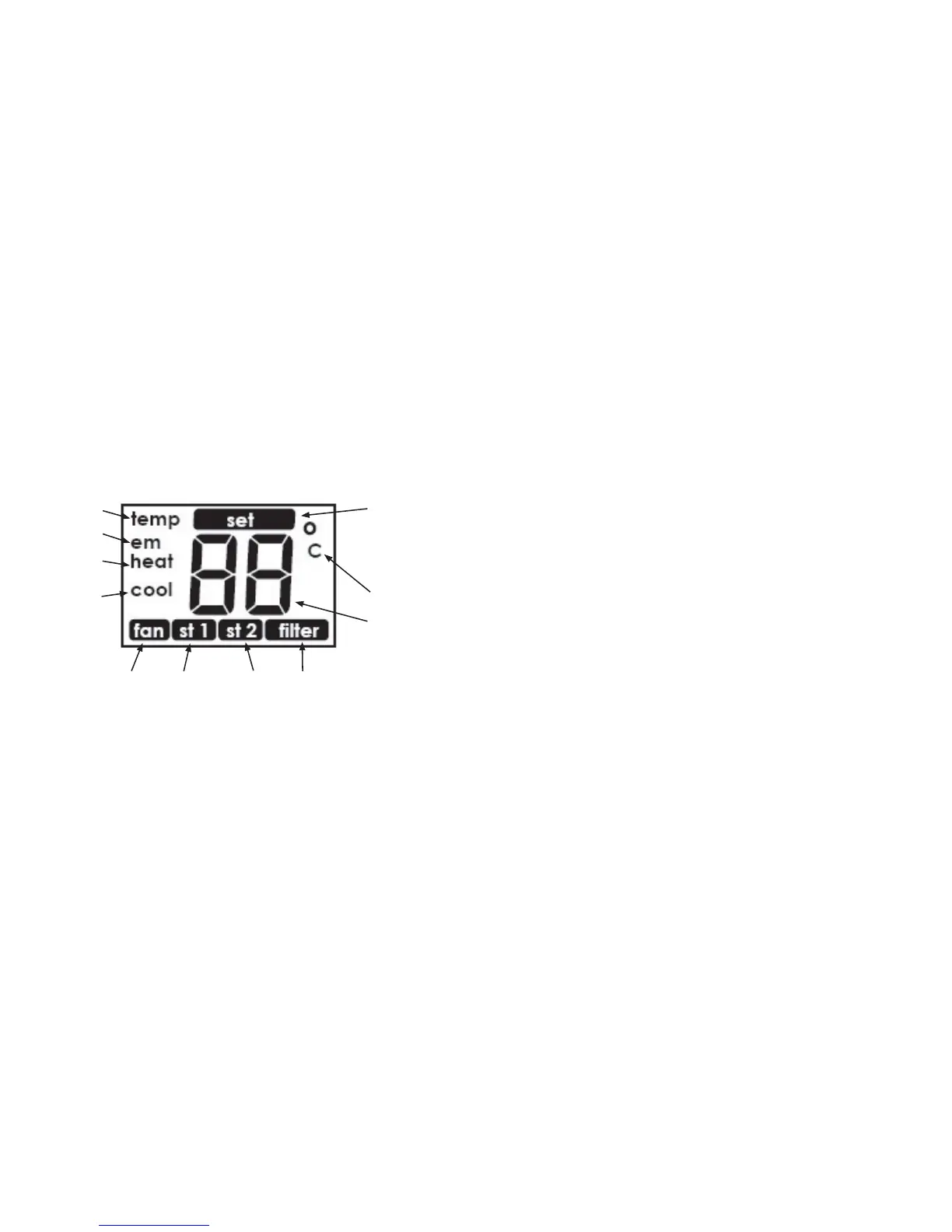
LCD Display
A
B
C
D
E
F
G
H
J
K
I
LCD Display
A temp - the large number being displayed is either the indoor temperature or the set temperature.
B em - emergency heat is turned on.
C heat - normal heat is turned on.
D cool - normal cooling is turned on.
E fan - indicates the fan is running.
F st 1 - comes on when you set the Stage 1 heat and cool span.
G st 2 - comes on when you set the Stage 2 heat and cool span.
H Filter button - resets the lter time counter.
I alpha-numeric - displays temperature (either indoor or set).
J C - the temperature being displayed is Celsius. Select either Celsius or Fahrenheit with the #2 System
Set-Up Switch. NOTE: The LCD Display DOES NOT show an “F” for Fahrenheit.
K set - the large number being displayed is the set value (temperature, Stage 1 span, Stage 2 span,
Residual Cooling Fan Delay, or the Refresh Fan Cycle time).
NOTE: With the “system” switch in the “off” position, if you press the Up or Down button, the LCD Display
will show “OF”.



 To Next Page