23 23A
IMPOSTAZIONE
OROLOGIO
Impostazione
dell’orologio del telecomando
e/o dell’apparecchio.
1 - Selezione
modalitàdifunzionamento
- Premere il tasto SELECT:
CLOCK SET
inizierà a lampeggiare.
- Premere i tasti (+) o (-),
le ore inizieranno
a lampeggiare.
Premere i tasti (+) o (-)
per impostare l’ora corrente.
- Premendo nuovamente
il tasto SELECT, i minuti
inizieranno a lampeggiare.
Utilizzare i tasti (+) o (-)
per impostare i minuti correnti.
- Premere il tasto ON/SEND
di trasmissione oppure
premere nuovamente il tasto
SELECT per uscire
dal programma.
2 - Trasferimento
modalitàdifunzionamento
- Per inviare l’informazione
all’apparecchio
premere il tasto ON/SEND.
SETTING
THE CLOCK
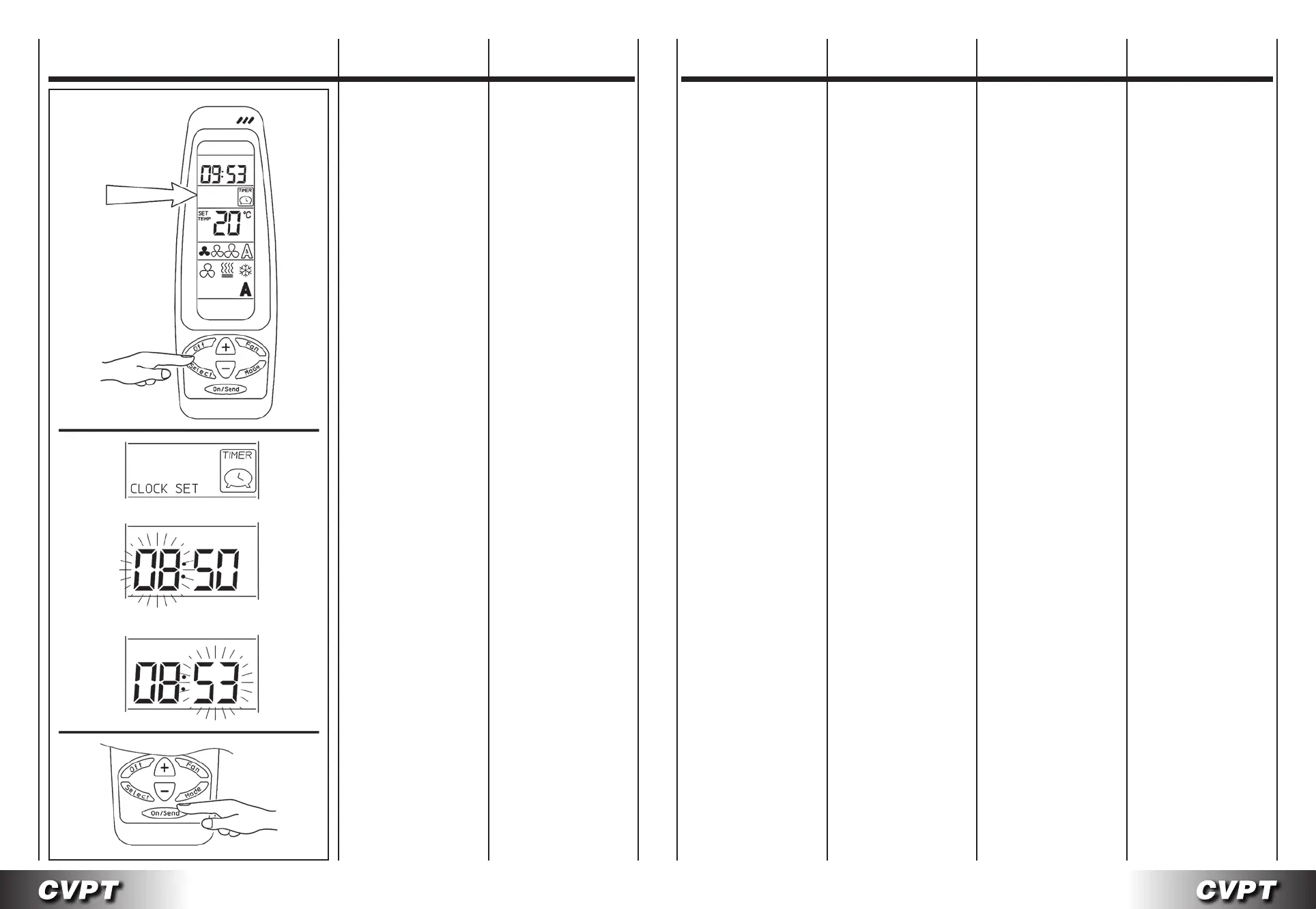
Setting the clock
on the remote control
and/or the appliance.
1 - Selecting
theoperatingmode
- Press the SELECT button:
CLOCK SET
will start flashing.
- Press the (+) or (-) button,
the hours will start flashing.
Use the (+) or (-) button
to set the current hours.
- Press the SELECT
button again; the minutes
will start flashing.
Use the (+) or (-) button
to set the current minutes.
- Press the ON/SEND button
to send the information
or alternatively press
the SELECT button again
to exit the procedure.
2 - Transferring
theoperatingmode
- To send the information
to the appliance
press the ON/SEND button.
PROGRAMMATION
HORLOGE
EINSTELLUNG
DER UHR
PROGRAMACIÓN
DEL RELOJ
INSTELLING
KLOK
Programmation
de l’horloge de la télécommande
et/ou de l’appareil.
1 - Sélection
modedefonctionnement
- Appuyer sur la touche
SELECT: CLOCK SET
commence à clignoter.
-
Appuyer sur les touches (+) ou
(-) les deux chiffres de l’heure
commencent à clignoter.
À l’aide des touches
(+) ou (-) programmer l’heure.
- Appuyer de nouveau
sur la touche SELECT,
les deux chiffres des minutes
commencent à clignoter.
À l’aide des touches (+) ou (-)
programmer les minutes.
- Appuyer sur la touche
de transmission ON/SEND
ou appuyer de nouveau
sur la touche SELECT
pour quitter le programme.
2 - Transmission
modedefonctionnement
- Pour envoyer l’information
à l’appareil appuyer
sur la touche ON/SEND.
Einstellung
der Uhr der Fernbedienung
und/oder des Geräts.
1 -Wahldes
Betriebsmodus
- Die Taste SELECT drücken:
CLOCK SET
beginnt zu blinken.
- Die Taste (+) oder (-) drücken,
die Stunden
beginnen zu blinken.
Mit der Taste (+) oder (-)
die aktuelle Uhrzeit einstellen.
- Erneut die Taste SELECT
drücken, die Minuten
beginnen zu blinken.
Mit der Taste (+) oder (-) die
aktuellen Minuten einstellen.
- Die Übertragungstaste
ON/SEND drücken oder
erneut die Taste SELECT
drücken, um das Programm
zu verlassen.
2 -Übertragung
desBetriebsmodus
- Zur Übertragung
von Informationen zum Gerät
die Taste ON/SEND drücken.
Programación
del reloj del mando a distancia
y/o del aparato.
1 - Seleccióndelamodalidad
defuncionamiento
- Pulse la tecla SELECT:
CLOCK SET
empezará a parpadear.
- Pulse las teclas (+) o (-),
las horas empezarán
a parpadear.
Utilice las teclas (+) o (-)
para programar la hora.
- Vuelva a pulsar la tecla
SELECT, los minutos
empezarán a parpadear.
Utilice las teclas (+) o (-)
para programar los minutos.
- Pulse la tecla ON/SEND
de transmisión o bien vuelva
a pulsar la tecla SELECT
para salir del programa.
2 -Transferenciadelamodali-
daddefuncionamiento
- Para enviar la información
al aparato
pulse la tecla ON/SEND.
Instelling
klok afstandsbediening
en/of apparaat.
1 - Keuzewerkwijze
- Druk op de toets SELECT
CLOCK SET
begint te knipperen.
- Druk op de toets (+) of (-).
De uren knipperen.
Gebruik de toetsen (+) en (-)
om het juiste uur te regelen.
- Druk nogmaals
op de toets SELECT.
De minuten knipperen.
Gebruik de toetsen (+) en (-)
om de minuten te regelen.
- Druk op de toets ON/SEND
of nogmaals op de toets
SELECT om het programma
te verlaten.
2 -Overdrachtwerkwijze
- Om de informatie
naar het apparaat te sturen,
druk op de toets ON/SEND.


 To Next Page
 Loading...