8 9
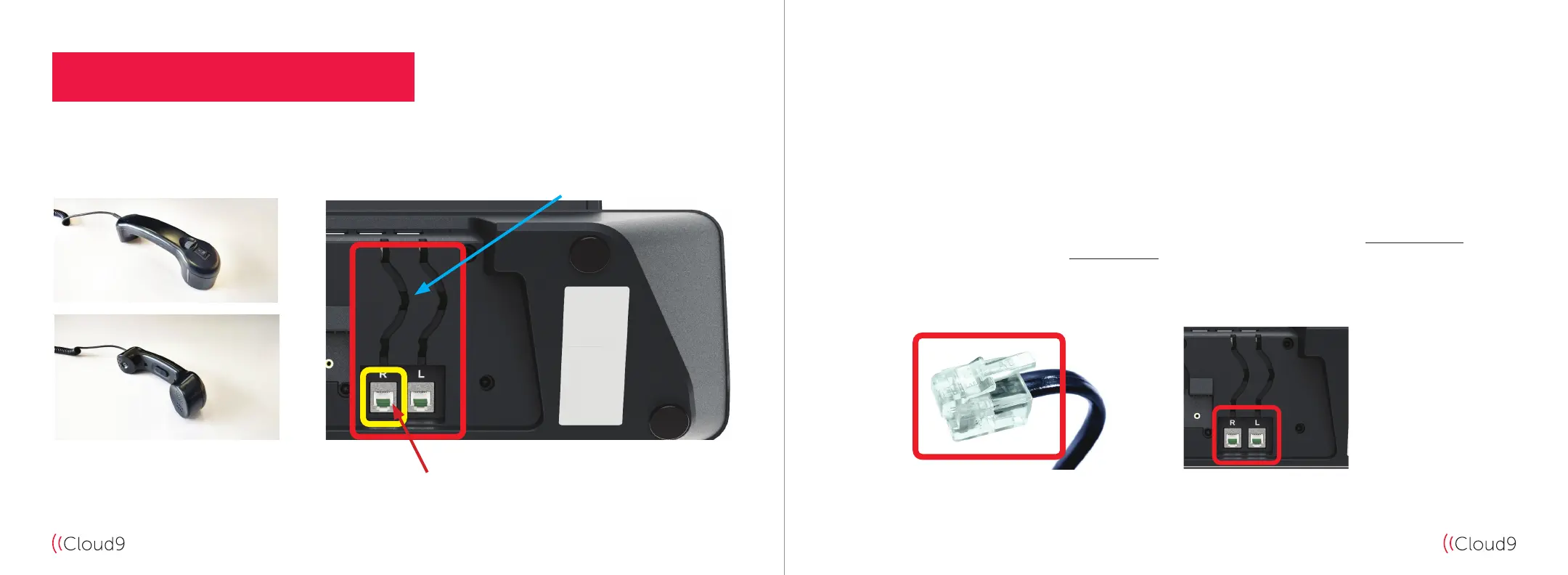
Cloud9 Handset Cloud9 CloudHub Underside
Diagram A
CLOUD9 HANDSET INSTALLATION
1. Install the Cloud9 Handset(s) RJ11 Connector (see Diagram B) into the RJ11 socket located on the Cloud9
CloudHub underside and run the cable through the cable channel to ensure the cable(s) are kept tidy
and secure (highlighted by the blue arrow in Diagram A).
The handset socket highlighted in yellow in the left diagram is the socket for your “Right Handset” and
the second RJ11 socket is for your “Left Handset” if a secondary handset is required (see Diagram C).
Diagram B Diagram C
R = Right Handset
L = Left Handset


 To Next Page