6 / 26
When the MIDI Thru5 WC is not powered on, press and
hold the button and then power on the MIDI Thru5 WC until
the LED light located in the center of the interface flashes
slowly 3 times, then release. The interface will be manually
reset to the factory default state.
When the MIDI Thru5 WC is powered on, press and hold
the button for 3 seconds and then release it, the Bluetooth
role of the interface will be manually set to the "Force
Peripheral" mode (this mode is used to connect to a
computer or mobile phone). If the interface has previously
been connected to other Bluetooth MIDI devices, this
action will disconnect all connections.
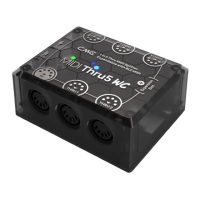
3. 5-pin DIN MIDI Socket
IN: One 5-pin MIDI IN socket is used to connect the MIDI
OUT or MIDI THRU port of standard MIDI device to receive
MIDI messages.
THRU: Five 5-pin MIDI THRU sockets are used to connect
to the MIDI IN port of standard MIDI devices, and forwards
all MIDI messages received by the MIDI Thru5 WC to all
connected MIDI devices.
4. Expansion Slot (on the circuit board inside the product housing)
The optional WIDI Core module of the CME can be used to
expand the 16-channel bi-directional wireless Bluetooth MIDI
function. Please visit www.cme-pro.com/widi-core/ for more details
on the module. Module needs to be purchased separately.


 To Next Page
 Loading...