DO200 Parking Occupation Sensor
Beijing Dingtek Technology Corp., Ltd. Tel:86-10-64718863,64753700
http://www.dingtek.com E-mail: service@dingtek.com
Room A209, Flounder Business Park, Shunbai Road 12, Chaoyang District, Beijing, China 100022 Page
5
2.4 Initialization
The DO200 detector can be initialized using a magnet. Note that the device must be initialized
after installation.
2.5 Device Self-Test Function
Self-calibration function; timing self-calibration to reduce errors. The default self-test interval is
24h.
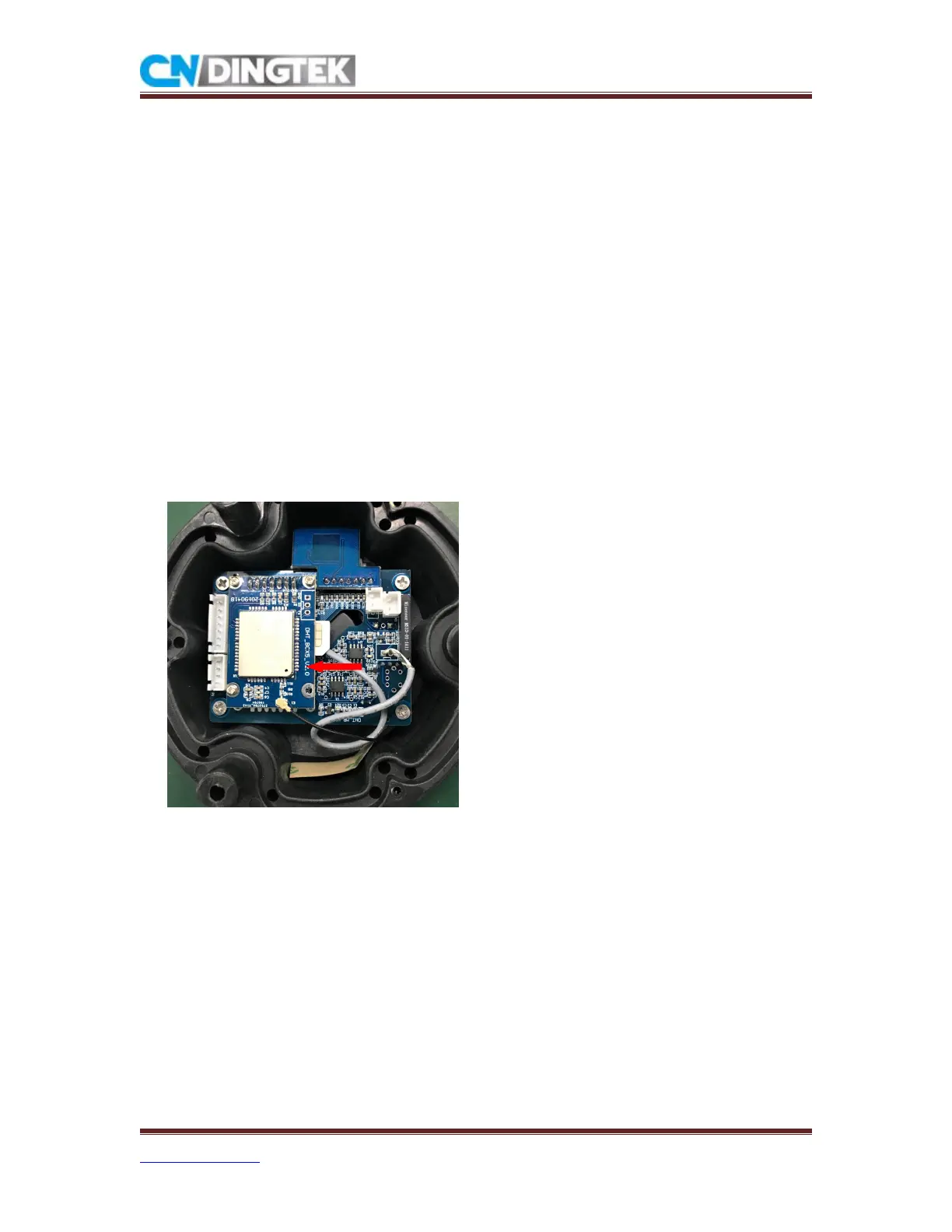
3 Install NB sim card
NB-IoT card: MICRO card; The frequency band of the card used must be consistent with the
device frequency band.
Install the NB card: This sensor uses a self-elastic card slot. Please open the device casing and
find the position of the card slot on the NB module. Press the card into the card slot according to
the following picture.
Note: When installing, please pay attention to the position and orientation of the card.
Installation direction
4 Sensor Initialization
(
reset sensor
)
Move the magnet around the probe one turn and remove the magnet. This process restarts the
device. If the device is successfully rebooted, the device will report a data that is displayed as
being moved and the current full/empty state.



 To Next Page