2
Thefaniconremainsflashingevenifthebeepsare
silenced.Theicononlystopsflashingwhenthe
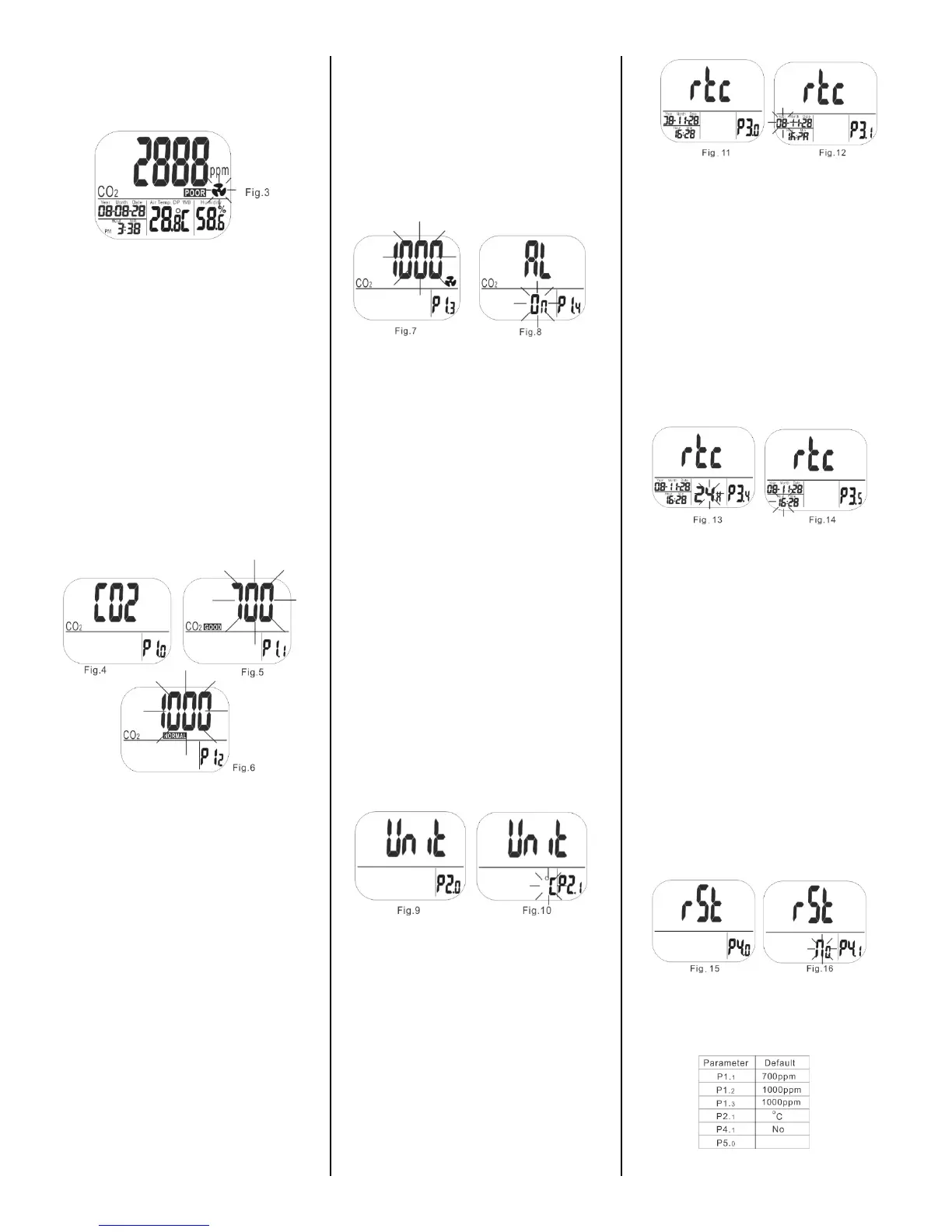
CO2levelfallbelowthelowerlimit(Fig.3)
SETUP
Thereare4setupmodes:P1‐CO2alarmlevels,
P2‐temperature(CorF),P3‐date/time,and
P4‐factoryreset.Whenyoupress“SET”thesetup
modewillbeshowninthelowerrightcornerof
thescreen.
Toentersetup,whileinnormalmode,holddown
the“SET“button
for3seconds.Toexitsetup,press
“ESC“whileP1.
0
,P2.
0
,P3.
0
,orP4.
0
isdisplayed.
P1.
1
SETCO2GOO DLEVEL
Press“SET“todisplayP1.
0
and”CO2”(Fig.4)onthe
LCD.Press“SET“againtosettheCO2GOODlevel.
ThecurrentsetvaluewillbeblinkingonLCD
(Fig.5).
Press“▲“toincreaseor“MIN/MAX▼“to
decreasethevalue.TheGOODalarmrangeisfrom
0to700ppmin100ppmincrements.
OncethepreferredCO2levelisselected,
press”SET“tocontinueontoP1.
2
tosetthe
NORMALlevel(Fig.6)orpress“ESC“toreturnto
P1.
0
withoutsavingchanges.
P1.
2
SETCO2NORMALLEVEL
P1.
2
istheupperlimitoftheCO2NORMALlevel.
ThecurrentvaluewillflashontheLCD(Fig.6).
Press“▲“toincreaseor“MIN/MAX▼” to
decreasethevalue.TheNORMALlevelcanbeset
between700and1,000ppm.Oncethepreferred
valueisselected,press”SET“tosave
P1.
2
and
continueontosettheP1.
3
POOR+ALARM
thresholdsetting(Fig.7)orpress“ESC“toreturnto
P1.
0
withoutsavingchanges.
P1.
3
SETCO2POORLEVEL+ALARM
P1.
3
isusedtosettheCO2alarmthreshold.The
currentsetvaluewillblinkontheLCD(Fig.7).Press
“▲“toincreaseor“MIN/MAX▼“todecreasethe
value.ThePOORlevelcanbesetbetween1,000to
5,000ppm.Press“SET“toconfirmP1.
3
and
continuetoP1.
4
(Fig.8)orpress“ESC“without
savingtoreturntoP1.
0
P1.
4
SETALARMON/OFF
P1.
4
isusedtosetalarmonandoff.Whenentering
P1.
4
,thedefault“On“willbeblinkingontheLCD
(Fig.8).
Press“▲“or“MIN/MAX▼“toswitchthealarm
to“Off“.Thenpress“SET“toconfirmP1.
4
and
returntoP1.
0
(Fig.4)orpress“ESC“toreturnto
P1.
0
withoutsaving.
CAUTION:
AlthoughtheTIM10alarmcanbesetupto
5,000ppm,theaccuracyoftheCO2readingisonly
specifiedupto2,000ppm.Alarmvalueshigher
than2,000ppmareforreferenceonlyandshould
notbeusedforpersonalsafety.
P2.
0
SETTEMPERATUREUNITS
Holddownthe“SET”buttonforatleast3seconds
toentersetupmode,thenpress“▲“inP1.
0
mode
toaccessP2.
0
tosetthetemperaturescale(Fig.9).
Press“SET“againtoshowtemperaturein
o
Cor
o
F
onthedisplay(Fig.10).Press“▲“or“MIN/MAX
▼“tochangeunits,thenpress“SET“tosaveor
“ESC”toexitwithoutsavingandreturntoP2.
0
P3.
0
SETREALTIMECLOCK
TheTIM10candisplaytimeineither24houror12
hour(am/pm)format.Holddownthe“SET”
buttonforatleast3secondstoentersetupmode,
thenpress“▲“twicetoaccesstheP3.
0
real‐time
clock(rtc)setup(Fig.11).
Tostart,press“SET“todisplayP3.
1
with“rtc”and
theblinkingyeardigits(Fig.12)inthelowerleft
cornerofthedisplay.Tochangetheyear,press“▲
“or“MIN/MAX▼“tochangethevalue,then
press“SET“tosavetheyearandcontinue,or
press“ESC“toexitwithoutsaving.
Continuetopress“SET“tochangetothemonth,
andthentheday.Afteryoupress“SET”,press“▲
“or“MIN/MAX▼”whiletheyear,monthorday
valuesareflashingtosetthecorrectdate.Press
“SET“tosaveandmoveforwardtosetthe
time,or
press“ESC“toreturntoP3.
0
modewithoutsaving.
Tosettheclock,inP3.
4
modewiththehours
flashing,press“▲“or“MIN/MAX▼“tochange
from12to24hourtimeformat(Fig11).Press
“SET“tosaveandmoveforwardtoP3.
5
modeto
setthetime,orpress“ESC“toreturntoP3.
0
modewithoutsaving.
WhileinP3.
5
mode,thecurrenthoursettingwill
blink(Fig.14).Tochangethesetting,press“▲“or
“MIN/MAX▼“toadjustthetime.Press“SET“to
savethesettingorpress“ESC“toreturnto
P3.
0
.modewithoutsaving.
P4.
0
RESET
Holddownthe“SET”buttonforatleast3seconds
toentersetupmode,thenpress“▲“3timesto
accessP4.
0
modetorevertthemetertothe
factorydefaultstate(Fig.15).
Press“SET“togotoP4.
1
mode.“No”willbe
blinkingonthedisplay(Fig.16).Press“▲”
or”MIN/MAX▼”tochangeto“Yes”,thenpress
“SET“tosavethesetting.Press“ESC”toreturnto
P4.
0
Cwithoutsaving.
Ifyouchoose“Yes”,themeterisresettothe
followingfactorydefaults:



 To Next Page
 Loading...