3 / 10
OPERATION
• LED Modes -
» Left-hand Talk/State LED is blue and double blinks when logged in and single blinks when logged
out.
» Right-hand Charging LED is red when charging in progress. LED
turns o when charging is complete.
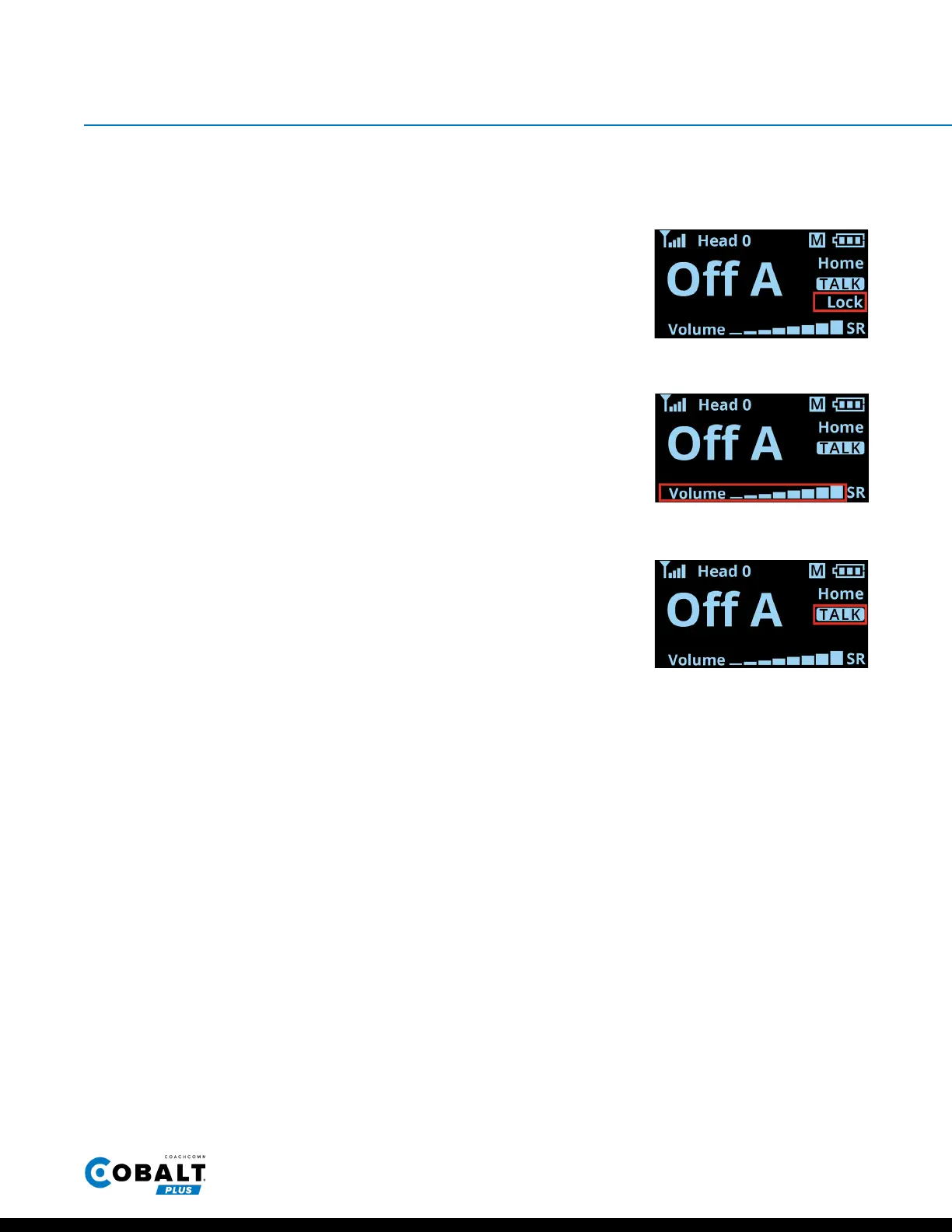
• Lock - To toggle between Lock and Unlock, press the TALK and MODE
buttons simultaneously for 2 seconds. When the beltpack is locked, the
“Lock” will be displayed on the screen.
• Volume Up and Down - Use the + and − buttons to control the volume.
“Volume” and a stair-step indicator display the beltpack’s current
volume setting on the OLED.
• Talk - Use the TALK button to enable or disable talk for the device.
“TALK” appears on the OLED when enabled.
» For normal users, use a single, short press to toggle talk on and o.
» For Shared Talk users (Oense S and Defense S), press and hold
while talking to enable it for the device. (Only one Oense S and one
Defense S user can talk at a time.)
Figure 3: Lock Indicator
Figure 4: Volume Setting
Figure 5: Talk Indicator


 To Next Page