16 • Important: Always read and follow the instructions.
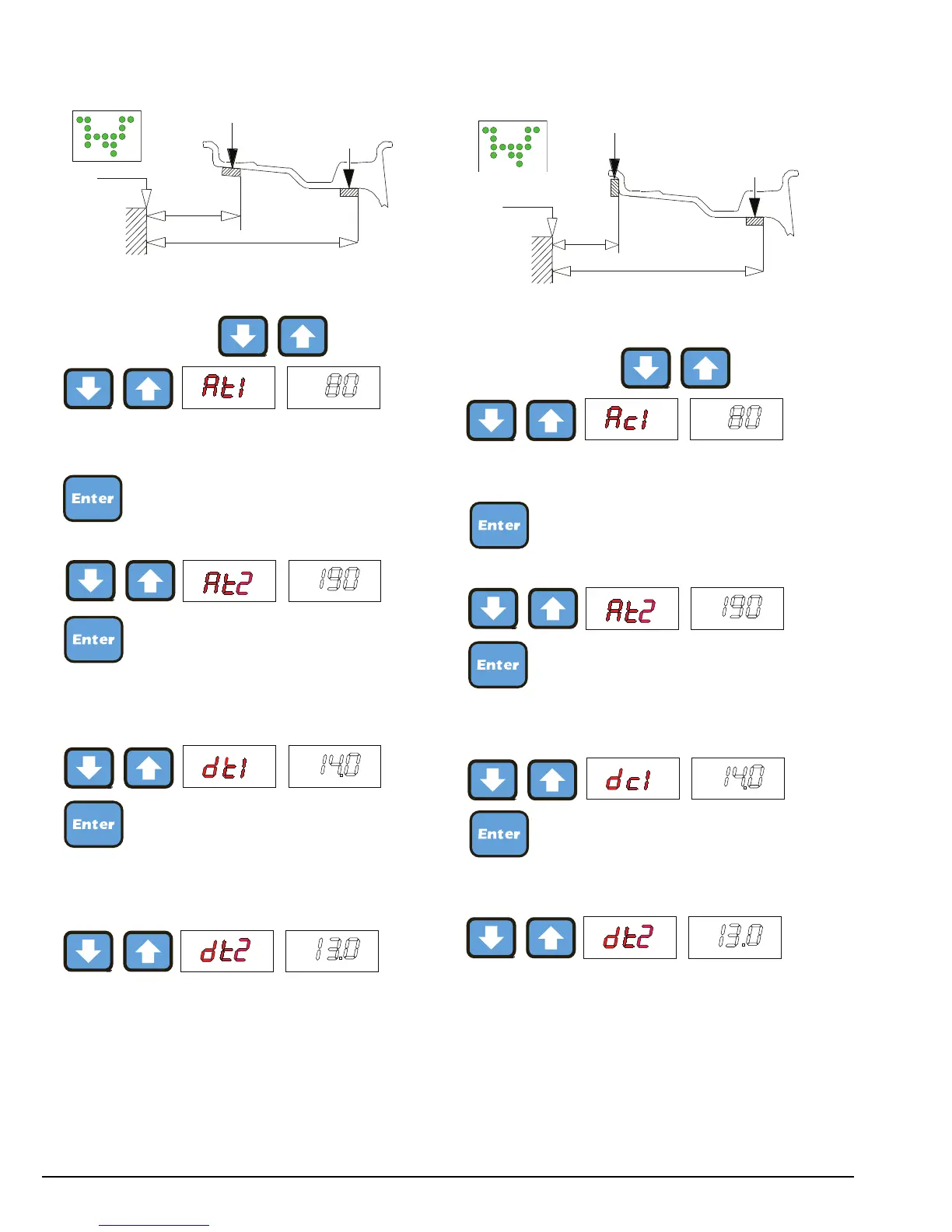
875 - t1-t2 Rims
- Setting:
To go to these functions:
- press one of the two buttons for more than 2 sec-
onds (measure from the first notch)
- Hold the button down for more than 2 seconds
(measure from the first notch)
- Hold the button down for more than 2 seconds (set
the nominal diameter to 1” or measure the actual
diameter at the application point)
- Hold the button down for more than 2 seconds
(measure the actual diameter at the application point)
Note: when dt2 is not set, dt2 = dt1 + 1” is auto-
matic.
875 - c1-t2 Rims
- Setting:
To go to these functions:
- press one of the two buttons for more than 2 sec-
onds (measure from the first notch)
- press one of the two buttons for more than 2 sec-
onds (measure from the first notch)
- press one of the two buttons for more than 2 sec-
onds (set the nominal diameter)
- press one of the two buttons for more than 2 sec-
onds (measure the actual diameter at the application
point)
Note: when dt2 is not set, dt2 = dc1 + 2” is auto-
matic.



 To Next Page