-8-
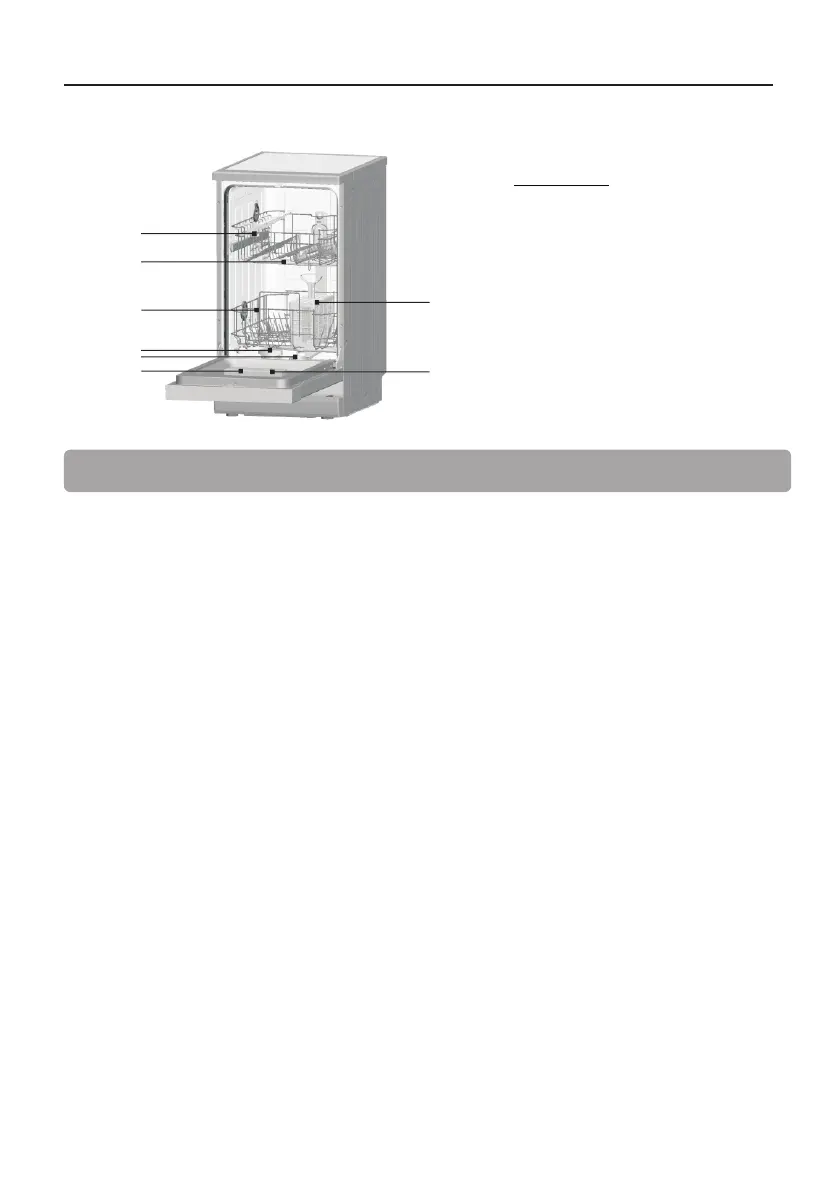
Dishwasher Features
Front View
1 Upper Basket
2 Spray Arms
3 Lower Basket
4 Water Softener
5 Filters
6 Detergent Dispenser
7 Rinse Aid Dispenser
8 Cutlery basket
1
2
3
4
5
6
8
7
Before using your dishwasher for the first time:
A. Set the water softener
B. Loading the salt into the softener
C. Fill the rinse aid dispenser
D. Fill in detergent
A. Set the Water Softener
The water softener is designed to remove minerals and salts from the water, which would have a
detrimental or adverse effect on the operation of the appliance. The higher the content of these
minerals and salts, the harder the water is. The softener should be adjusted according to the
hardness of the water in your area. Your local Water Authority can advise you on the hardness of
the water in your area.
Setting
The amount of salt dispensed can be set from H0 to H7.
Salt is not required at the set value H0.
1. Find out about the hardness value of your tap water. Your water utility company will help you
with this.
2. Set value can be found in the water hardness table.
3. Close the door.
4. Switch on "Power" switch.
5. Hold down " Delay" button and then press "Program" button for 5 seconds.The buzzer rings
one time and H..
flashes on the digital display.(factory setting is H4)
First use


 To Next Page