Need help?
Do you have a question about the cobas Urisys 1100 and is the answer not in the manual?
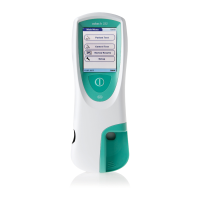
The Urisys 1100® is a reflectance photometer designed to automatically read and evaluate the results of Chemstrip® 10 MD urine test strips for various urine analytes. It eliminates factors known to affect visual evaluation of urine test strips, such as variable lighting conditions, individual skill levels in matching test strip pad colors, different reaction times for test strips, clerical errors, and strong urine sample colors. The device is intended for in vitro diagnostic use and is restricted to sale by or on the order of a physician.
The Urisys 1100® performs patient tests and quality control (QC) tests with QC material, calibration, and prints out test results. It stores test results and consumable information (lot number, expiry date), displays stored information, and can export stored information via network or to USB mass storage. The device is manufactured for a lifetime of 5 years or 35,000 measurements, after which no further measurements can be performed.
The measuring principle involves placing a test strip on a sliding tray. A stepping motor moves the tray under a stationary reading head. The device reads a reference pad, followed by each test pad on the strip. The reading head contains 6 LEDs (3x 555 nm green, 3x 610 nm orange) that emit light at various wavelengths. The light reflected from the test pad is picked up by a phototransistor, converted to a digital signal by an analog-to-digital converter, and then processed by a microprocessor to a relative reflectance value. This value is compared with defined range limits to output a semi-quantitative result. Each test pad is read photometrically after about 55 seconds. For strongly alkaline urine samples, the device automatically corrects the specific gravity test result.
The software provides a user interface accessible via a touch screen display, enabling selection of settings and recurrent functions. The device switches to Standby mode after a configured period of inactivity, displaying date and time. It resumes Ready-to-Measure status when the screen is touched, unless certain error messages are displayed.
Dimensions:
Weight:
Power Supply:
Consumption:
Noise Level:
System Description:
Interfaces:
Registrations:
Consumables:
Operating Conditions:
Storage Conditions:
Transport Conditions:
Lifetime:
Strip Throughput:
Extraneous Light (In-house):
User Management: The device supports user authentication with Administrator and Operator roles. Administrators have full configuration rights, including adding/editing/deleting users and installing software updates. Operators can perform routine tasks like running tests, calibrations, QC measurements, sending results, checking system information, managing strips, and exporting data files. Passwords must be between 3 and 32 alphanumeric characters and are case sensitive. Auto logon options are available for both Administrator and Operator roles, allowing operation without credentials.
Patient ID Entry: Patient IDs can be automatically assigned, manually entered via a virtual keyboard or external USB keyboard, or scanned using a barcode reader. Automatic patient IDs are ascending serial numbers that cannot be altered or cleared.
Consumable Information Entry: Information for test strip lots, calibration strip lots, and QC material (lot number, expiry date, levels, target ranges) must be entered before use. This can be done manually via the touch screen or by scanning barcodes with a barcode reader.
Measurement Process: After tapping "Patient test," the screen instructs the user to insert a test strip. The device incubates the strip for 55 seconds before reading the first test pad. The entire measurement takes 70 seconds, with a throughput of approximately 45 strips per hour. A grey reference pad in the test strip tray is evaluated with each reading to compensate for temperature and aging effects.
Result Handling: Test results are stored for 60 days. After this period, they are automatically deleted upon device power-on. Results are displayed with sequence number, patient ID, date, time, and strip type. They can be displayed in conventional, SI, or arbitrary units. Results diverging from negative, normal, or trace values are flagged with an asterisk and highlighted in red. Patient reports can be printed automatically or on demand. Test results and log files can be exported as CSV files to a USB device or transferred via network to a data management system.
Connectivity: The device supports wired (LAN) and wireless (Wi-Fi via USB stick) network connections for data transfer to a DMS or cobas® infinity edge, and for software updates. USB-A ports allow connection of external keyboards, USB mass storage devices, and barcode readers.
Software Updates: Software updates can be installed from a connected USB mass storage device or downloaded via a configured cobas® infinity edge connection.
Default Settings: The device settings can be restored to default values, preserving existing user and password information.
Cleaning and Disinfecting: Daily cleaning and disinfection of the device and test strip tray are required.
Calibration: The device is factory-calibrated but requires recalibration with a specified calibration strip every 7 days or before the first samples are read after installation. A message prompts for calibration when due. Calibration compensates for aging effects and optical system influences.
Quality Control (QC): QC measurements ensure proper device functioning. Commercially available urine QC material (positive and negative) should be run daily or when a new vial of strips is opened. Results are compared against defined target ranges.
Test Strip Tray Replacement: The test strip tray should be replaced after 18 months of use or 10,000 measurements, whichever comes first. The device displays a message when replacement is due. After replacement, the tray usage counter must be reset.
Troubleshooting: The device displays error messages (e.g., "Reference pad error," "Wrong strip," "Strip measurement error," "Calibration error," "Calibration invalid," "Missing strip tray," "Light barrier error," "Motor step error," "Optics error," "Printer paper missing or cover open," "Interface error," "Invalid password," "Invalid user ID," "List download failed," "cobas® Infinity edge timeout," "QC results fall outside the target ranges," "No printout") to guide users in resolving issues. For persistent errors or device defects, contact Roche Diagnostics Customer Support.
 General
| Brand | cobas |
|---|---|
| Model | Urisys 1100 |
| Category | Measuring Instruments |
| Language | English |


 To Next Page