Home
COBHAM
Touch terminals
SAILOR 6018
Page 54
COBHAM SAILOR 6018 - Page 54
82 pages
Manual
Save Page as PDF
To Next Page
To Next Page
To Previous Page
To Previous Page
Loading...
Chapter 2
: Operation
44
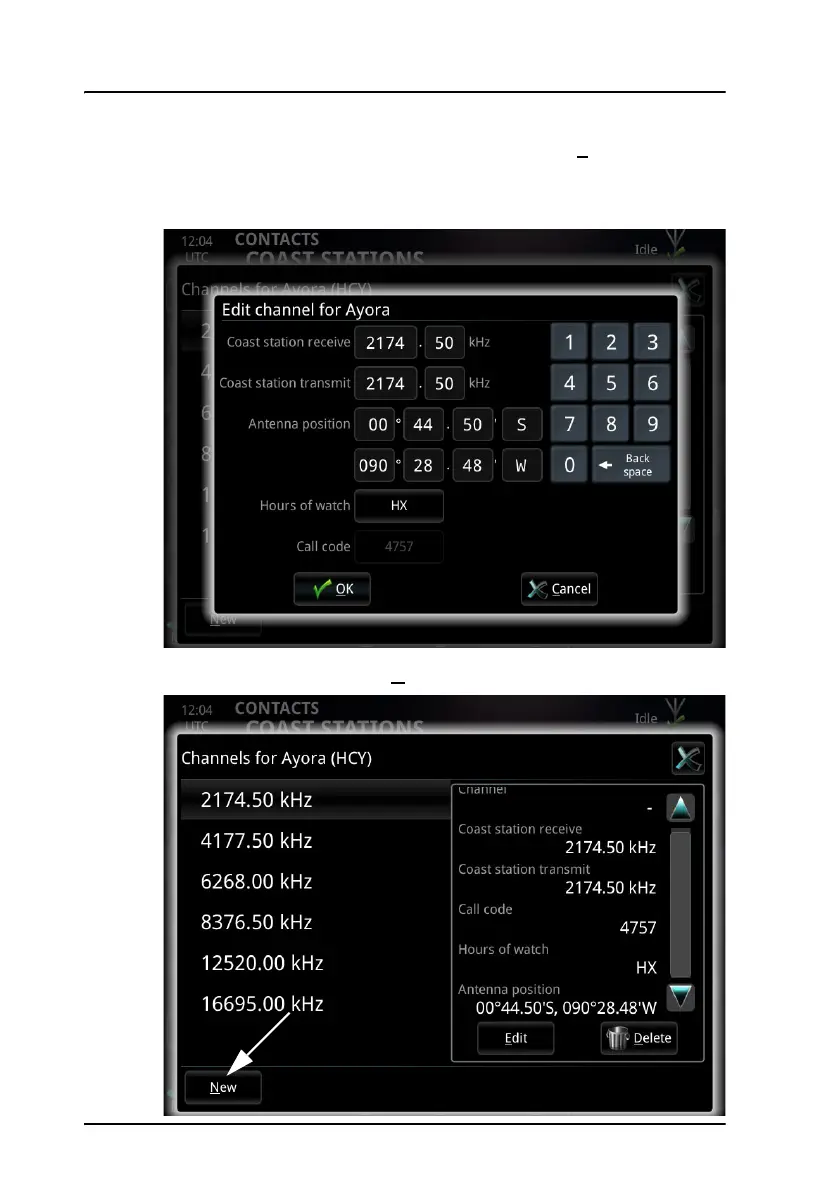
Contacts - Coast stations
4.
T
o edit a channel, sel
ect
the channel and then select
E
dit
in the small
window to the right.
5.
Edit the channel and select
OK
.
6.
T
o add a new channel, sel
ect
N
ew
at the bottom of the window.
53
55
Table of Contents
Main Page
default chapter
9
Table of Contents
9
Chapter 1 Introduction
11
System Overview
12
The Radiotelex Application
13
Chapter 2 Operation
15
Before You Start
16
Send a DSC Distress Alert
17
Send a Distress Telex
18
Cancel a Distress Alert
19
Overview of the Radiotelex User Interface
20
Set up a Telex Call
23
Make a Telex Call
26
Messages
33
Receive Telex Messages
39
Scan Frequencies
40
Contacts - Individual
45
Contacts - Coast Stations
49
Contacts Backup
56
System Information
57
System Settings
58
Power Status
60
Chapter 3 Troubleshooting
63
Get Support
63
Generate a Diagnostic Report
64
Troubleshooting Guide
65
Status Signaling
67
Glossary
73
Index
77
Other manuals for COBHAM SAILOR 6018
Installation Manual
52 pages
Installation Guide
2 pages
Related product manuals
COBHAM EXPLORER 540
172 pages
COBHAM Explorer 510
136 pages
COBHAM EXPLORER 323
158 pages



 To Next Page