EasyManua.ls Logo

Cobra KING F8 - User Manual

Cobra KING F8
3 pages
Print Icon
To Next Page IconTo Next Page
Loading...
9-12°
8-11°
BACK / HEEL
FRONT / BACK
HIGH / MID-HIGH
LOW-MID / MID
LOW / MID
VERY LOW / LOW
Loft Range
Loft Range
Weight Adjustability
Trajectory
Trajectory
Spin
Spin
COMPARISON
TUNE YOUR FLIGHT.
COBRAs KING F8 family of drivers feature moveable
weights and MyFly adjustable loft technology, allowing
golfers to easily manage their trajectory, distance
and spin. Find the weight and loft configuration that
delivers your best driving performance.
Question and Answer IconNeed help?

Do you have a question about the Cobra KING F8 and is the answer not in the manual?

Summary

Tune Your Flight

Tune Your Center of Gravity Position

Weight Adjustment Instructions

Steps to change weight settings using the provided wrench for optimal performance.

KING F8 Weight Placement

Placing the 12g weight in FRONT for lower trajectory, or BACK for higher trajectory with more spin.

KING F8+ Weight Placement

Placing the 12g weight in BACK for higher trajectory, or HEEL for more draw.

Tune Your Trajectory and Launch with MyFly

MyFly Loft Adjustment Instructions

Steps to adjust loft using the wrench, detailing trajectory and spin changes.

Quick Tips for Ball Flight

Advice on adjusting loft to correct ball flight issues like too low or too high.

Track and Tune Cobra Connect

Summary

Tune Your Flight

Tune Your Center of Gravity Position

Weight Adjustment Instructions

Steps to change weight settings using the provided wrench for optimal performance.

KING F8 Weight Placement

Placing the 12g weight in FRONT for lower trajectory, or BACK for higher trajectory with more spin.

KING F8+ Weight Placement

Placing the 12g weight in BACK for higher trajectory, or HEEL for more draw.

Tune Your Trajectory and Launch with MyFly

MyFly Loft Adjustment Instructions

Steps to adjust loft using the wrench, detailing trajectory and spin changes.

Quick Tips for Ball Flight

Advice on adjusting loft to correct ball flight issues like too low or too high.

Track and Tune Cobra Connect

Overview

The COBRA KING F8 and F8+ drivers are designed to help golfers optimize their trajectory, distance, and spin through a range of adjustable features. These drivers are part of the KING F8 family, which emphasizes customization to deliver the best possible driving performance for individual players.

Function Description

The primary function of the COBRA KING F8 and F8+ drivers is to provide golfers with a highly customizable club that allows them to fine-tune their ball flight characteristics. This customization is achieved through two main technologies: moveable weights for adjusting the Center of Gravity (CG) and MyFly adjustable loft technology. By manipulating these settings, golfers can influence launch angle, spin rate, and trajectory, ultimately aiming for increased distance and accuracy. The drivers are engineered to help golfers manage their flight path, whether they need a lower, more penetrating shot or a higher, towering trajectory, and to control spin for optimal carry and roll.

Usage Features

The COBRA KING F8 and F8+ drivers offer several key usage features that empower golfers to personalize their club settings:

Adjustable Center of Gravity (CG) System:

Both the KING F8 and F8+ drivers are equipped with an adjustable CG system that utilizes two moveable weights: a 12g weight and a 2g weight. These weights can be positioned in different ports to alter the club's CG, which in turn affects launch and spin characteristics.

  • Weight Adjustment Process:

    • Step 1: Loosen and Remove Weights: To begin, use the provided wrench to loosen and remove both the 12g and 2g weights by turning the wrench counter-clockwise.
    • Step 2: Place Weights: Once both weights are removed, place the 12g weight in your desired setting (e.g., "Low" or "High" for the F8, or "Front," "Back," or "Draw" for the F8+) and the remaining 2g weight in the empty weight port.
    • Step 3: Tighten Weights: After positioning the weights, use the wrench to tighten both weights by turning it clockwise until an audible click is heard. It is crucial to use the wrench and not to overtighten by hand, as this could lead to the weights loosening during a swing.
  • KING F8 Specific CG Settings:

    • "Low" (FRONT) Position: Placing the 12g weight in the "Low" (FRONT) position promotes a lower, more penetrating ball flight. This setting is ideal for golfers looking to reduce spin and achieve more roll.
    • "High" (BACK) Position: Placing the 12g weight in the "High" (BACK) position promotes a higher launching ball flight with slightly more spin. This can be beneficial for golfers who need more carry distance.
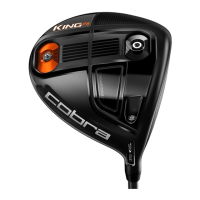
    • Trajectory and Spin Impact: The F8, with its "BACK/HEEL" weight adjustability, is designed to offer a "HIGH/MID-HIGH" trajectory and "LOW/MID" spin. The "BACK CG" setting provides a higher launch, while the "HEEL CG" and "HEEL CG + MYFLY DRAW" settings can help promote a draw bias for straighter shots.
  • KING F8+ Specific CG Settings:

    • "High" (BACK) Position: Placing the 12g weight in the "High" (BACK) position promotes a higher, towering ball flight. This setting is suitable for golfers who desire maximum carry.
    • "Draw" (HEEL) Position: Placing the 12g weight in the "Draw" (HEEL) position promotes more draw bias, which can help correct slices and achieve straighter drives.
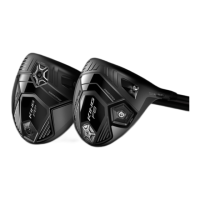
    • Trajectory and Spin Impact: The F8+, with its "FRONT/BACK" weight adjustability, is designed to offer a "LOW-MID/MID" trajectory and "VERY LOW / LOW" spin. The "FRONT CG" setting provides a lower, more penetrating flight, while the "BACK CG" and "BACK CG + MYFLY DRAW" settings can offer a higher launch with a draw bias.

MyFly Adjustable Loft Technology:

The MyFly adjustable loft technology provides 8 adjustable loft settings, allowing golfers to maximize their distance and consistency. COBRA's patented Smart Pad® Technology ensures that the clubhead remains square at address, regardless of the chosen loft setting.

  • Loft Adjustment Process:

    • Step 1: Loosen Shaft: To adjust the loft, insert the wrench into the screw on the sole of the club and loosen the shaft by turning it counter-clockwise.
    • Step 2: Rotate Shaft: Continue turning the shaft counter-clockwise until it can be pulled far enough from the head to allow it to rotate freely.
    • Step 3: Select Loft Setting: Rotate the shaft until your desired loft setting aligns with the hosel window. Increasing or decreasing the loft will change the trajectory by approximately +/- 0.7 degrees and the spin by +/- 400 rpm, respectively. The available settings include STD (standard), +1°, +1°D, +1.5°, -1°, -1°D, -1.5°, and 10.5° (or other specific loft numbers depending on the driver model).
    • Step 4: Tighten Shaft: Once the desired loft is selected, insert the shaft back into the head and tighten the screw by turning the wrench clockwise until a single, audible click is heard.
  • Quick Tips for Loft Adjustment:

    • Low Ball Flight: If your ball flight is too low, increase the loft to add spin and promote a higher trajectory with more carry.
    • High Ball Flight: If your ball flight is too high, decrease the loft to reduce spin and promote a lower trajectory with more roll.

COBRA CONNECT™ Powered By Arccos™:

The COBRA CONNECT™ feature, powered by Arccos™, allows golfers to track their driving distance and accuracy. This integrated system provides detailed statistics and analysis, which can be used to improve their game. Users can access more information about COBRA CONNECT by visiting www.cobragolf.com/cobraconnect. This feature enhances the user experience by providing data-driven insights into their performance, helping them make informed decisions about their club settings and overall game strategy.

Maintenance Features

The maintenance of the COBRA KING F8 and F8+ drivers primarily revolves around the proper use and care of the adjustable components to ensure their longevity and functionality.

  • Wrench Usage: Always use the provided wrench for adjusting the weights and loft settings. This ensures that the components are tightened to the correct torque, preventing damage to the screws or the clubhead.
  • Audible Click: When tightening the weights and the shaft, listen for the audible click. This indicates that the components are securely fastened and will not loosen during a swing. Over-tightening by hand should be avoided, as it can strip threads or damage the mechanism.
  • Regular Cleaning: While not explicitly detailed in the provided text, general golf club maintenance practices would apply. Regularly cleaning the clubhead, face, and sole will prevent dirt and debris buildup, which can affect performance and the integrity of the adjustable components.
  • Storage: Proper storage of the driver and its wrench will help prevent loss or damage to these essential tools. Keeping the wrench with the club or in a designated golf bag pocket is recommended.

In summary, the COBRA KING F8 and F8+ drivers are sophisticated tools designed to give golfers unparalleled control over their ball flight. Through their intuitive adjustable CG and MyFly loft technologies, coupled with performance tracking via COBRA CONNECT, these drivers offer a comprehensive solution for optimizing driving performance on the course. Proper adherence to the adjustment instructions and general club care will ensure these features continue to deliver their intended benefits.

Cobra KING F8 Specifications

General IconGeneral
Club TypeDriver
Shaft MaterialGraphite
AdjustabilityYes
MaterialTitanium
Head Volume460cc
FlexRegular, Stiff
Length45.5 inches
Hand OrientationRight, Left
GripLamkin REL 360

Videos

How to Adjust the Cobra KING F8/F8+

Related product manuals