Need help?
Do you have a question about the Cobra SC 400D and is the answer not in the manual?
Functions of buttons during recording: Stop, Photo, Toggle Audio, Lock Video/Emergency, Alexa Wake, Alexa Search.
Voice commands for controlling the dash cam: Front/Rear Video On/Off, Record Video, Lock Video, Screen On/Off, Take Photo.
Instructions for connecting cabin and rear view cameras to the dash cam.
Tips on continuous loop recording, formatting SD cards, saving footage, and upgrading SD cards.
Identification of key ports and buttons on the SC 400D dash cam for connectivity and control.
List of accessories included with the SC 400D: GPS mount, cables, charger, and rear camera components.
Step-by-step guide for attaching GPS, connecting power, and setting up the camera on the windshield.
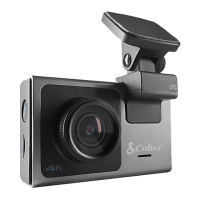
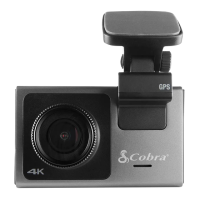
The Cobra SC 400D is a smart dash cam designed to enhance your driving experience by providing various recording, safety, and connectivity features. It offers a comprehensive solution for capturing road events, ensuring your safety, and keeping you connected.
The primary function of the Cobra SC 400D is continuous loop recording, which means it constantly records video footage while you drive. This ensures that you always have a record of your journeys. The dash cam supports both front-view and, with an optional accessory camera, rear-view recording, providing a broader perspective of your surroundings.
A key feature is its voice command capability. The device responds to specific voice commands, allowing you to control various functions without taking your hands off the wheel. For example, you can say "Front Video On" or "Rear Video On" to display the respective camera views on the screen. "Record Video" initiates loop recording, while "Lock Video" locks the current video, tagging it as a favorite to prevent it from being overwritten. You can also use "Screen On" and "Screen Off" to control the display, and "Take Photo" to capture still images, which are saved to a dedicated "Photos" folder. This hands-free operation enhances safety by minimizing distractions.
The dash cam also includes an emergency recording function. By pressing the Lock/Emergency Recording Button or using the "Lock Video" voice command, you can save important clips from being deleted by the continuous loop recording process. This is crucial for preserving evidence in case of an incident.
Connectivity is a core aspect of the SC 400D. It integrates with the Drive Smarter app, allowing you to view, edit, and share your recorded footage directly from your smartphone or desktop. The app also facilitates real-time driver alerts, keeping you informed about road conditions and potential hazards. Furthermore, the device supports Alexa Wake Button functionality, enabling voice interaction with Alexa for various tasks, such as phone connections.
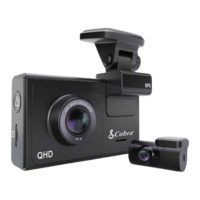
For expanded recording capabilities, the SC 400D can be connected to accessory cameras. A cabin camera can be attached to the video input port for interior views, while a rear camera can be connected via an extension cable to provide a view of the road behind your vehicle. This modularity allows you to customize your recording setup based on your needs.
Operating the Cobra SC 400D is designed to be intuitive. When recording, the screen displays the current time (e.g., 00:16) and offers various on-screen buttons for quick access to functions. These include "Stop Recording," "Take Photo," "Toggle Audio Recording," "Lock Video/Emergency Recording Button," and "Alexa Wake Button" for phone connection. When recording is stopped, the screen shows the elapsed time (e.g., 00:02:16) and provides options like "Begin Recording," "View Videos," "Toggle Audio Recording," "Enter Settings," and "Alexa Wake Button."
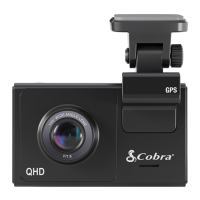
The device is easy to set up. You begin by attaching the GPS mount to the main camera and removing any protective film. The Micro USB cable is then connected to the GPS mount, and the power adapter is plugged into your vehicle's 12V port. For optimal performance, it's recommended to attach the camera to your windshield. The front bezel can be rotated to reduce glare, ensuring clear footage.
After physical setup, you'll be guided through the process of setting up the Drive Smarter app and pairing with Alexa, typically by scanning a QR code displayed on the camera screen. It's important to ensure your phone's volume is turned up to hear Alexa's responses during this process.
When installing accessory cameras, specific instructions should be followed. For a cabin camera, it connects directly to the video input port on the SC 400. For a rear camera, an extension cable is connected to the video input port on the dash cam, and then to the rear camera itself. The rear camera (FV-RV1) should be attached to the vehicle's back window, positioned to face out of the vehicle in the correct orientation.
The continuous loop recording feature automatically manages storage by deleting the oldest videos to make space for new recordings. However, you can manually save important clips using the "Lock Video" voice command or the Lock/Emergency Recording Button to prevent them from being overwritten.
Maintaining the Cobra SC 400D primarily involves managing its storage and ensuring optimal performance. The dash cam features continuous loop recording, which means it automatically deletes the oldest videos to make space for new recordings. This self-management reduces the need for frequent manual deletion.
If you need to format the SD card, it is crucial to do so within the camera's settings menu, not on your PC. Formatting the SD card on a computer may lead to compatibility issues or improper functioning. The dash camera may occasionally prompt you to format your SD card; this is a normal process designed to ensure smooth operation and will delete saved footage. Before formatting, it's advisable to download and save any favorite clips using the Drive Smarter App or by connecting the camera to your PC.
For users considering upgrading their SD card, it's recommended to visit Cobra.com for a list of compatible cards to ensure proper functionality and avoid potential issues. Using an incompatible SD card could lead to recording errors or data loss.
Regularly checking for and downloading important clips to your smartphone or PC via the Drive Smarter app or direct connection is a good practice to prevent accidental deletion due to loop recording or formatting. This ensures that any critical events or memorable moments from your drives are safely stored.
The device's design, including the rotating front bezel, helps in reducing glare, which can contribute to clearer recordings and potentially extend the lifespan of the camera's lens by minimizing exposure to harsh reflections. Keeping the camera lens clean and free from obstructions will also ensure the best possible video quality.
 General
| Field of View | 140° |
|---|---|
| Loop Recording | Yes |
| G-Sensor | Yes |
| Night Vision | Yes |
| Wi-Fi | Yes |
| Cloud Video Management | Yes |
| Parking Mode | Yes |
| Power Source | 12V |
| Storage | Up to 256GB MicroSD Card (Not Included) |

 To Next Page