Page 18
SET UP & USE
ENGLISH
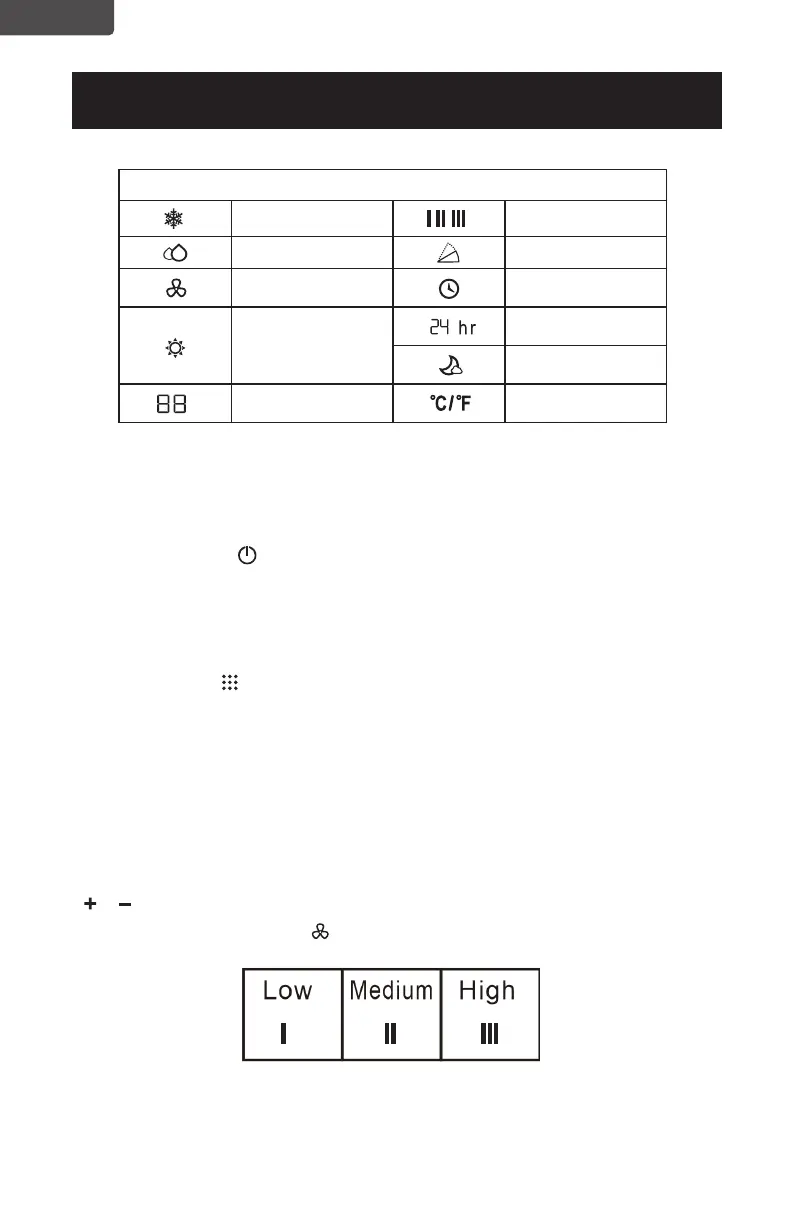
LED Display Indicators
Cooling mode Fan speed
Dehumidify mode Swing
Fan mode
Timer on
Time
Sleep
Display temp. or
hours
• Press to Turn Air Conditioner ON or OFF. Press LED button to illuminate the
• Press the mode button to scroll through COOL , DRY , FAN , HEAT
• The corresponding symbol will illuminate on the LED display to indicate which
mode is selected.
•
Fahrenheit or
Celsius.
COOL
•
POWER BUTTON
LED screen on the unit.
MODE BUTTON
(Heat model CBPAC815H only)
Select the target temperature 61˚F – 88˚F (16˚C – 31˚C) by pressing the
or buttons until the desired temperature is displayed on the LED screen.
Press the Fan Speed Button to select Low, Medium, or High Speed.
Heat mode
Heat model
CBPAC815H only


 To Next Page