EasyManua.ls Logo

Coby CETW527 - User Manual

Coby CETW527
28 pages
Print Icon
To Next Page IconTo Next Page
Loading...
R
CETW527
EN
...
01
13
...
ES
User Manual
Manual De Usuario
TWS Earbuds With Charging Case
Auriculares TWS con estuche de carga
Question and Answer IconNeed help?

Do you have a question about the Coby CETW527 and is the answer not in the manual?

Overview

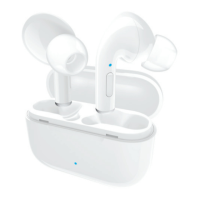
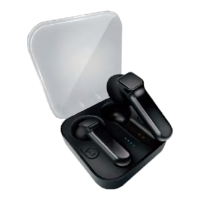
The COBY CETW527 TWS Earbuds are true wireless stereo earbuds designed for audio playback and hands-free calling, featuring a compact design and a portable charging case.

Function Description:

These earbuds provide a wireless audio experience, connecting to devices via Bluetooth. They are equipped with a Multi-Function Button (MFB) on each earbud for controlling various functions, and a built-in microphone for calls. The included charging case not only stores the earbuds but also recharges them, extending their usage time.
Important Technical Specifications:

  • Model Number: CETW527
  • Model Name: True Wireless Stereo Earbuds With charge case
  • Power Input: 5 V/1A (Charging case)
  • Charging Time:
    • Charging case: Up to 2 hours
    • Earbuds: Up to 1.5 hours
  • Playtime:
    • Earbuds: Up to 5 hours
    • With charging case: Up to 12 hours
  • Battery Type: Rechargeable Lithium-ion
  • Driver (full range): 10 mm × 2
  • Range: 10m/33 ft
  • Bluetooth Version: V 5.3
  • Dimension (Charging case): 44 x 44 x 25 mm (1.73 x 1.73 x 0.98 inch)
  • Weight (with charging case): 29.1 g/ 1.03 oz

Usage Features:

Powering On/Off:

  • Powering On: The earbuds automatically power on when taken out of the charging case. Alternatively, they can be manually powered on by pressing and holding the MFB on both earbuds for 5 seconds. When powering on, both earbuds will show an alternating red and blue flashing light and emit a "power on" tone notification.
  • Powering Off: The earbuds automatically power off when placed back into the charging case. To manually power them off, press and hold the MFB on a single earbud for 5 seconds. This will result in two blue flashes and a "power off" tone notification.

Charging:

  • Charging the Charging Case: The charging case is charged via a Type C charging port using a USB power source. A flashing blue light on the case power indicator signifies charging, while a steady blue light indicates a fully charged case.
  • Charging the Earbuds: When the earbuds' battery is low, their status indicator will slowly flash red and emit a tone notification. To charge them, place them into the charging case and close the lid. A steady red light on the earbuds indicates charging, and the LED light turns off when fully charged.
  • Checking Case Battery Power: To check the charging case's remaining battery power, remove the earbuds and then place them back in the case. The case power indicator will glow blue, indicating the power level (0-25%, 25-50%, 50-75%, 75-100%). If the battery level is low, it will flash red.

Pairing:

  • True Wireless Stereo Connection: When taken out of the charging case and placed next to each other, the earbuds automatically enter True Wireless stereo pairing mode, indicated by alternating red and blue flashing lights on both earbuds. Once connected successfully (right earbud connected to the left), one earbud will show alternating red and blue flashes, while the other will turn off, accompanied by a "connected" tone notification.
  • Bluetooth Connection with Device: After a successful True Wireless stereo connection, the earbuds automatically enter Bluetooth pairing mode. To connect, enable Bluetooth on your device, search for "CETW527," and tap to connect. A successful connection is indicated by both earbuds turning off and a "connected" tone notification. The earbuds will automatically pair with the last successfully connected device when turned on again.

Controls (MFB):

  • Music Mode:
    • Play/Pause: Press MFB once on either earbud.
    • Next Track: Quickly press MFB twice on the right earbud.
    • Previous Track: Quickly press MFB twice on the left earbud.
    • Volume Up: Quickly press MFB three times on the right earbud.
    • Volume Down: Quickly press MFB three times on the left earbud.
  • Phone Call Mode:
    • Answer/End a Call: Quickly press MFB twice on either earbud.
    • Reject a Call: Press and hold MFB for 2 seconds on either earbud.
  • Voice Assistant Mode:
    • Activate Siri/Other Voice Assistant: Press and hold MFB for 2 seconds on either earbud.
    • Exit: Press MFB once on either earbud.

Troubleshooting:

  • Earbuds not connecting to each other (alternating red/blue lights on both): Reset earbuds by taking them out and placing them back in the charging case. If still not connected, "Forget device" on "CETW527" in your device's Bluetooth settings, then turn off Bluetooth to manually initiate True Wireless stereo connection. Allow up to 30 seconds for connection in public areas.
  • Earbuds connected to each other but not to device: Ensure earbuds are not connected to another device. If so, "Forget device" on "CETW527" on those devices. Confirm your desired pairing device has Bluetooth enabled.
  • No response from earbuds: Check if earbuds' battery is depleted; if so, charge them. Otherwise, reset by taking them out and placing them back in the charging case.
  • Sound only on one earbud: Reset earbuds by taking them out and placing them back in the charging case.

Maintenance Features:

  • Cleaning: Do not use corrosive cleaner/oil.
  • Environmental Protection: The product should not be discarded as household waste and should be delivered to an appropriate collection facility for recycling. Follow local rules for disposal of old products and rechargeable batteries to prevent negative environmental and health consequences.
  • Storage: Avoid storing the device where flammables or explosives are present.
  • Temperature: Ideal temperatures are 0°C to 35°C. Avoid extreme temperatures and excessive heat (sunshine, fire).
  • Moisture: Do not expose the device to rain, moisture, or submerge it in water.
  • Physical Damage: Avoid dropping the device and do not disassemble it.
  • Cables: Use original or certified cables for charging.
  • Children: Keep out of reach of children as it contains small parts that may pose a choking hazard.

Coby CETW527 Specifications

General IconGeneral
BrandCoby
ModelCETW527
CategoryHeadphone
LanguageEnglish

Related product manuals