Pairing with your phone and COBY Smart app
3. When the account setup is complete, tap “Log In”, then enter your ac-
count and password, and select “I Agree” to log in to the COBY Smart App.
Tip: For the rst login, ensure that you have allowed the notications and
Bluetooth access permissions.
1. Pair with your phone:
Follow the steps described in "
Pairing
" on
page 2 to pair the earbuds with your phone.
2. Pair with COBY Smart App:
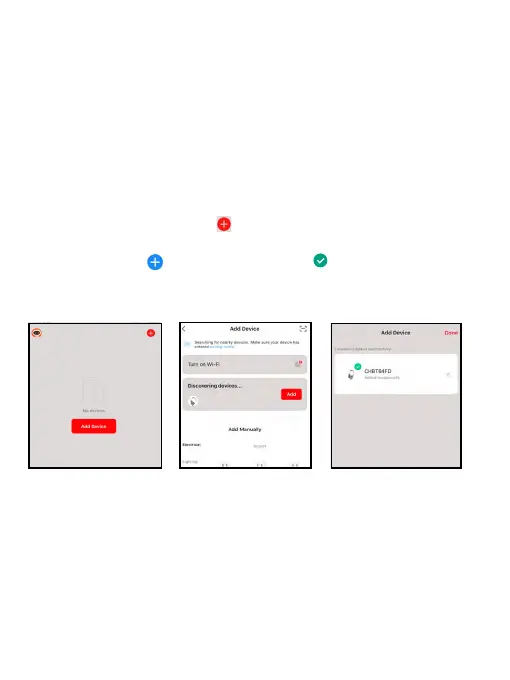
After you log in to the COBY Smart App,
tap "
Go to App
" to enter the Add Device screen of the COBY Smart app.
Tap "
Add Device
" or
the icon
>
Add Device
at the upper right corner,
and it will automatically search for nearby devices. If the headphones are
found, tap “
Add
” > , and wait until the icon appears on the screen,
indicating that the Bluetooth connection with the COBY Smart is
complete.
Tip: If the headphones can’t be found, you can restart the headphones
by
pressing the Power button
. Then retry the pairing operation again.
EN 5


 To Next Page