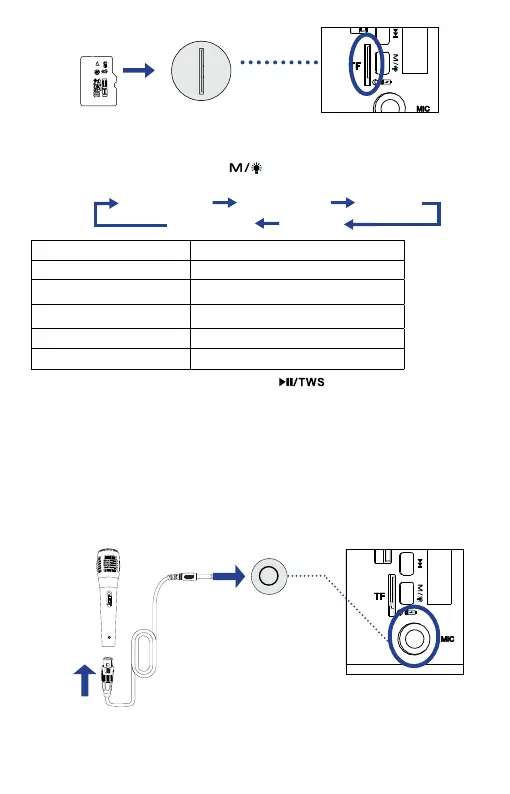
Playback Mode Indication on the display screen
Bluetooth Mode < BLUE >
FM Radio Mode
< FM >
AUX Mode
< LinE >
USB Mode < USB >
TF Card Mode < TF >
The speaker will take the newly connected USB disk, TF card, or Audio out
device as the first priority for the music playback. If the USB disk, TF card, and
Audio Out device are connected to the speaker at the same time, you can
repeatedly press the Mode button to toggle these playback modes, and
the playback mode will change as follows:
Note: Under AUX mode, you can press the button to mute the music
playback sound, adjust the volume level on the speaker, and for other music
playback controls, you can operate them through your media device.
Microphone Mode
The speaker has a 6.35mm Microphone In port, which allows the user to
connect the speaker with your microphone (not included):
1. Plug one end of the microphone cable (not included) into the Mic In port of
the speaker, and the other end into the MIC Out port of the microphone.
MIC Out
Port
Microphone
TF card (supports
up to 64GB)
TF card slot
MIC In
Port
Notes: 1. You can also connect other audio output instruments to the speaker,
such as electronic guitar and piano.
2. The Microphone mode is available under any playback mode.
2. Turn on the microphone. Turn the Power/Volume Knob on the speaker to
set your desired volume. Now you can stream your sound from the microphone
to the speaker.
Bluetooth Mode FM Radio Mode AUX Mode
TF Card Mode USB Mode
EN 03 EN 04


 To Next Page