Need help?
Do you have a question about the Cocktail Audio Audio X10 and is the answer not in the manual?
Details the top panel layout and controls of the device.
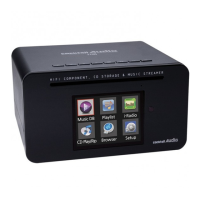
Illustrates the front panel display, CD drive, and side connections.
Details all the input and output ports on the rear panel of the device.
Explains the function of each button on the remote control for operating the device.
Ensures all items included in the X10 package are present before setup.
Provides instructions for inserting batteries into the remote control.
Describes optional accessories like passive speakers and WiFi USB dongles.
Guides on installing and formatting a 3.5-inch SATA hard disk for the X10.
Explains essential connections for basic operation, including speakers and power.
Lists the technical audio output and input specifications of the X10 amplifier.
Covers connecting various external audio and computing devices to the X10.
Guides through the initial setup process, including language and format selection.
Describes the procedure for starting the device for regular use after initial setup.
Configuration options for the Music Database, including display modes and recovery.
Process for extracting audio from CDs into digital files, with format and quality options.
Customization options for audio playback, including equalizer and output settings.
Configuration for wired and wireless network connections, including IP settings.
Enables network services like Samba, Web, UPnP, and FTP servers.
Device settings related to OSD language, playback behavior, factory reset, and HDD format.
Procedures for checking current firmware and performing manual or automatic updates.
Configuration for device time, including internet synchronization and manual setting.
Explains the function and content of the device's music database.
Describes the FreeDB service used for retrieving CD metadata.
Guides on ripping CDs when the X10 is connected to the internet.
Instructions for ripping CDs when the X10 is not connected to the internet.
Explains ripping behavior when FreeDB is installed locally.
Shows how to view the status and results of CD ripping and file conversion.
Guides on how to select and play music files stored in the Music DB.
Details how to search for music within the Music DB by various criteria.
Instructions for deleting, renaming, exporting, and managing music entries.
Steps for playing CDs directly when the X10 is connected to a network.
Steps for playing CDs directly when the X10 is not connected to a network.
Guides on how to create a new playlist by selecting music files.
Describes a temporary playlist function that is removed upon stopping playback or power off.
Details on creating advanced virtual playlists based on artist, genre, or album.
Utilizing UPnP and Samba protocols for music streaming with other devices.
Using the X10 to stream music to Sonos devices.
Guides on accessing and playing internet radio stations.
Instructions on saving preferred internet radio stations to the 'My Favorites' list.
Procedure for recording live internet radio broadcasts.
Instructions for playing audio files from CDs containing music data.
Overview of file management functions like copying, moving, and deleting files.
Allows bookmarking specific points in long audio files like audiobooks.
Adjusting audio output using equalizer presets.
Options to modify music playback modes like Normal, Shuffle, Repeat.
Configuring up to six alarm settings with time, cycle, and sound source.
Setting the device to power off automatically at a specified time.
Instructions for playing external audio sources and recording them.
Troubleshooting steps for when the device does not power on.
Steps to resolve issues with the remote control not working.
Solutions for network shared folders not appearing on PC.
Troubleshooting steps when no sound is produced during music playback.
Steps to resolve issues where the device cannot read discs.
Troubleshooting steps for when discs are skipping during playback.
Solutions for a humming sound coming from the speakers.
 General
| Type | Network Audio Player |
|---|---|
| Weight | 2.5 kg |
| Digital Output | Coaxial, Optical |
| Frequency Response | 20Hz - 20kHz |
| Audio Formats Supported | MP3, WMA, AAC, FLAC, WAV, OGG |
| Connectivity | Ethernet, Wi-Fi, USB |
| Hard Drive | Optional |
| USB | USB 2.0 |
| Analog Output | RCA |
| Display | 3.5" TFT LCD |
| Network | Ethernet, Wi-Fi |
| Storage | Supports external storage via USB |
| Inputs | USB, Ethernet |
| Outputs | RCA, Coaxial, Optical |

 To Next Page