You should familiarise yourself with the operation of the lock
and check that all parts work properly.
Remove the battery cover from the back plate and install the 4 x
AA cells supplied.
Connect the cables from the front plate and back plate. A BEEP
should be heard when you do this. If no BEEP is heard then
check that the batteries are correctly installed.
Place the long spindle in the front plate socket and using finger
grip only, test that the spindle is easily moved 80
o
in both
directions. Leave socket in the centred position.
Enter the factory Master Code #1234.
The Blue LED should flash and the spindle should not turn as
before. After 5 seconds the Red LED should flash and the
spindle should turn easily again. This confirms that the clutch
engaged correctly when the code was entered.
N.B. When the Master Code is entered 3 times consecutively
without performing a programming function, a penalty time of
10 seconds is activated.
Disconnect the cables.
REMOTE RELEASE OPTION
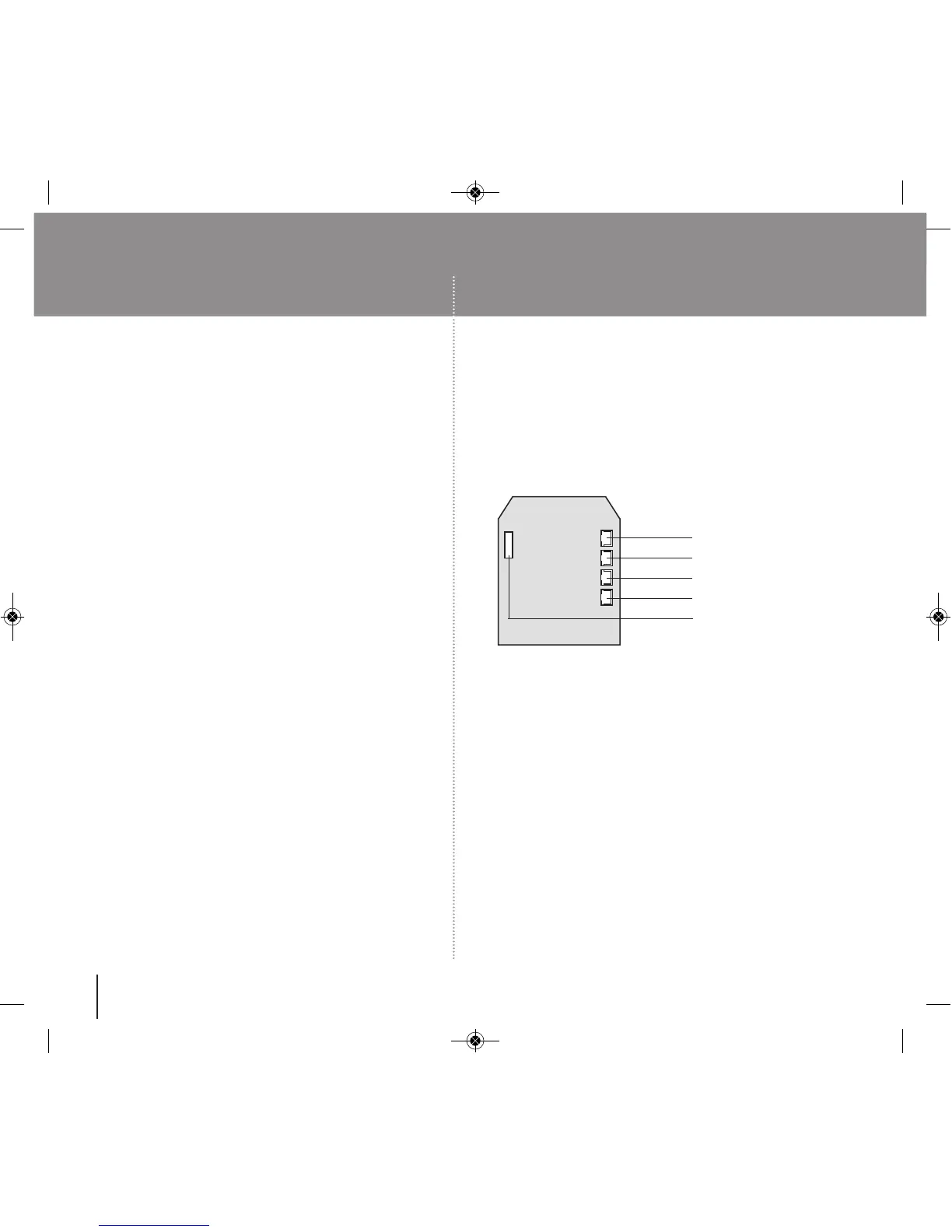
Cables are provided for the REM 1 and REM 2 terminals on the circuit board
(Fig 1).
OPERATIONS CHECK SPECIAL FIXING NOTE
4
AUDIT TRAIL OPTION
If the CL5210AT is ordered, it will be supplied with parts 18,19, 20 and 21
from the contents list. The Data Transfer Cable (18) will be fixed to the PCB
in position 5, see Fig 1 below.
Note : To upgrade a standard CL5210 lock to one with Audit Trail
functionality, an upgrade kit (P5000 AT KIT) can be purchased, which
includes parts 18,19, 20 and 21.
FIG 1
1. Battery
2. Remote 1
3. Remote 2
4. Clutch/Actuator
5. Data Cable Connector
(AT option only)
REM 1 is for connection to a reception desk push button or a door intercom
system. Pressing the button will cause the Blue LED to flash on the lock and
release the lock for the pre-set time.
REM 2 is for connection to a fire alarm system so as to release a door in an
emergency. This allows rooms, wards, offices to be easily checked to ensure
that no person is trapped or overlooked during an emergency or a practice fire
drill. When activated REM 2 will maintain the unlocked condition for 30
minutes, and the Red LED will flash and BEEP during this time. The lock will
automatically lock again after 30 minutes. If necessary Program 11 can be
used to re-lock before the end of the 30 minutes.
REM 1 and REM 2 do not require additional power.They are normally open
contacts requiring a momentary or maintained signal to close.


 To Next Page
 Loading...