EasyManua.ls Logo

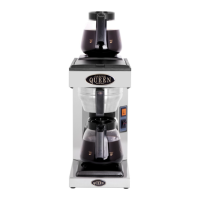
Coffee Queen M-2 - User Manual

Coffee Queen M-2
15 pages
Print Icon
To Next Page IconTo Next Page
Loading...
1234567890123456789012345678901212345678901234567890123456789012123456789012345678901234567890121234567890123456789012345678901212345678901234567890123456789012123456789
1
23456789012345678901234567890121234567890123456789012345678901212345678901234567890123456789012123456789012345678901234567890121234567890123456789012345678901212345678
9
1
23456789012345678901234567890121234567890123456789012345678901212345678901234567890123456789012123456789012345678901234567890121234567890123456789012345678901212345678
9
1
23456789012345678901234567890121234567890123456789012345678901212345678901234567890123456789012123456789012345678901234567890121234567890123456789012345678901212345678
9
1
23456789012345678901234567890121234567890123456789012345678901212345678901234567890123456789012123456789012345678901234567890121234567890123456789012345678901212345678
9
1
23456789012345678901234567890121234567890123456789012345678901212345678901234567890123456789012123456789012345678901234567890121234567890123456789012345678901212345678
9
1
23456789012345678901234567890121234567890123456789012345678901212345678901234567890123456789012123456789012345678901234567890121234567890123456789012345678901212345678
9
1
23456789012345678901234567890121234567890123456789012345678901212345678901234567890123456789012123456789012345678901234567890121234567890123456789012345678901212345678
9
1
23456789012345678901234567890121234567890123456789012345678901212345678901234567890123456789012123456789012345678901234567890121234567890123456789012345678901212345678
9
1
23456789012345678901234567890121234567890123456789012345678901212345678901234567890123456789012123456789012345678901234567890121234567890123456789012345678901212345678
9
1
23456789012345678901234567890121234567890123456789012345678901212345678901234567890123456789012123456789012345678901234567890121234567890123456789012345678901212345678
9
1234567890123456789012345678901212345678901234567890123456789012123456789012345678901234567890121234567890123456789012345678901212345678901234567890123456789012123456789
Rev. 070525
M-2
U SE/GB
Energisnål kaffebryggare.
Kapacitet 1,8 liter eller 2 x 1,8 liter.
Lätt att installera och använda
GB
English
SE
Svenska
Power saving coffee machines.
Capacity 1,8 litres or 2 x 1,8 litres.
Simple installation and easy to use.
A TASTE OF THE FUTURE
Användarmanual
User manual
COFFEE QUEEN
Din återförsäljare / Your retail dealer
...............................................................................
...............................................................................
...............................................................................

Other manuals for Coffee Queen M-2

Question and Answer IconNeed help?

Do you have a question about the Coffee Queen M-2 and is the answer not in the manual?

Summary

Coffee Machine Functions

Upper Hotplate Identification

Identifies the upper heating plate of the coffee machine.

Brew Lamp Indicator

Indicates the brewing status of the coffee machine.

Brewing Start Control

Button or switch to initiate the brewing process.

Lower Hotplate Identification

Identifies the lower heating plate of the coffee machine.

Installation and Initial Setup

Machine Placement Guidelines

Place the machine on a flat, level, and waterproof surface.

Electrical Connection Requirements

Connect the plug to a separate grounded wall socket (230 V, 10 amp).

Hotplate Functionality Check

Test hotplate operation by turning on switches and checking for heat and indicator lights.

Initial Water Brewing Cycle

Perform initial brewings with water only to flush and fill the water system.

Coffee Brewing Procedure

Filter Placement

Insert a 90mm filter into the filter holder.

Adding Ground Coffee

Add 100-125 grams of coffee, ensuring even spread in the filter.

Securing the Filter Holder

Place the filter holder securely into its designated position.

Adding Water to the Machine

Lift the lid and pour 1.8L of fresh tap water into the machine.

Pot Placement for Brewing

Position the coffee pot correctly under the filter holder.

Starting the Brewing Process

Turn on the brewing control switch to begin the coffee making.

Warming Brewed Coffee

Keep a brewed pot warm on the upper hotplate while starting a new brew.

Maintenance and Care Instructions

Daily Cleaning Procedures

Wash pot and filter holder with detergent, clean spray nozzle and hot plate.

Important Safety Warning

Warning against submerging the machine in water or washing it in a dishwasher.

Weekly Descaling Process

Descale the machine using a specific solution, followed by rinsing brews.

Exterior Surface Cleaning

Clean the exterior with a soft cloth and non-abrasive liquid cleaner.

Dishwasher Care for Carafe

Instructions for safely washing the glass carafe in a dishwasher.

Important Safety and Handling Information

General Operational Stability

Ensure the brewer is on a stable, waterproof surface for proper operation.

Professional Installation Requirement

All installation work must be performed by authorized personnel.

Glass Carafe Handling Precautions

Follow specific warnings for washing, cleaning, and carrying the glass carafe.

Troubleshooting Common Issues

Switch Not Lighting

Check power connection, fuse, and switch functionality.

Hotplate Not Heating

Verify element connection and check for defective elements.

Excessive Steam Emission

Address potential issues like descaling, blocked nozzles, or kinked hoses.

Brewing Lamp Off, No Brewing

Reset trip-switch, check microswitch, or float mechanism.

Brewing Lamp On, No Brewing

Check element connection or potential boiler unit failure.

Warranty and Service Information

Warranty Coverage Details

Covers construction, material, or manufacturing defects for two years.

Warranty Exclusions

Excludes consumables, normal maintenance, and damage from misuse.

Contacting for Service

Please contact your local retail dealer for service inquiries.

Coffee Queen M-2 Specifications

General IconGeneral
BrandCoffee Queen
ModelM-2
CategoryCoffee Maker
LanguageEnglish

Related product manuals