Need help?
Do you have a question about the COLBOR CL60 and is the answer not in the manual?
Guide on removing the COB protective film before first use and cover before every use.
Detailed steps for attaching the adapter ring and reflector to the COLBOR CL60 light.
Instructions on mounting the light to a quick-mount holder and tripod.
Duration and conditions for the limited warranty service.
Limitations and conditions that void the product warranty.
Steps to follow for making a warranty claim.
The COLBOR CL60 Video Light is a professional lighting solution designed for various video production needs, offering a range of features for precise control over illumination.
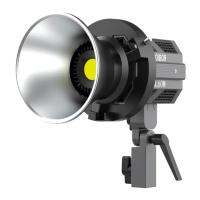
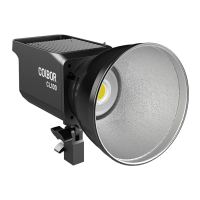
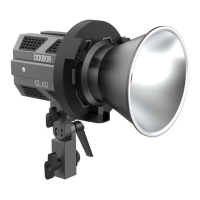
The COLBOR CL60 is primarily a video light that utilizes a COB (Chip-on-Board) bead to produce high-intensity illumination. It supports both DC power supply via a Type-C input and battery power through a V-mount and battery setup, providing flexibility for studio and on-location shoots. The device features an LCD display screen for easy monitoring of settings such as brightness (DIM), color temperature (CCT), and special effects (EFF).
The light offers two main operational modes: CCT Mode and EFF Mode. In CCT Mode, users can adjust the color temperature from 2700K to 6500K, allowing for adaptation to different ambient lighting conditions or creative preferences. Brightness is also adjustable from 0% to 100%. EFF Mode provides a selection of special effects, including Fire, CCT Chase, Pulsing, TV, Explosion, Faulty Bulb, Welding, Strobe, Lightning, and SOS, each with adjustable effect rates from Lv.1 to Lv.5.
A key feature of the CL60 is its multi-light connection capability, allowing multiple units to be linked together via a rail system. This enables the creation of larger light matrices for more extensive lighting setups. The device also incorporates a quick-mount holder for easy installation onto tripods and a Bowen Mount Adapter for compatibility with a wide range of light modifiers such as reflectors.
For enhanced control, the CL60 supports wireless connection via an APP, allowing users to remotely manage settings. It also includes a Repeater (RP) function to extend the effective distance of light control in multi-light setups, particularly useful when lights are spread across a larger area.
Before initial use, it is crucial to remove the COB protective film and the COB protective cover to prevent overheating and potential damage. The light is designed for easy installation and disassembly of accessories. The adapter ring is pushed into the light head and fastened, while reflectors are aligned with the adapter ring, inserted, and rotated clockwise until the ejector pin springs back, securing them in place. Disassembly involves pushing the ejector pin and rotating anticlockwise.
Fixing the video light involves sliding the quick-mount holder into the chute under the light and tightening a knob. A tripod can then be installed into the quick-mount holder and secured. The light's angle can be adjusted and locked with another knob.
Powering the device can be done through a DC power adapter connected to the Type-C input or by installing a V-mount and battery. To power on, a long press of the power button is required, which illuminates the button and brings up the operation interface. A short press of the power button turns the device off.
In CCT Mode, the brightness control wheel allows for continuous adjustment of brightness (0-100%) or quick switching between preset levels (0%, 25%, 50%, 75%, 100%) by pressing the wheel. Similarly, the color temperature control wheel adjusts CCT (2700K-6500K) or quickly switches to preset temperatures (2700K, 3200K, 4000K, 5600K, 6500K) when pressed. Rolling the wheel temporarily enlarges the parameter value, returning to the main screen after 1.5 seconds of inactivity.
In EFF Mode, the EFF Rate Option Button switches between effect rates (Lv.1 to Lv.5). The EFF Mode Button cycles through the various special effects. Brightness and color temperature adjustments in EFF Mode follow the same procedure as in CCT Mode.
The CL60 offers a settings menu, accessed by a short press of the Settings Button. Here, users can configure wireless connection, fan mode (Smart or Quiet), group settings (NULL, A-O), communication mode (TX, RX, TXRX), and repeater function (ON/OFF). The fan status icon indicates whether the fan is in Smart Mode (adjusts speed based on temperature) or Quiet Mode (runs at low speed with overheating protection). The group status icon shows if the light is part of a group and its role (Tx, Rx, TxRx). The repeater status icon indicates if the RP function is active.
For multi-light setups, lights are connected by sliding the rail of one light into the chute of another. The Repeater (RP) function is crucial for maintaining stable control over multiple lights, especially when the distance between them exceeds 10 meters. It is recommended to place a light with RP function enabled in the middle of a group to extend control distance. If more than five lights are connected, one RP light is suggested; for more than ten, two RP lights are recommended.
The COLBOR CL60 is designed with safety and longevity in mind. Users are advised to keep the product away from corrosive chemicals, liquids, and moist environments. It should not be used with wet hands, nor should it be splashed or soaked in water. During operation, the COB and heat sink can become hot, so users should avoid blocking them, turning the product upside down, or touching them directly.
To ensure the service life of the device, the cooling system continues to run for a short period after shutdown until the COB temperature drops below 45℃. Before storage, the product should be allowed to cool completely, and the power cable should be disconnected and stored properly.
The manual strongly advises against disassembling the product by oneself, as this will invalidate the warranty. Any faults should be addressed by an authorized technician. Using original COLBOR parts is recommended, as damage from non-original parts is not covered by the warranty. Artificial damage due to drops or external impacts is also excluded from warranty coverage.
The device includes an overheated alarm icon ([!]) that flashes if the internal temperature is too high, prompting the user to take cooling measures. The icon disappears when the temperature returns to normal. Factory settings can be restored by long-pressing both control wheels together for 5 seconds, which reboots the product to its default mode.
 General
| Power Output | 65W |
|---|---|
| Color Temperature | 2700K-6500K |
| CRI | 97+ |
| TLCI | 97+ |
| Dimming | 0-100% |
| Beam Angle | 120° |
| Control | On-board |
| Power Supply | AC Adapter |
| Operating Voltage | DC 20V |

 To Next Page