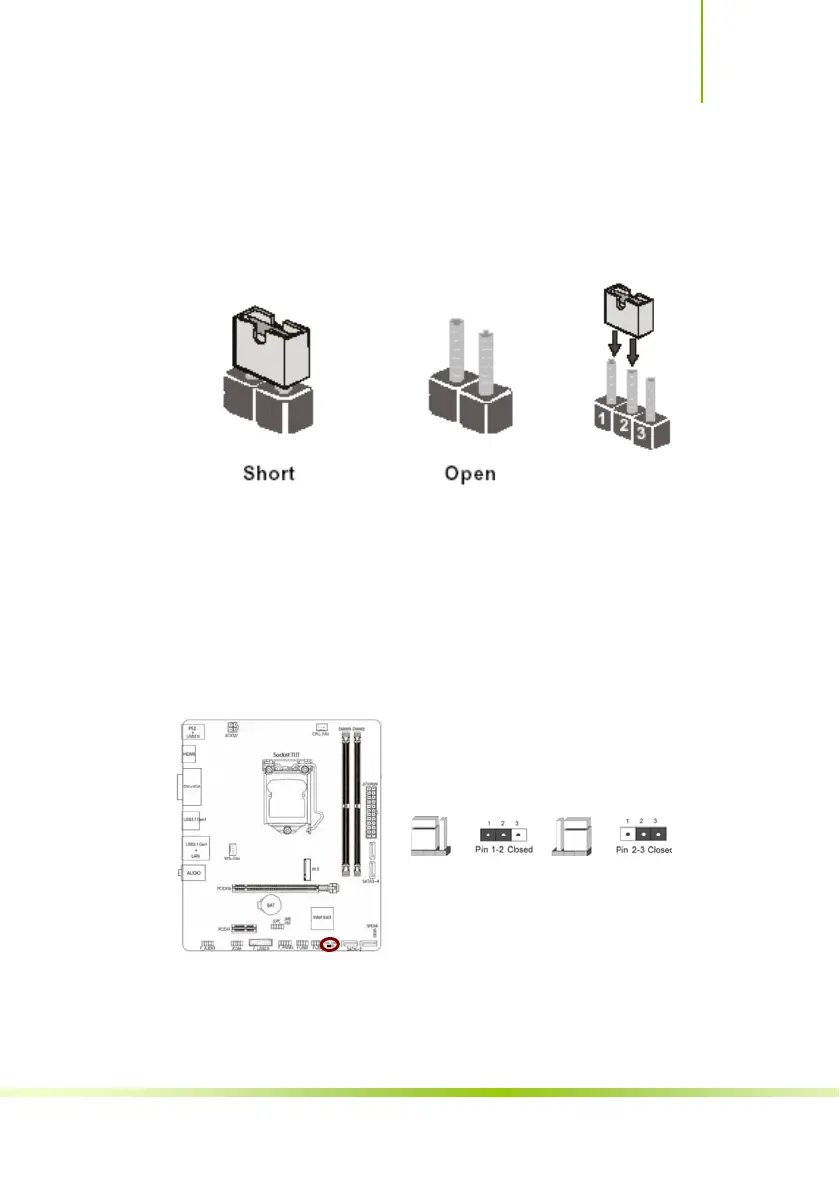
Clear CMOS Jumper: CLR_CMOS
There is a CMOS RAM on board that has a power supply from external
battery to keep the system configuration data. With the CMOS RAM, the
system can automatically boot OS every time it is turned on. If you want to
clear the system configuration, use the CLR_CMOS Jumper to clear data.
Clear CMOS PROCEDURE
You can clear CMOS by shorting 2-3 pin. Before you clearing the CMOS,
following next procedure:
1、Turn off the AC power supply and connect pins 2 and 3 together using the
jumper cap.
2、Return the jumper setting to normal (pin 1-2) or Remove the jumper cap
3、Turn the AC power supply back on.
Clear CMOS
2-3 clear CMOS
CLR_CMOS CLR_CMOS
1-2 Normal
41
Hardware Installation








 To Next Page